
Summer Certification Sale 70% Discount Offer - Ends in 0d 00h 00m 00s - Coupon code: save70

Associate-Cloud-Engineer Google Exam Lab Questions

Google Cloud Certified - Associate Cloud Engineer Questions and Answers

Question 69

For analysis purposes, you need to send all the logs from all of your Compute Engine instances to a BigQuery dataset called platform-logs. You have already installed the Stackdriver Logging agent on all the instances. You want to minimize cost. What should you do?

Options:

A.

1. Give the BigQuery Data Editor role on the platform-logs dataset to the service accounts used by your instances.2. Update your instances’ metadata to add the following value: logs-destination: bq://platform-logs.

B.

1. In Stackdriver Logging, create a logs export with a Cloud Pub/Sub topic called logs as a sink.2. Create a Cloud Function that is triggered by messages in the logs topic.3. Configure that Cloud Function to drop logs that are not from Compute Engine and to insert Compute Engine logs in the platform-logs dataset.

C.

1. In Stackdriver Logging, create a filter to view only Compute Engine logs.2. Click Create Export.3. Choose BigQuery as Sink Service, and the platform-logs dataset as Sink Destination.

D.

1. Create a Cloud Function that has the BigQuery User role on the platform-logs dataset.2. Configure this Cloud Function to create a BigQuery Job that executes this query:INSERT INTO dataset.platform-logs (timestamp, log)SELECT timestamp, log FROM compute.logsWHERE timestamp > DATE_SUB(CURRENT_DATE(), INTERVAL 1 DAY)3. Use Cloud Scheduler to trigger this Cloud Function once a day.

Question 70

You have a project for your App Engine application that serves a development environment. The required testing has succeeded and you want to create a new project to serve as your production environment. What should you do?

Options:

A.

Use gcloud to create the new project, and then deploy your application to the new project.

B.

Use gcloud to create the new project and to copy the deployed application to the new project.

C.

Create a Deployment Manager configuration file that copies the current App Engine deployment into a new project.

D.

Deploy your application again using gcloud and specify the project parameter with the new project name to create the new project.

Question 71

Your company has a 3-tier solution running on Compute Engine. The configuration of the current infrastructure is shown below.
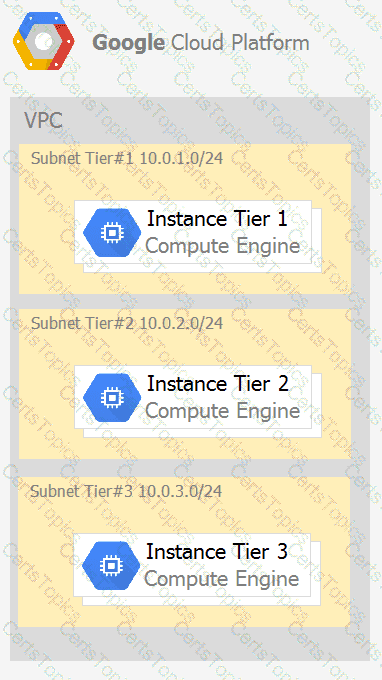
Each tier has a service account that is associated with all instances within it. You need to enable communication on TCP port 8080 between tiers as follows:

• Instances in tier #1 must communicate with tier #2.

• Instances in tier #2 must communicate with tier #3.

What should you do?

Options:

A.

1. Create an ingress firewall rule with the following settings:• Targets: all instances• Source filter: IP ranges (with the range set to 10.0.2.0/24)• Protocols: allow all2. Create an ingress firewall rule with the following settings:• Targets: all instances• Source filter: IP ranges (with the range set to 10.0.1.0/24)• Protocols: allow all

B.

1. Create an ingress firewall rule with the following settings:• Targets: all instances with tier #2 service account• Source filter: all instances with tier #1 service account• Protocols: allow TCP:80802. Create an ingress firewall rule with the following settings:• Targets: all instances with tier #3 service account• Source filter: all instances with tier #2 service account• Protocols: allow TCP: 8080

C.

1. Create an ingress firewall rule with the following settings:• Targets: all instances with tier #2 service account• Source filter: all instances with tier #1 service account• Protocols: allow all2. Create an ingress firewall rule with the following settings:• Targets: all instances with tier #3 service account• Source filter: all instances with tier #2 service account• Protocols: allow all

D.

1. Create an egress firewall rule with the following settings:• Targets: all instances• Source filter: IP ranges (with the range set to 10.0.2.0/24)• Protocols: allow TCP: 80802. Create an egress firewall rule with the following settings:• Targets: all instances• Source filter: IP ranges (with the range set to 10.0.1.0/24)• Protocols: allow TCP: 8080

Question 72

The core business of your company is to rent out construction equipment at a large scale. All the equipment that is being rented out has been equipped with multiple sensors that send event information every few seconds. These signals can vary from engine status, distance traveled, fuel level, and more. Customers are billed based on the consumption monitored by these sensors. You expect high throughput – up to thousands of events per hour per device – and need to retrieve consistent databased on the time of the event. Storing and retrieving individual signals should be atomic. What should you do?

Options:

A.

Create a file in Cloud Storage per device and append new data to that file.

B.

Create a file in Cloud Filestore per device and append new data to that file.

C.

Ingest the data into Datastore. Store data in an entity group based on the device.

D.

Ingest the data into Cloud Bigtable. Create a row key based on the event timestamp.
