Spring Sale 70% Discount Offer - Ends in 0d 00h 00m 00s - Coupon code: save70

AD01 Exam Dumps : Blue Prism Accredited Developer Exam

PDF
AD01 pdf
 Real Exam Questions and Answer
 Last Update: Mar 19, 2026
 Question and Answers: 189 With Explanation
 Compatible with all Devices
 Printable Format
 100% Pass Guaranteed
$25.5  $84.99
AD01 exam
PDF + Testing Engine
AD01 PDF + engine
 Both PDF & Practice Software
 Last Update: Mar 19, 2026
 Question and Answers: 189
 Discount Offer
 Download Free Demo
 24/7 Customer Support
$40.5  $134.99
Testing Engine
AD01 Engine
 Desktop Based Application
 Last Update: Mar 19, 2026
 Question and Answers: 189
 Create Multiple Test Sets
 Questions Regularly Updated
  90 Days Free Updates
  Windows and Mac Compatible
$30  $99.99

Verified By IT Certified Experts

CertsTopics.com Certified Safe Files

Up-To-Date Exam Study Material

99.5% High Success Pass Rate

100% Accurate Answers

Instant Downloads

Exam Questions And Answers PDF

Try Demo Before You Buy

Certification Exams with Helpful Questions And Answers

Blue Prism Accredited Developer Exam Questions and Answers

Question 1

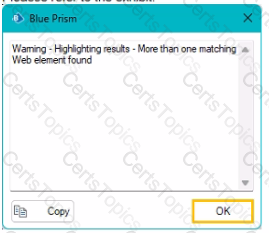
The staff number field of the Centrix Data Solutions business application can be spied successfully, however when using the Highlight feature in Application Modeller, the following behaviour is encountered:

Which of the following Attributes would you use to help obtain a unique element match?

Options:

A.

Parent Class Name

B.

Parent Ordinal

C.

Class Name

D.

Ordinal

E.

XandY

Buy Now
Question 2

Please refer to the exhibit.

When searching for a Customer Profile in the Blue Prism insurance application, the relevant number is entered into the Customer ID field. This field has been spied in Blue Prism and the attribute set has been returned by Application Modeller.

Which Attribute can be un-ticked to ensure consistent visibility of the element to Blue Prism?

Options:

A.

Window Text

B.

Screen Visible

C.

Visible

D.

Class Name

Question 3

Please refer to the exhibit.

A Developer has used the Win32 mode lo spy the login window and the Region mode to spy the Username field of a Windows-based application.

Using the Navigate stage, the developer would like to

* Bring the application screen to bring it foreground

* Send a 'Global Mouse Click Centre' command to the center of the username field

* Use Global Send Keys to populate the username field

How should the navigate stage be configured?

A)

B)

C)

D)

Options:

A.

Option A

B.

Option B

C.

Option C

D.

Option D