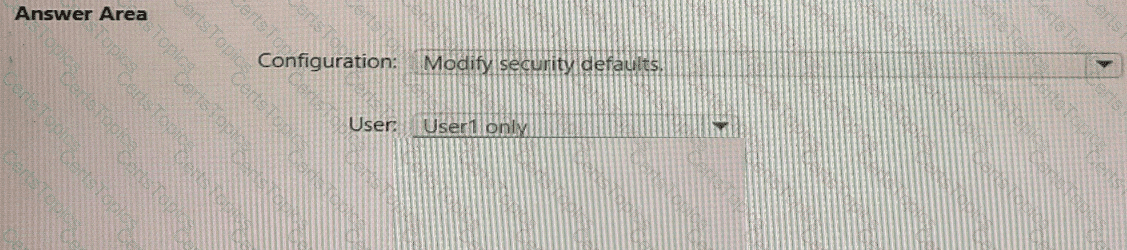
You need to track application access assignments by using Identity Governance. The solution must meet the delegation requirements.
What should you do first?
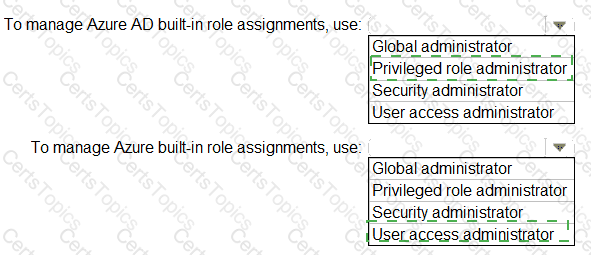
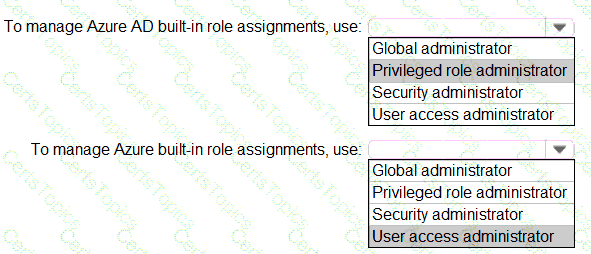
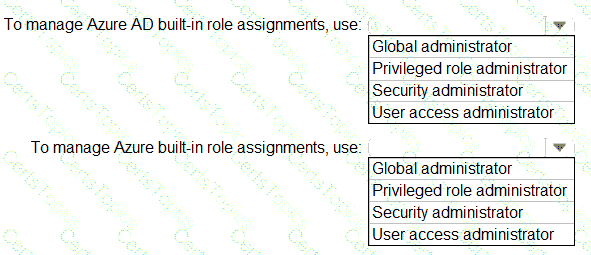
You need to identify which roles to use for managing role assignments. The solution must meet the delegation requirements.
What should you do? To answer, select the appropriate options in the answer area.
NOTE:Each correct selection is worth one point.
You need to configure the detection of multi-staged attacks to meet the monitoring requirements.
What should you do?
You need to configure the MFA settings for users who connect from the Boston office. The solution must meet the authentication requirements and the access requirements.
What should you configure?
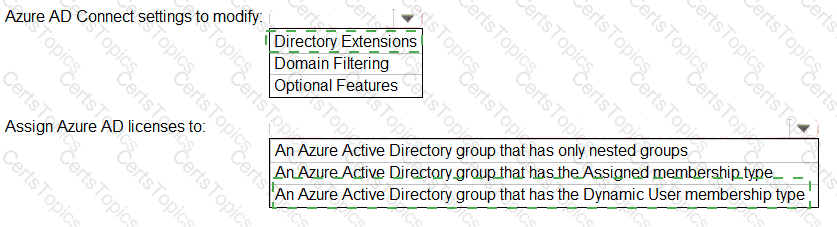
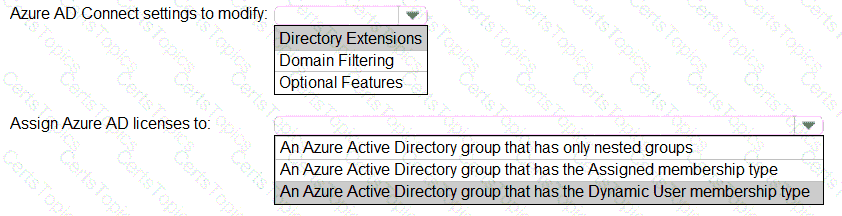
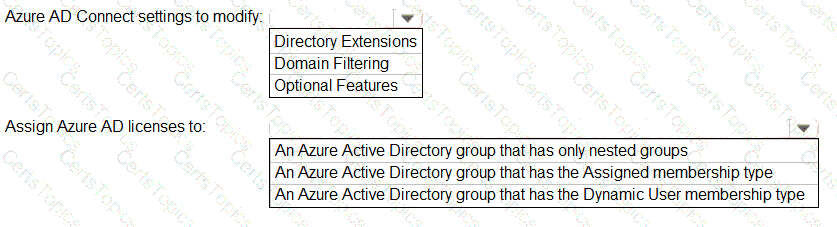
You need to configure the assignment of Azure AD licenses to the Litware users. The solution must meet the licensing requirements.
What should you do? To answer, select the appropriate options in the answer area.
NOTE:Each correct selection is worth one point.
You need to implement password restrictions to meet the authentication requirements.
You install the Azure AD password Protection DC agent on DC1.
What should you do next? To answer, select the appropriate options in the answer area.
NOTE: Each correct selection is worth one point.

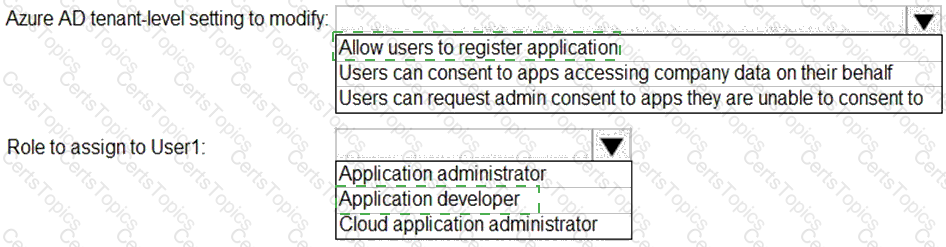
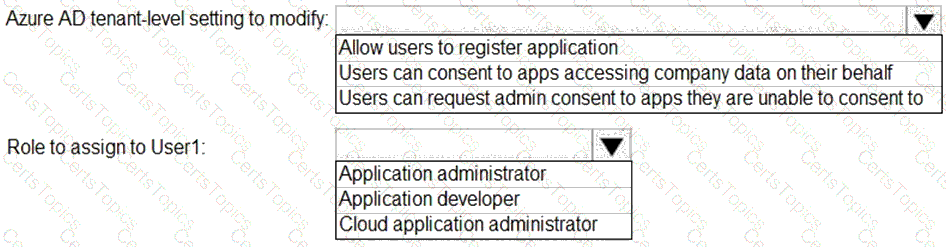
You need to configure app registration in Azure AD to meet the delegation requirements.
What should you do? To answer, select the appropriate options in the answer area.
NOTE:Each correct selection is worth one point.
You need to meet the authentication requirements for leaked credentials.
What should you do?
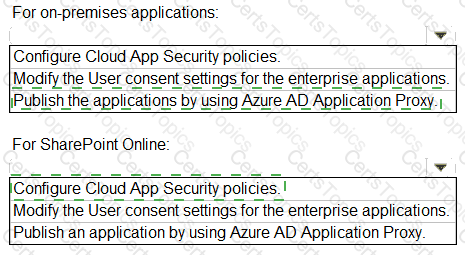
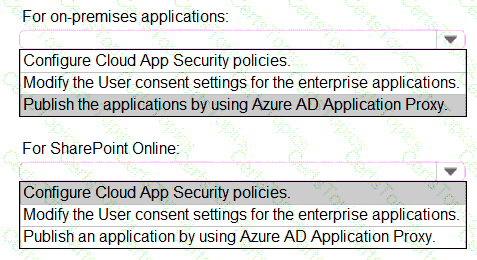
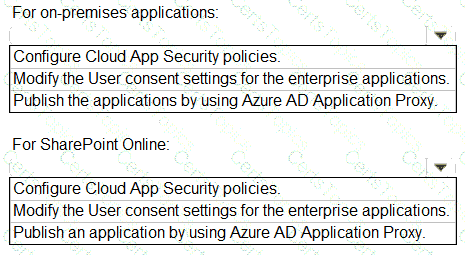
You need to implement on-premises application and SharePoint Online restrictions to meet the authentication requirements and the access requirements.
What should you do? To answer, select the appropriate options in the answer area.
NOTE:Each correct selection is worth one point.
You need to create the LWGroup1 group to meet the management requirements.
How should you complete the dynamic membership rule? To answer, drag the appropriate values to the correct targets. Each value may be used once, more than once, or not at all. You many need to drag the split bar between panes or scroll to view content.
NOTE: Each correct selection is worth one point.

You need to modify the settings of the User administrator role to meet the technical requirements. Which two actions should you perform for the role? Each correct answer presents part of the solution. NOTE: Each correct selection is worth one point.
You need to resolve the issue of the guest user invitations. What should you do for the Azure AD tenant?
You need to resolve the issue of I-.Group1. What should you do first?
You need to implement the planned changes for Package1. Which users can create and manage the access review?
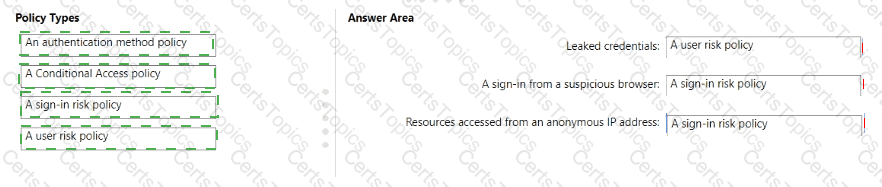
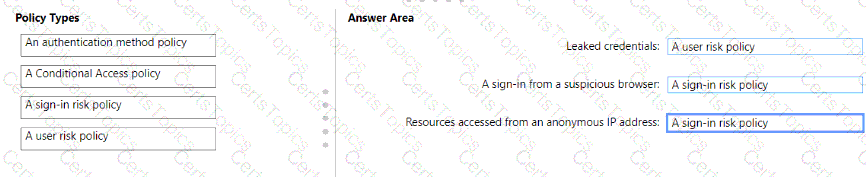
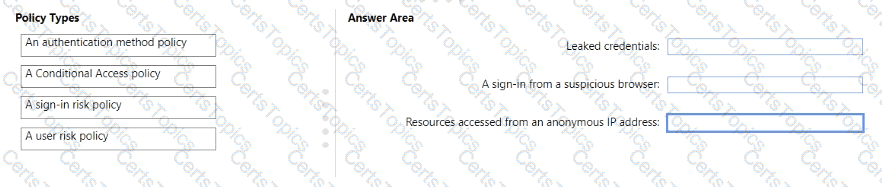
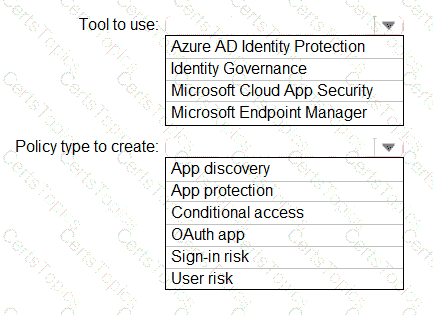
You need to resolve the recent security incident issues.
What should you configure for each incident? To answer, drag the appropriate policy types to the correct issues. Each policy type may be used once, more than once, or not at all. You may need to drag the split bar between panes or scroll to view content.
NOTE: Each correct selection is worth one point.
You need to resolve the issue of the sales department users. What should you configure for the Azure AD tenant?
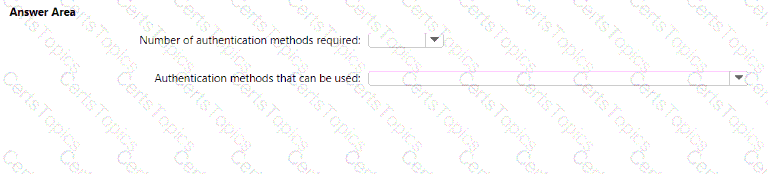
You implement the planned changes for SSPR.
What occurs when User3 attempts to use SSPR? To answer, select the appropriate options in the answer area.
NOTE: Each correct selection is worth one point.
You need implement the planned changes for application access to organizational data. What should you configure?
You need to implement the planned changes for litware.com. What should you configure?
You need to meet the planned changes and technical requirements for App1.
What should you implement?
You need to implement the planned changes and technical requirements for the marketing department.
What should you do? To answer, select the appropriate options in the answer area.
NOTE: Each correct selection is worth one point.
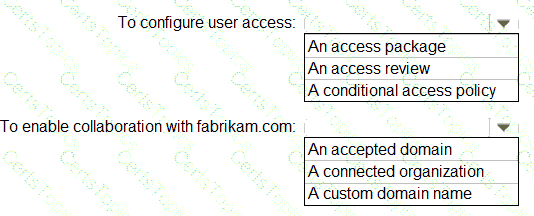
You need to locate licenses to the A. Datum users. The solution must need the technical requirements.
Which type of object should you create?
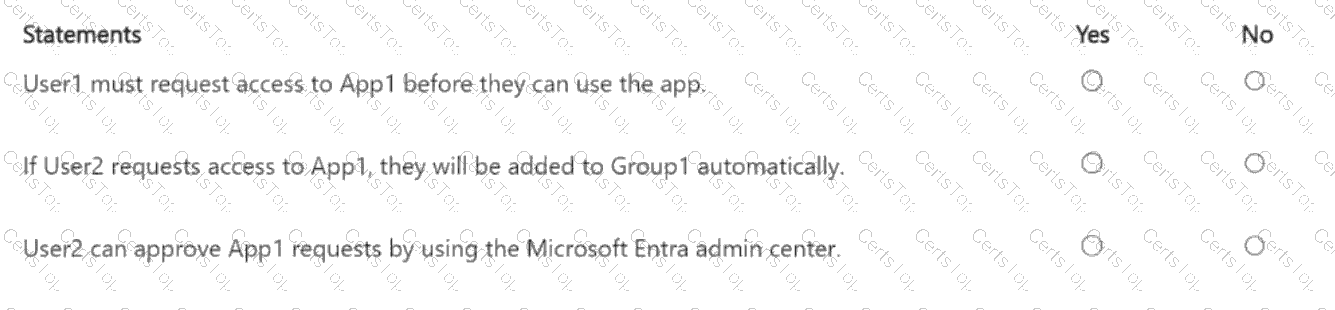
You have a Microsoft Entra tenant that contains a group named Group1 and two users named User1 and User2. User1 is a member of Group1.
You register an enterprise application named App1.
You enable self-service application access for App1 and configure the following settings:
Allow users to request access to this application: Yes
To which group should assigned users be added: Group1
Require approval before granting access to this application: Yes
Who is allowed to approve access to this application: User2
For each of the following statements, select Yes if the statement is true. Otherwise, select No.
You have a Microsoft 365 E5 subscription that contains a Microsoft SharePoint Online site named Site!. Site! hosts PDF files
You need to prevent users from printing the files directly from Sitel.
Which type of policy should you create in the Microsoft Defender for Cloud Apps portal?
You have an Azure Ad tenant that contains the users show in the following table.
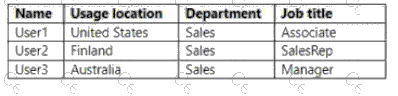
You create a dynamic user group and configure the following rule syntax.

Which users will be added to the group?
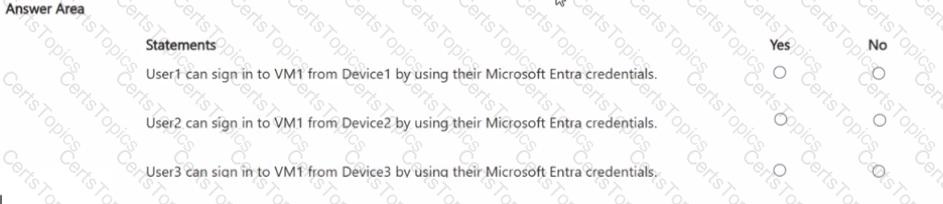
You have an Azure subscription that is linked to a Microsoft Entra tenant. The tenant contains three users named User1, User2 and User3.
You have the devices shown in the following table.
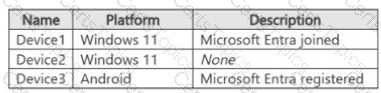
You deploy a virtual machine that has the following configurations:
• Name:VM1
• Resource group: RG1
• Operating system: Windows Server
• Login with Microsoft Entra ID: Enabled
You have the Azure role assignments shown in the following table.
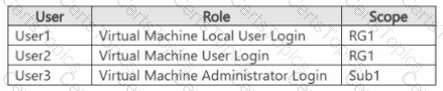
For each of the following statements, select Yes if the statement is true. Otherwise, select No
NOTE: Each correct selection is worth one point.
You have a Microsoft 365 E5 subscription.
You have an Azure subscription that is linked to a Microsoft Entra tenant. The tenant contains a user named User1.
You plan to deploy Microsoft Entra Permissions Management.
You need to ensure that User1 can onboard the Azure subscription to Permissions Management. The solution must follow the principle of least privilege.
Which Microsoft Entra role should you assign to User1?
You have a Microsoft 365 tenant.
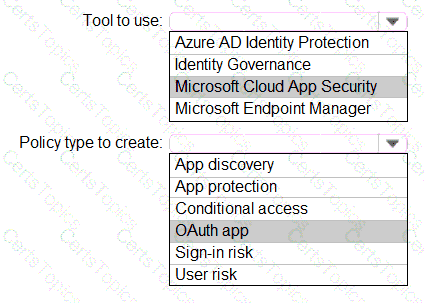
Sometimes, users use external, third-party applications that require limited access to the Microsoft 365 data of the respective user. The users register the applications in Azure Active Directory (Azure AD).
You need to receive an alert if a registered application gains read and write access to the users’ email.
What should you do? To answer, select the appropriate options in the answer area.
NOTE: Each correct selection is worth one point.
You have a Microsoft 365 subscription that contains the users shown in the following table.
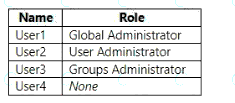
From the tenan1, you configure a naming policy for groups.
Which users are affected by the naming policy?
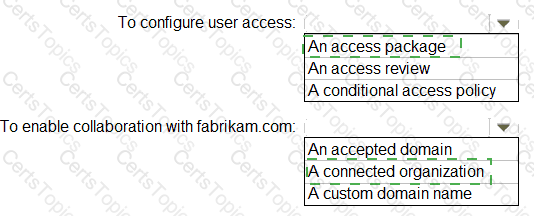
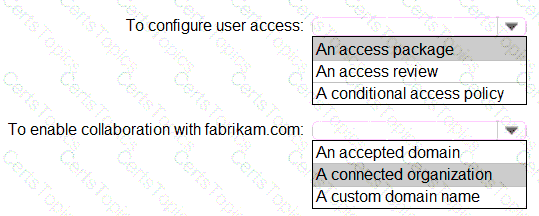
You have an Azure AD tenant named Contoso that contains a terms of use (ToU) named Terms1 and an access package. Contoso users collaborate with an external organization named Fabrikam. Fabrikam users must accept Terms1 before being allowed to use the access package.
You need to identify which users accepted or declined Terms1.
What should you use?
Your company has a Microsoft 365 tenant.
All users have computers that run Windows 10 and are joined to the Azure Active Directory (Azure AD) tenant.
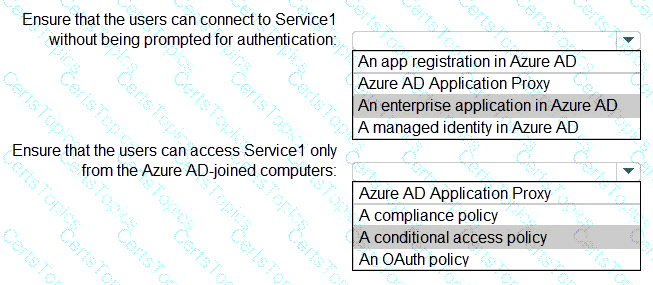
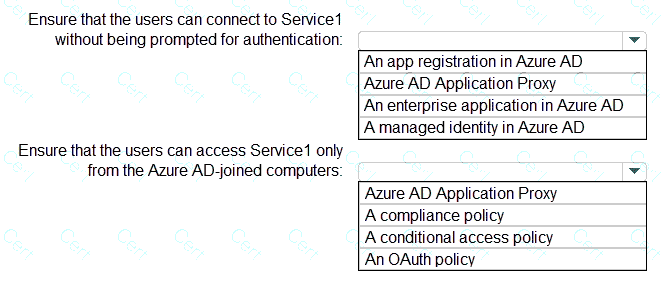
The company subscribes to a third-party cloud service named Service1. Service1 supports Azure AD authentication and authorization based on OAuth. Service1 is published to the Azure AD gallery.
You need to recommend a solution to ensure that the users can connect to Service1 without being prompted for authentication. The solution must ensure that the users can access Service1 only from Azure AD-joined computers. The solution must minimize administrative effort.
What should you recommend for each requirement? To answer, select the appropriate options in the answer area.
NOTE: Each correct selection is worth one point.
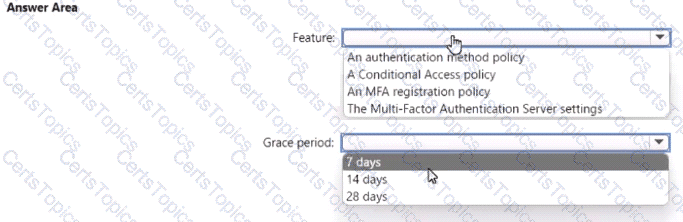
You need to support the planned changes and meet the technical requirements for MFA.
Which feature should you use, and how long before the users must complete the registration? To answer, select the appropriate options in the answer area.
NOTE: Each correct selection is worth one point.
You have a Microsoft 36S tenant.
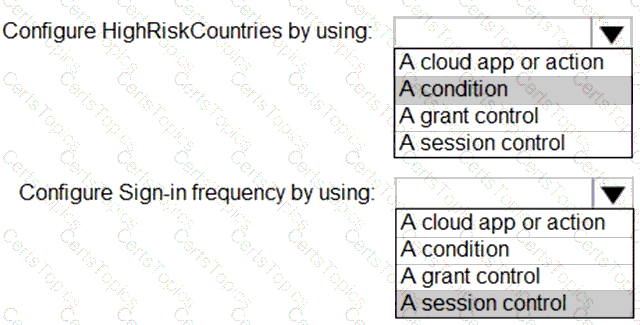
You create a named location named HighRiskCountries that contains a list of high-risk countries.
You need to limit the amount of time a user can stay authenticated when connecting from a high-risk country.
What should you configure in a conditional access policy? To answer, select the appropriate options in the answer area.
NOTE: Each correct selection is worth one point.

You use Azure Monitor to analyze Azure Active Directory (Azure AD) activity logs.
Yon receive more than 100 email alerts each day for tailed Azure Al) user sign-in attempts.
You need to ensure that a new security administrator receives the alerts instead of you.
Solution: From Azure monitor, you modify the action group.
Does this meet the goal?
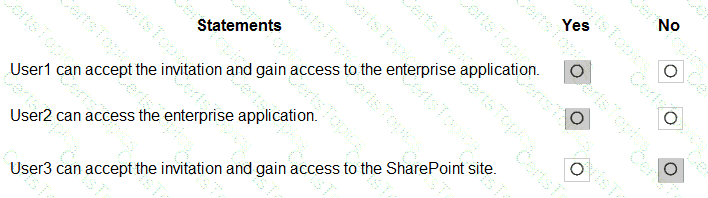
You have a Microsoft 365 tenant named contoso.com.
Guest user access is enabled.
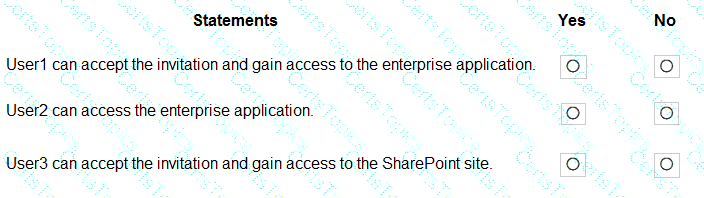
Users are invited to collaborate with contoso.com as shown in the following table.

From the External collaboration settings in the Azure Active Directory admin center, you configure the Collaboration restrictions settings as shown in the following exhibit.
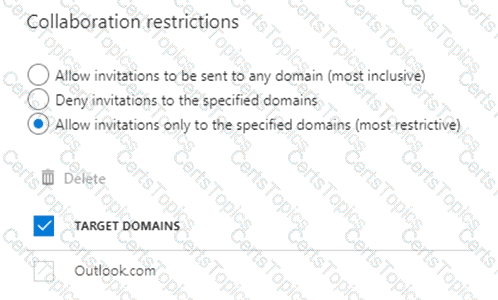
From a Microsoft SharePoint Online site, a user invites user3@adatum.com to the site.
For each of the following statements, select Yes if the statement is true. Otherwise, select No.
NOTE:Each correct selection is worth one point.
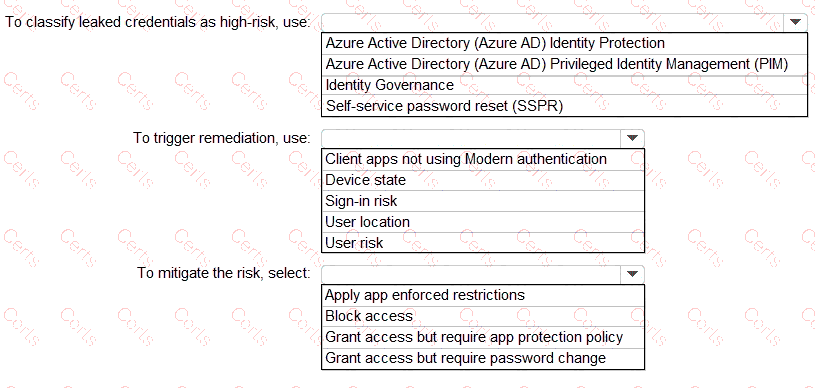
You have a Microsoft 365 tenant.
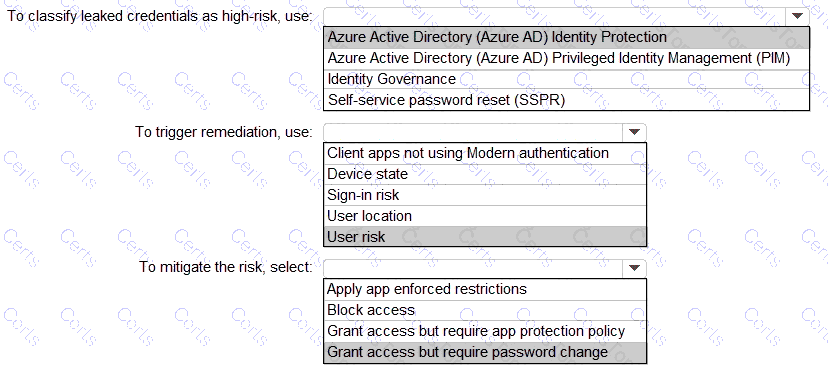
You need to identify users who have leaked credentials. The solution must meet the following requirements.
• Identity sign-Ins by users who ate suspected of having leaked credentials.
• Rag the sign-ins as a high risk event.
• Immediately enforce a control to mitigate the risk, while still allowing the user to access applications.
What should you use? To answer, select the appropriate options in the answer area.
NOTE: Each correct selection is worth one point.
Note: This question is part of a series of questions that present the same scenario. Each question in the series contains a unique solution that might meet the stated goals. Some question sets might have more than one correct solution, while others might not have a correct solution.
After you answer a question in this section, you will NOT be able to return to it. As a result, these questions will not appear in the review screen.
You have a Microsoft 365 tenant.
You have 100 IT administrators who are organized into 10 departments.
You create the access review shown in the exhibit. (Click theExhibittab.)
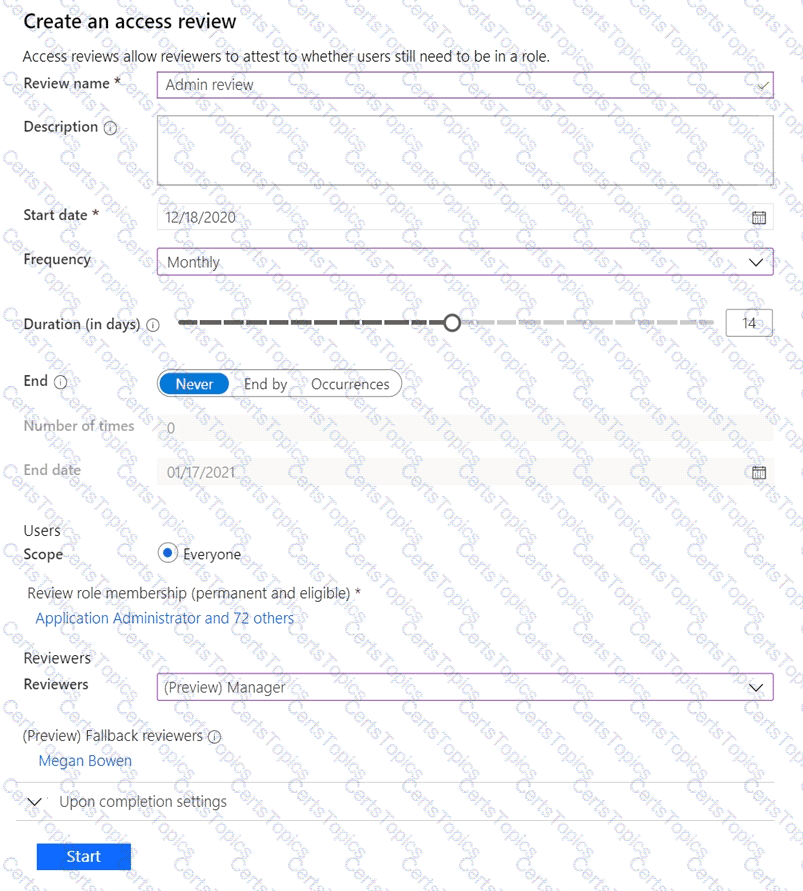
You discover that all access review requests are received by Megan Bowen.
You need to ensure that the manager of each department receives the access reviews of their respective department.
Solution: You add each manager as a fallback reviewer.
Does this meet the goal?
You have a Microsoft 365 E5 subscription that contains a user named User1.
You need to ensure that User1 can create access reviews for Microsoft Entra roles. The solution must use the principle of least privilege.
Which role should you assign to User1?
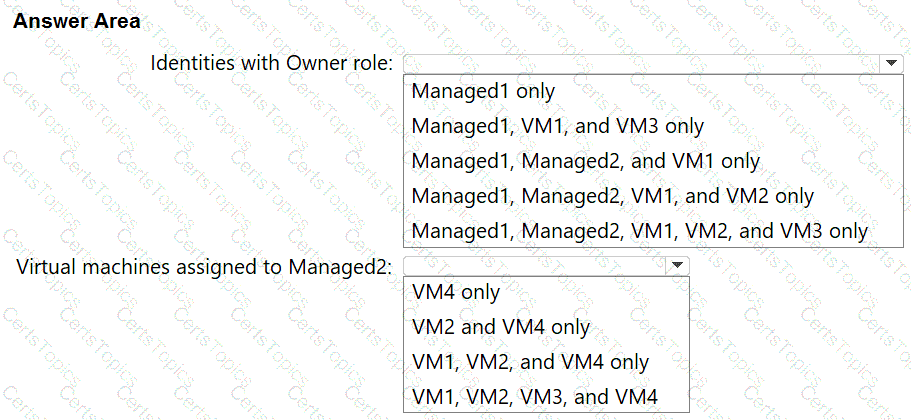
You have an Azure subscription that contains the resources shown in the following table.
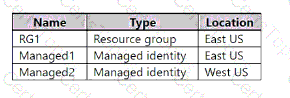
The subscription contains the virtual machines shown in the following table.
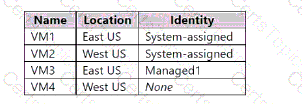
Which identities can be assigned the Owner role for RG1, and to which virtual machines can you assign Managed2? To answer, select the appropriate options in the answer area NOTE: Each correct selection is worth one point.
Note: This question is part of a series of questions that present the same scenario. Each question in the series contains a unique solution that might meet the stated goals. Some question sets might have more than one correct solution, while others might not have a correct solution.
After you answer a question in this section, you will NOT be able to return to it as a result these questions will not appear in the review screen.
You have a Microsoft 365 ES subscription.
You create a user namedUser1.
You need to ensure that User1 can update the status of identity Secure Score improvement actions.
Solution: You assign the Security Operator role User1.
Does this meet the goal?
You have an Azure AD tenant that contains the users shown in the following table.
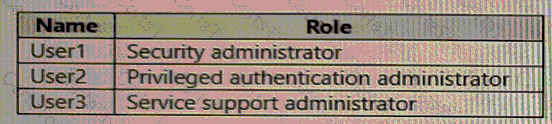
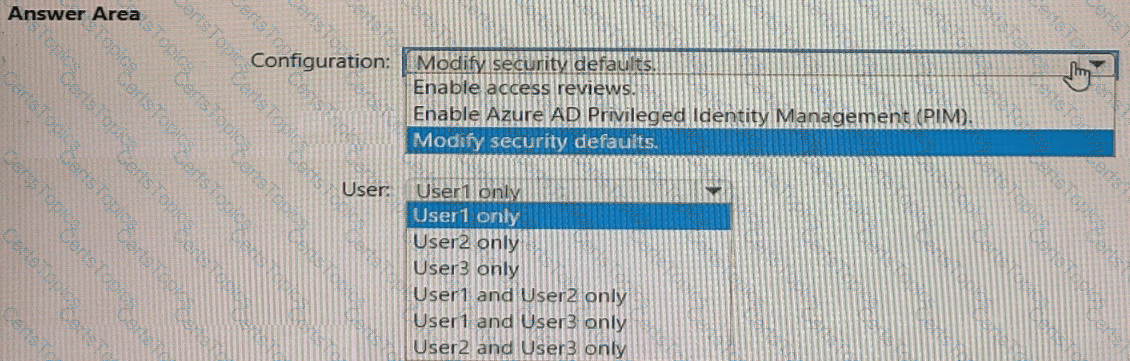
User2 reports that he can only configure multi-factor authenticating (MFA) to use the Microsoft Authenticator app.
You need to ensure that User2 can configure alternate MFA methods.
Which configuration is required, and which user should perform the configuration? To answer, select the appropriate options in the answer area.
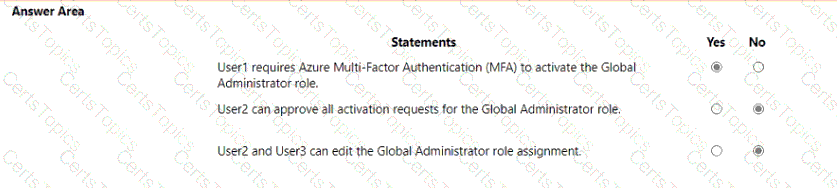
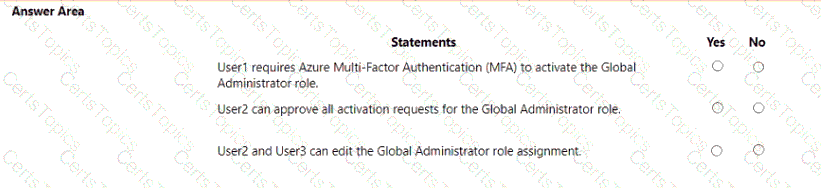
You have an Azure AD tenant contains the users shown in the following table.

In Azure AD Privileged Identity Management (PIM), you configure the Global Administrator role as shown in the following exhibit.
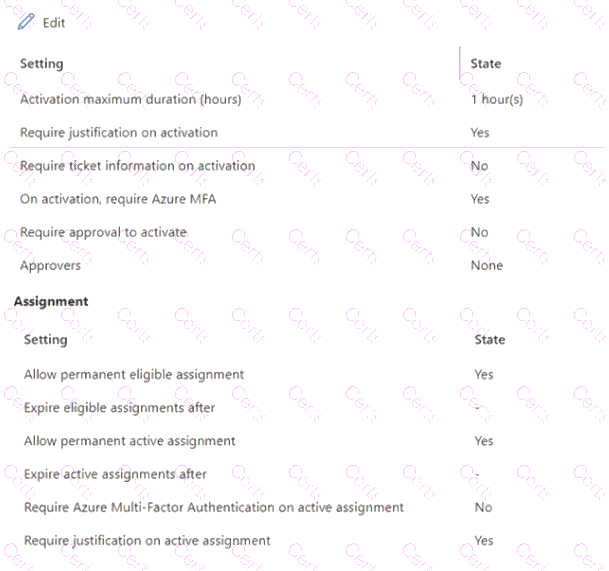
User 1 is eligible for the Global Administrator role.
For each of the following statements, select Yes if the statement is true. Otherwise, select No.
NOTE: Each correct selection is worth one point.
Note: This question is part of a series of questions that present the same scenario. Each question in the series contains a unique solution that might meet the stated goals. Some question sets might have more than one correct solution, while others might not have a correct solution.
After you answer a question in this section, you will NOT be able to return to it. as a result, these questions will not appear in the review screen.
You have an Amazon Web Services (AWS) account a Google Workspace subscription, and a GitHub account
You deploy an Azure subscription and enable Microsoft 365 Defender.
You need to ensure that you can monitor OAuth authentication requests by using Microsoft Defender for Cloud Apps.
Solution: From the Microsoft 365 Defender portal, you add the GitHub app connector
Does this meet the goal?
You have an Azure subscription that containes a registered app named App1.
You need to review the sign-in activity for App1. The solution must meet the following requirements:
• Identify the number of failed sign-ins.
• Identify the success rate of sign-ins.
• Minimize administrative effort.
What should you use?
Task 2
You need to implement a process to review guest users who have access to the Salesforce app. The review must meet the following requirements:
• The reviews must occur monthly.
• The manager of each guest user must review the access.
• If the reviews are NOT completed within five days, access must be removed.
• If the guest user does not have a manager, Megan Bowen must review the access.
Task 10
You need to create a group named Audit. The solution must ensure that the members of Audit can activate the Security Reader role.
Task 3
You need to add the Linkedln application as a resource to the Sales and Marketing access package. The solution must NOT remove any other resources from the access package.
Task 1
You need to deploy multi factor authentication (MFA). The solution must meet the following requirements:
• Require MFA registration only for members of the Sg-Finance group.
• Exclude Debra Berger from having to register for MFA.
• Implement the solution without using a Conditional Access policy.
Task 5
You need to assign a Windows 10/11 Enterprise E3 license to the Sg-Retail group.
Task 8
You need to prevent all users from using legacy authentication protocols when authenticating to Microsoft Entra ID.
Task 7
You need to lock out accounts for five minutes when they have 10 failed sign-in attempts.
Task 4
You need to ensure that all users can consent to apps that require permission to read their user profile. Users must be prevented from consenting to apps that require any other permissions.
Task 6
You need to implement additional security checks before the members of the Sg-Executive can access any company apps. The members must meet one of the following conditions:
• Connect by using a device that is marked as compliant by Microsoft Intune.
• Connect by using client apps that are protected by app protection policies.
Task 9
You need to ensure that when users in the Sg-Operations group go to the My Apps portal a tab named Operations appears that contains only the following applications:
• Unkedln
• Box
Copyright © 2021-2026 CertsTopics. All Rights Reserved