
Note: This question is part of a series of questions that present the same scenario. Each question in the series contains a unique solution that might meet the stated goals. Some question sets might have more than one correct solution, while others might not have a correct solution.
After you answer a question in this section, you will NOT be able to return to it. As a result, these questions will not appear in the review screen.
You have a Microsoft 365 tenant.
You have 100 IT administrators who are organized into 10 departments.
You create the access review shown in the exhibit. (Click theExhibittab.)
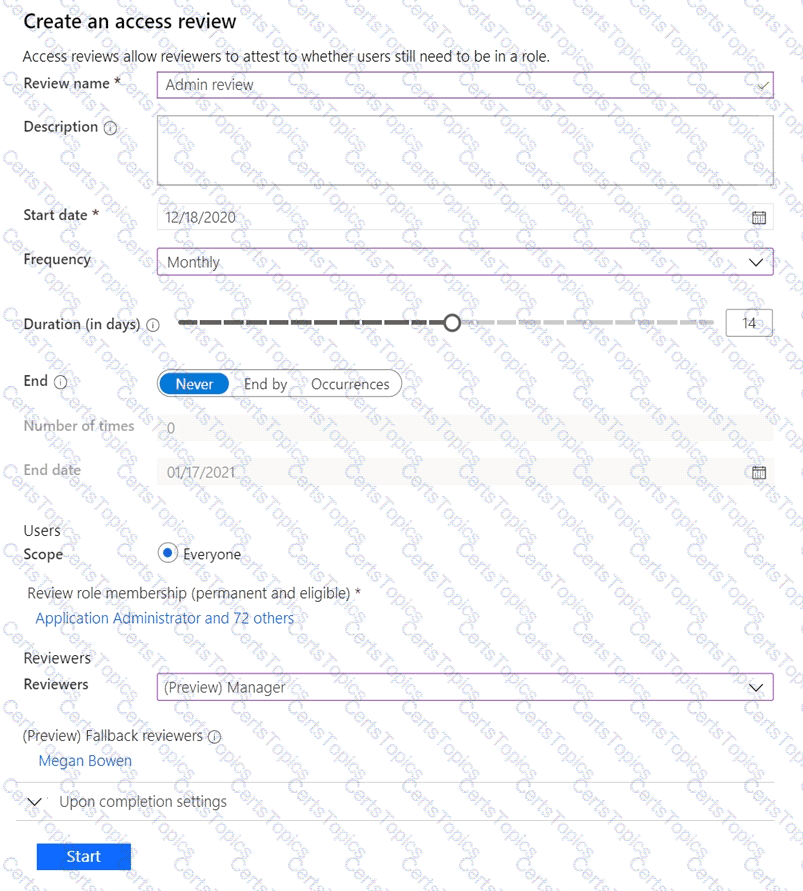
You discover that all access review requests are received by Megan Bowen.
You need to ensure that the manager of each department receives the access reviews of their respective department.
Solution: You add each manager as a fallback reviewer.
Does this meet the goal?
You have a Microsoft 365 E5 subscription that contains a user named User1.
You need to ensure that User1 can create access reviews for Microsoft Entra roles. The solution must use the principle of least privilege.
Which role should you assign to User1?
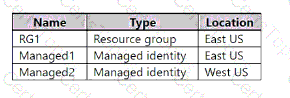
You have an Azure subscription that contains the resources shown in the following table.
The subscription contains the virtual machines shown in the following table.
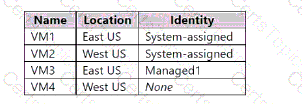
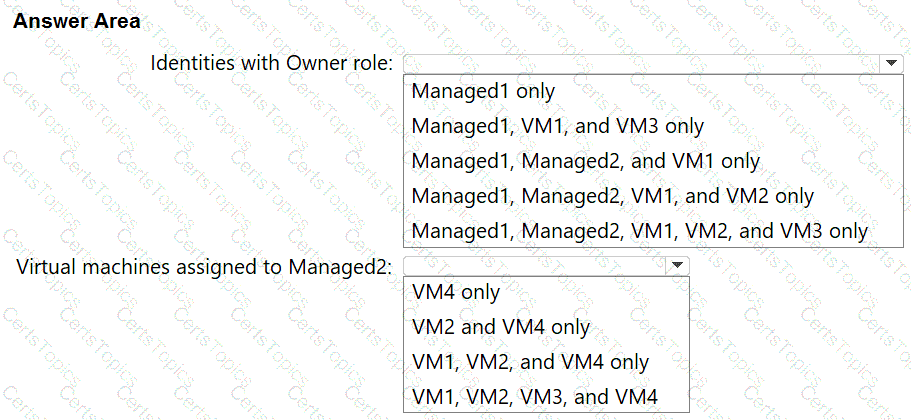
Which identities can be assigned the Owner role for RG1, and to which virtual machines can you assign Managed2? To answer, select the appropriate options in the answer area NOTE: Each correct selection is worth one point.
Note: This question is part of a series of questions that present the same scenario. Each question in the series contains a unique solution that might meet the stated goals. Some question sets might have more than one correct solution, while others might not have a correct solution.
After you answer a question in this section, you will NOT be able to return to it as a result these questions will not appear in the review screen.
You have a Microsoft 365 ES subscription.
You create a user namedUser1.
You need to ensure that User1 can update the status of identity Secure Score improvement actions.
Solution: You assign the Security Operator role User1.
Does this meet the goal?
Copyright © 2021-2026 CertsTopics. All Rights Reserved

