
Spring Sale 70% Discount Offer - Ends in 0d 00h 00m 00s - Coupon code: save70

Fortinet NSE6_FSR-7.3 Exam With Confidence Using Practice Dumps

Exam Code:
NSE6_FSR-7.3
Exam Name:
Fortinet NSE 6 - FortiSOAR 7.3 Administrator
Vendor:
Questions:
44
Last Updated:
Mar 6, 2026
Exam Status:
Stable
Fortinet NSE6_FSR-7.3

NSE6_FSR-7.3: NSE 6 Network Security Specialist Exam 2025 Study Guide Pdf and Test Engine

Are you worried about passing the Fortinet NSE6_FSR-7.3 (Fortinet NSE 6 - FortiSOAR 7.3 Administrator) exam? Download the most recent Fortinet NSE6_FSR-7.3 braindumps with answers that are 100% real. After downloading the Fortinet NSE6_FSR-7.3 exam dumps training , you can receive 99 days of free updates, making this website one of the best options to save additional money. In order to help you prepare for the Fortinet NSE6_FSR-7.3 exam questions and verified answers by IT certified experts, CertsTopics has put together a complete collection of dumps questions and answers. To help you prepare and pass the Fortinet NSE6_FSR-7.3 exam on your first attempt, we have compiled actual exam questions and their answers. 

Our (Fortinet NSE 6 - FortiSOAR 7.3 Administrator) Study Materials are designed to meet the needs of thousands of candidates globally. A free sample of the CompTIA NSE6_FSR-7.3 test is available at CertsTopics. Before purchasing it, you can also see the Fortinet NSE6_FSR-7.3 practice exam demo.

Fortinet NSE 6 - FortiSOAR 7.3 Administrator Questions and Answers

Question 1

Which playbook collection includes system-level playbooks that FortiSOAR uses to auto-populate date fields when the status of incident or alert records changes to Resolved or Closed?

Options:

A.

SLA Management Playbooks

B.

Utilities Playbooks

C.

Schedule Management Playbooks

D.

Approval/Manual Task Playbooks

Buy Now
Question 2

Which product is essential to level 3 of the SOC automation model?

Options:

A.

FortiAnalyzer

B.

FortiAuthenticator

C.

FortiManager

D.

FortiSOAR

Question 3

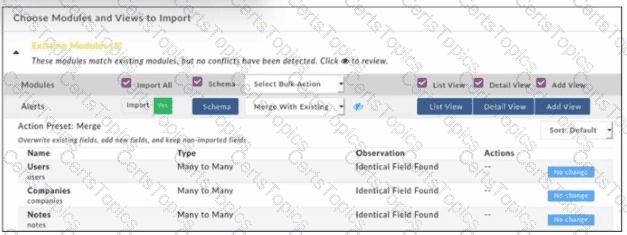
Refer to the exhibit.

When importing modules to FortiSOAR using the configuration wizard, what actions are applied to fields it you select Merge with Existing as the Bulk action?

Options:

A.

Existing fields are kept, new fields are added, and non-imported fields are deleted.

B.

Existing Holds are overwritten, now fields are added, and non-imported fields are deleted.

C.

Existing fields are kept, new fields are added, and non-imported fields are kept.

D.

Existing fields are overwritten, new fields are added, and non-Imported fields are kept.