Power Up Your Study Prep: Black Friday 75% Discount! Use coupon code below to save! - Ends in 0d 00h 00m 00s - Coupon code: big75certs

Note! The FCP_FMG_AD-7.6 Exam is no longer valid. To find out more, please contact us through our Live Chat or email us.

Fortinet FCP_FMG_AD-7.6 Exam With Confidence Using Practice Dumps

Exam Code:
FCP_FMG_AD-7.6
Exam Name:
Fortinet NSE 5 - FortiManager 7.6 Administrator
Vendor:
Questions:
65
Last Updated:
Oct 25, 2026
Exam Status:
Stable
Fortinet FCP_FMG_AD-7.6

FCP_FMG_AD-7.6: Fortinet Network Security Expert Exam 2025 Study Guide Pdf and Test Engine

Are you worried about passing the Fortinet FCP_FMG_AD-7.6 (Fortinet NSE 5 - FortiManager 7.6 Administrator) exam? Download the most recent Fortinet FCP_FMG_AD-7.6 braindumps with answers that are 100% real. After downloading the Fortinet FCP_FMG_AD-7.6 exam dumps training , you can receive 99 days of free updates, making this website one of the best options to save additional money. In order to help you prepare for the Fortinet FCP_FMG_AD-7.6 exam questions and verified answers by IT certified experts, CertsTopics has put together a complete collection of dumps questions and answers. To help you prepare and pass the Fortinet FCP_FMG_AD-7.6 exam on your first attempt, we have compiled actual exam questions and their answers. 

Our (Fortinet NSE 5 - FortiManager 7.6 Administrator) Study Materials are designed to meet the needs of thousands of candidates globally. A free sample of the CompTIA FCP_FMG_AD-7.6 test is available at CertsTopics. Before purchasing it, you can also see the Fortinet FCP_FMG_AD-7.6 practice exam demo.
Fortinet NSE 5 - FortiManager 7.6 Administrator Questions and Answers

Question 1

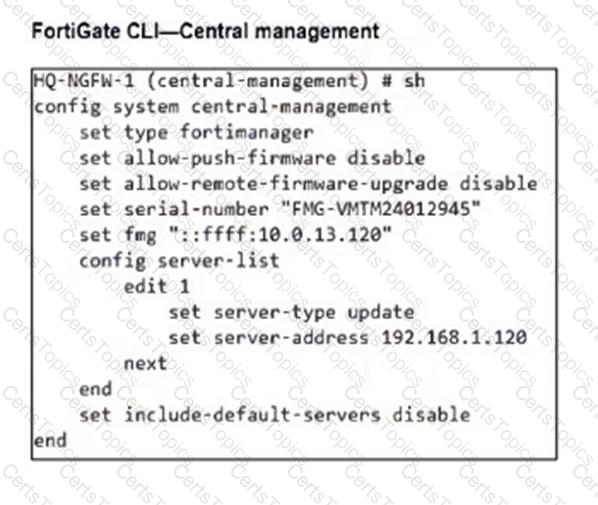
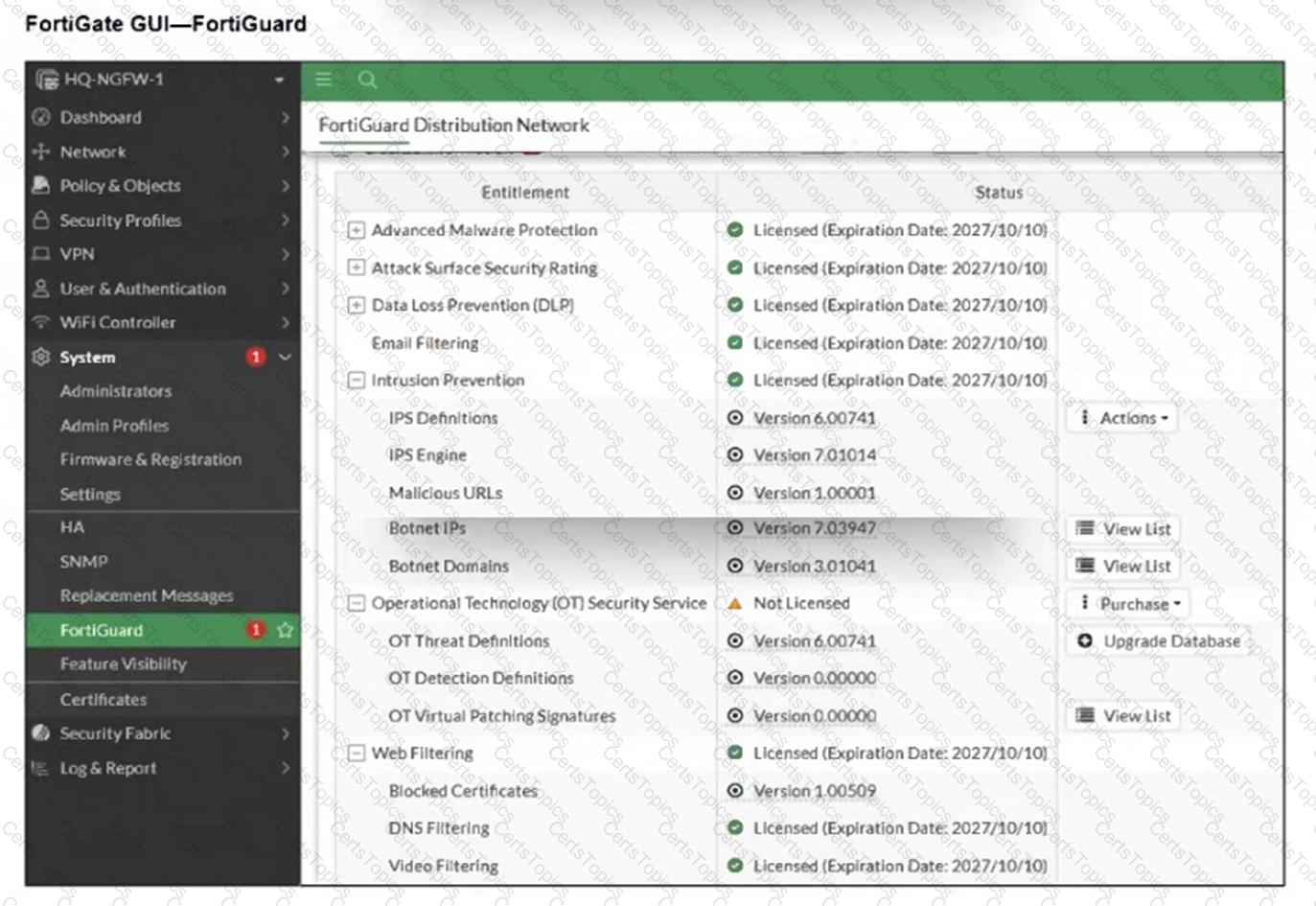
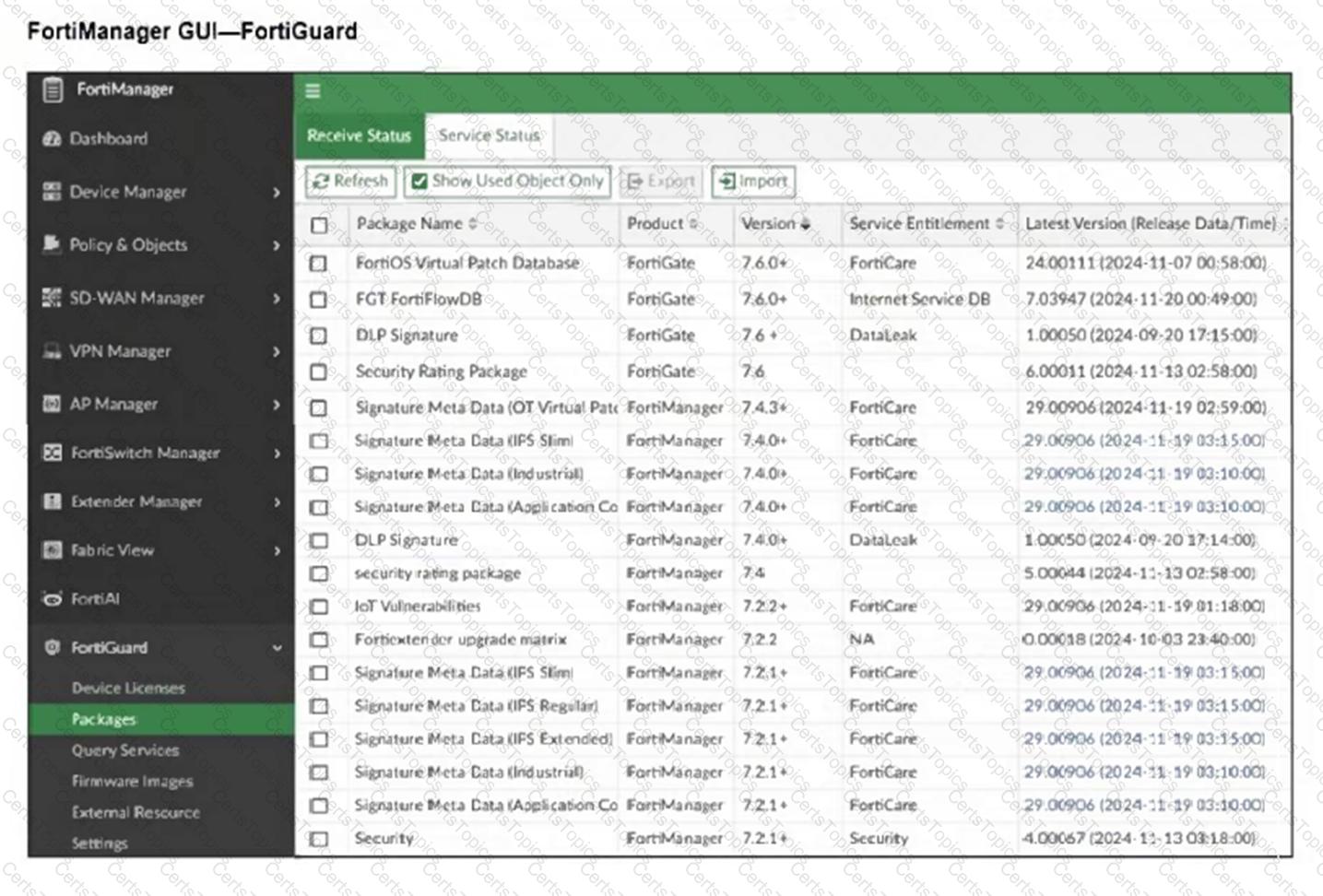
Refer to the exhibits.

FortiGate HQ-NGFW-1 downloads and validates FortiGuard databases from FortiManager which acts as a local FortiGuard Distribution Server (FDS) in a closed network. An administrator pushes a new firewall policy with an intrusion prevention system (IPS) profile from FortiManager to FortiGate HQ- NGFW-1 However, FortiGate does not recognize the new IPS signature from FortiManager.

What is the most likely reason why FortiGate HQ-NGFW-1 does not recognize the new IPS signature?

Options:

A.

FortiGate must enable rating for the FortiManager IP address, 192.168.1.120, in server list 1.

B.

FortiManager and FortiGate have different IPS database versions.

C.

The administrator must enable IPv6 connections for FortiGuard services on FortiManager.

D.

The administrator must enable the fortiguard-anycast option to correctly download all signatures from the local FDS.

Buy Now
Question 2

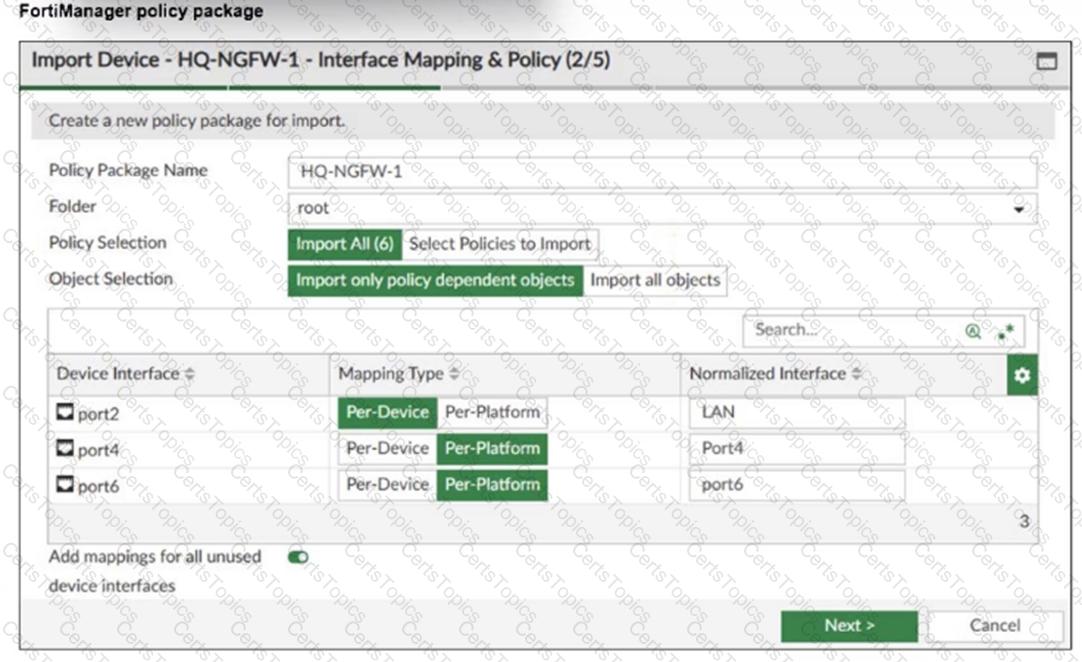
Refer to the exhibit.

An administrator added a FortiGate device to FortiManager with the default object settings at the ADOM layer.

What can you conclude from the import policy package process of the HQ-NGFW- 1 device?

Options:

A.

The administrator must select Per Platform for all interfaces to correctly detect all interfaces from HQ-NGFW-1.

B.

The administrator must manually create the port4 interface on the ADOM layer to avoid import policy errors.

C.

FortiManager will create LAN, port4, and port6 as normalized interfaces at the ADOM layer.

D.

FortiGate may not work as expected when the administrator does not import all objects.

Question 3

Push updates are failing on a FortiGate device located behind a network address translation (NAT) device?

Which two settings should the administrator check to correct this problem? (Choose two.)

Options:

A.

Make sure the NAT device IP address and the correct ports are configured on FortiManager.

B.

Make sure FortiGuard updates and web service are enabled on the FortiGuard service interface.

C.

Make sure the virtual IP address and the correct ports are configured on the NAT device.

D.

Make sure the Bind to IP address option on the FortiGuard service interface is set to the virtual IP address from the NAT device.