
Month End Sale 70% Discount Offer - Ends in 0d 00h 00m 00s - Coupon code: save70

F5 301b Exam With Confidence Using Practice Dumps

Exam Code:
301b
Exam Name:
LTM Specialist: Maintain & Troubleshoot
Certification:
Vendor:
Questions:
209
Last Updated:
Jan 27, 2026
Exam Status:
Stable
F5 301b

301b: LTM Specialist Exam 2025 Study Guide Pdf and Test Engine

Are you worried about passing the F5 301b (LTM Specialist: Maintain & Troubleshoot) exam? Download the most recent F5 301b braindumps with answers that are 100% real. After downloading the F5 301b exam dumps training , you can receive 99 days of free updates, making this website one of the best options to save additional money. In order to help you prepare for the F5 301b exam questions and verified answers by IT certified experts, CertsTopics has put together a complete collection of dumps questions and answers. To help you prepare and pass the F5 301b exam on your first attempt, we have compiled actual exam questions and their answers. 

Our (LTM Specialist: Maintain & Troubleshoot) Study Materials are designed to meet the needs of thousands of candidates globally. A free sample of the CompTIA 301b test is available at CertsTopics. Before purchasing it, you can also see the F5 301b practice exam demo.

LTM Specialist: Maintain & Troubleshoot Questions and Answers

Question 1

A web application requires knowledge of the client's true IP address for logging and analysis purposes. Instances of the application that can decode X-Forwarded-For HTTP headers reside in pool_a, while pool_b instances assume the source IP is the true address of the client.

Which iRule provides the proper functionality?

Options:

A.

when HTTP_DATA {

if {[HTTP::header exists X-Forwarded-For]}{

pool pool_a

} else {

pool pool_b

}

}

B.

when HTTP_RESPONSE {

if {[HTTP::header exists X-Forwarded-For]}{

pool pool_a

} else {

pool pool_b

}

}

C.

when HTTP_REQUEST {

if {[HTTP::header exists X-Forwarded-For]}{

pool pool_a

} else {

pool pool_b

}

}

D.

when HTTP_OPEN {

if {[HTTP::header exists X-Forwarded-For]}{

pool pool_a

} else {

pool pool_b

}

}

Buy Now
Question 2

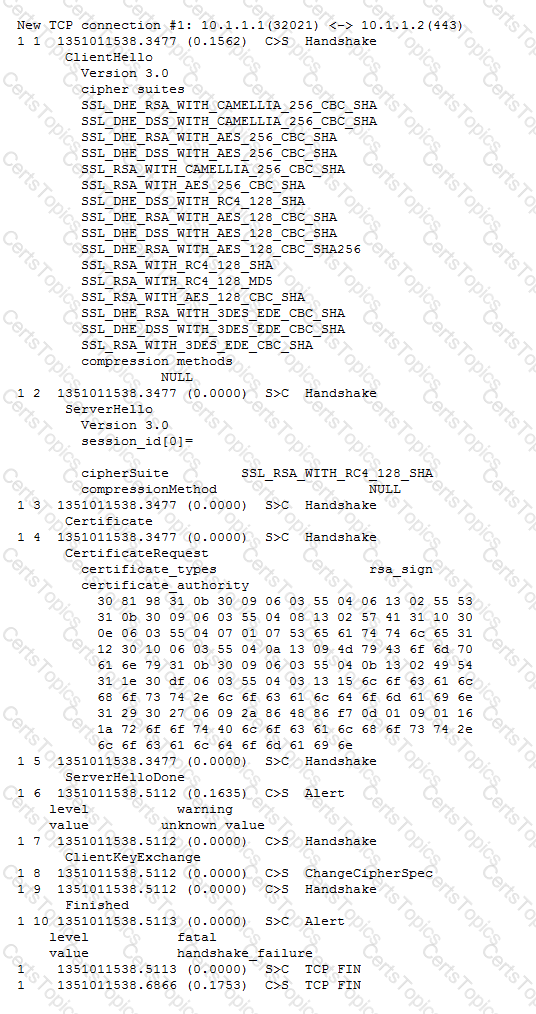
-- Exhibit –

-- Exhibit --

Refer to the exhibit.

A web application is configured to allow sessions to continue even after a user computer is shut down for the night. A new LTM device is configured to load balance the web application to several servers. The application owner reports that application users are logged out of the web application whenever their browser is restarted or computer is rebooted.

What is the problem?

Options:

A.

The virtual server does NOT have persistence configured.

B.

The virtual server does NOT have persistence mirroring configured.

C.

The cookie set by the LTM device does NOT have an "Expires" value.

D.

The cookie set by the server is NOT being passed to client by the LTM device.

Question 3

An LTM Specialist is troubleshooting an issue with a new virtual server. When connecting through the virtual server, clients receive the message "The connection was reset" in the browser, although connections directly to the pool member show the application is functioning correctly.

ltm pool srv1_https_pool {

members {

192.168.2.1:https{

address 192.168.2.1

}

}

}

ltm virtual https_example_vs {

destination 192.168.1.155:https

ip-protocol tcp

mask 255.255.255.255

pool srv1_https_pool

profiles {

http { }

tcp { }

}

snat automap

vlans-disabled

}

How should the LTM Specialist resolve this issue?

Options:

A.

Enable HTTP monitoring on the pool.

B.

Add a ClientSSL profile to the virtual server.

C.

Disable SNAT Automap on the virtual server.

D.

Remove the HTTP profile from the virtual server.