


F5 Related Exams
301b Exam
-- Exhibit –

-- Exhibit --
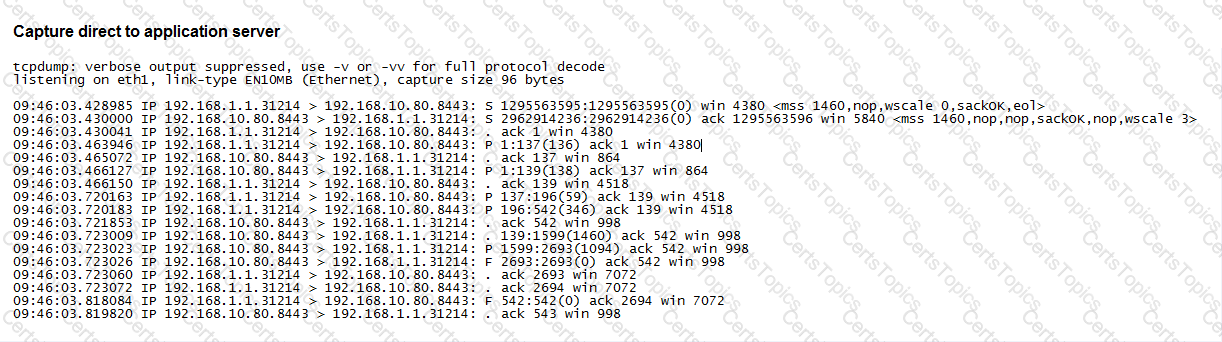
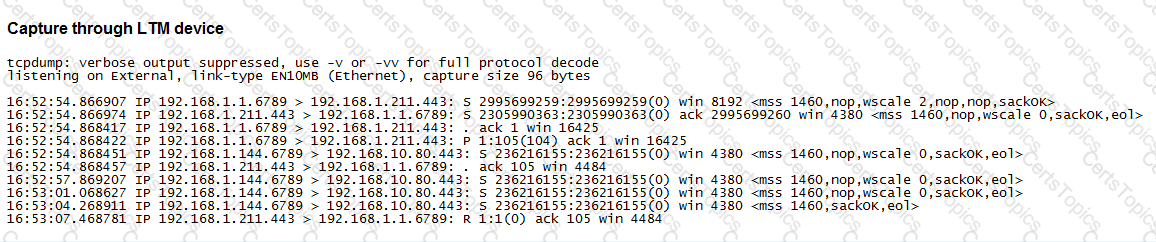
Refer to the exhibit.
A user is unable to access a secure application via a virtual server.
What is the cause of the issue?
The LTM Specialist is writing a custom HTTP monitor for a web application and has viewed the content by accessing the site directly via their browser. The monitor continually fails. The monitor configuration is:
ltm monitor http /Common/exampleComMonitor {
defaults-from /Common/http
destination *:*
interval 5
recv "Recent Searches"
send "GET /app/feed/current\?uid=20145 HTTP/1.1\\r\\nHost: gzip, deflate\\r\\nConnection: close\\r\\n\\r\\n"
time-until-up 0
timeout 16
}
A trace shows the following request and response:
Request:
GET /app/feed/current?uid=20145 HTTP/1.1
Host
Accept-Encoding gzip, deflate
Connection: close
Response:
HTTP/1.1 302 Moved Temporarily
Date Wed, 17 Oct 2012 18:45:52 GMT
Server Apache
Location
Content-Encoding gzip
Content-Type text/html;charset=UTF-8
Set-CookiE. JSESSIONID=261EFFBDA8EC3036FBCC22D991AC6835; Path=/app/feed/current?uid=20145
What is the problem?
An LTM Specialist is troubleshooting an issue with a new virtual server. When connecting through the virtual server, clients receive the message "The connection was reset" in the browser, although connections directly to the pool member show the application is functioning correctly.
ltm pool srv1_https_pool {
members {
192.168.2.1:https{
address 192.168.2.1
}
}
}
ltm virtual https_example_vs {
destination 192.168.1.155:https
ip-protocol tcp
mask 255.255.255.255
pool srv1_https_pool
profiles {
http { }
tcp { }
}
snat automap
vlans-disabled
}
How should the LTM Specialist resolve this issue?