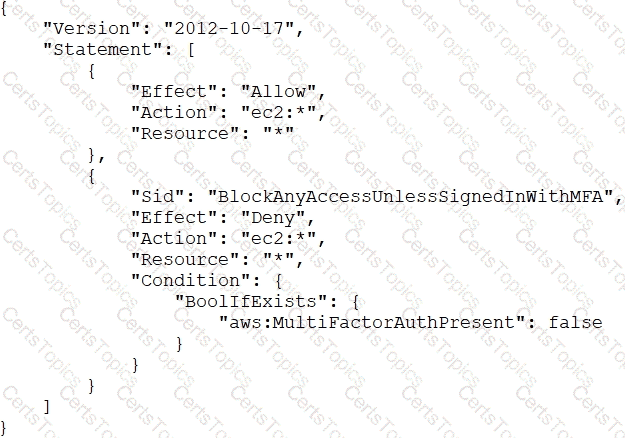
The correct answer is B. Instruct users to run the aws sts get-session-token CLI command and pass the multi-factor authentication --serial-number and --token-code parameters. Use these resulting values to make API/CLI calls.
According to the AWS documentation1, the aws sts get-session-token CLI command returns a set of temporary credentials for an AWS account or IAM user. The credentials consist of an access key ID, a secret access key, and a security token. These credentials are valid for the specified duration only. The session duration for IAM users can be between 15 minutes and 36 hours, with a default of 12 hours.
You can use the --serial-number and --token-code parameters to provide the MFA device serial number and the MFA code from the device. The MFA device must be associated with the user who is making the get-session-token call. If you do not provide these parameters when your IAM user or role has a policy that requires MFA, you will receive an Access Denied error.
The temporary security credentials that are returned by the get-session-token command can then be used to make subsequent API or CLI calls that require MFA authentication. You can use environment variables or a profile in your AWS CLI configuration file to specify the temporary credentials.
Therefore, this solution will resolve the problem of users being unable to perform EC2 commands using the AWS CLI, while still enforcing MFA.
The other options are incorrect because:
A. Changing the value of aws:MultiFactorAuthPresent to true will not work, because this is a condition key that is evaluated by AWS when a request is made. You cannot set this value manually in your policy or request. You must provide valid MFA information to AWS for this condition key to be true.
C. Implementing federated API/CLI access using SAML 2.0 may work, but it requires more operational effort than using the get-session-token command. You would need to configure a SAML identity provider and trust relationship with AWS, and use a custom SAML client to request temporary credentials from AWS STS. This solution may also introduce additional security risks if the identity provider is compromised.
D. Creating a role and enforcing MFA in the role trust policy may work, but it also requires more operational effort than using the get-session-token command. You would need to create a role for each user or group that needs to perform EC2 commands, and specify a trust policy that requires MFA. You would also need to grant the users permission to assume the role, and instruct them to use the sts assume-role command instead of the get-session-token command.