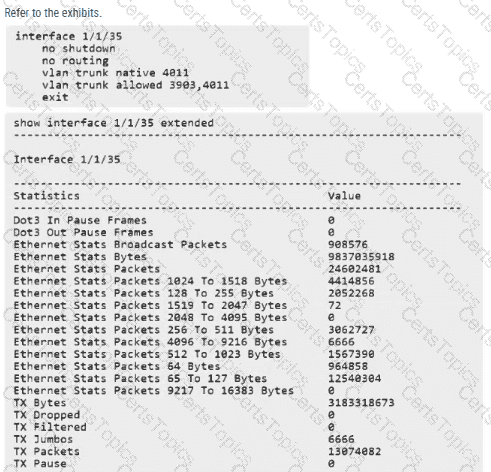
To resolve vMotion connectivity issues on an Aruba AOS-CX 8320, we must ensure the network infrastructure supports Jumbo Frames end-to-end.
MTU and vMotion Requirements: VMware vMotion is highly sensitive to the Maximum Transmission Unit (MTU). For optimal performance and reliability, a 9000-byte MTU is standard. If any switch port in the path is left at the default 1500-byte MTU, vMotion operations will typically time out or fail, even if standard small-packet traffic (like a basic ping) works.
AOS-CX Configuration Syntax: In the AOS-CX operating system, Jumbo frame support is enabled by modifying the MTU at the interface level.
The standard command is mtu 9198.
The value 9198 is used because it accounts for the 9000-byte payload plus L2 headers and tagging overhead.
Unlike the older AOS-S (ProCurve) software, AOS-CX does not use the jumbo command; it uses the mtu command under the physical interface context.
Analyzing the Exhibits:
The Configuration: The exhibit for interface 1/1/35 shows a standard trunk configuration but no MTU command. This confirms the port is operating at the default 1500-byte limit.
The Statistics: The show interface extended output shows TX Jumbos: 6666. This indicates that jumbo packets have been sent, but in a troubleshooting context, this may represent previous stats or the switch counting oversized frames before dropping them or failing to receive them from the server.
Why Option B is the Correct Fix: Even if " large " pings (e.g., 2000 bytes) work due to fragmentation or " baby giant " tolerances, the specific high-throughput requirements of vMotion necessitate that the physical transport layer (interface 1/1/35) be explicitly configured to handle the full 9000-byte frame size using the mtu 9198 command.
Addressing the SVI (Option A): While an SVI (interface vlan 3903) also has an MTU, the physical port is the primary gatekeeper for Layer 2 traffic. If the physical port is set to 1500, no jumbo frame will ever reach the SVI or be switched to another port on that VLAN.