



Weekend Sale Special - 75% Discount Offer - Ends in 0d 00h 00m 00s - Coupon code: big75certs

830-01 Exam Dumps : RCPE Certified Professional WAN Optimization

PDF
830-01 pdf
 Real Exam Questions and Answer
 Last Update: Nov 7, 2026
 Question and Answers: 402 With Explanation
 Compatible with all Devices
 Printable Format
 100% Pass Guaranteed
$22.5  $89.99
830-01 exam
PDF + Testing Engine
830-01 PDF + engine
 Both PDF & Practice Software
 Last Update: Nov 7, 2026
 Question and Answers: 402
 Discount Offer
 Download Free Demo
 24/7 Customer Support
$35  $139.99
Testing Engine
830-01 Engine
 Desktop Based Application
 Last Update: Nov 7, 2026
 Question and Answers: 402
 Create Multiple Test Sets
 Questions Regularly Updated
  90 Days Free Updates
  Windows and Mac Compatible
$26.25  $104.99

Verified By IT Certified Experts

CertsTopics.com Certified Safe Files

Up-To-Date Exam Study Material

99.5% High Success Pass Rate

100% Accurate Answers

Instant Downloads

Exam Questions And Answers PDF

Try Demo Before You Buy

Certification Exams with Helpful Questions And Answers

RCPE Certified Professional WAN Optimization Questions and Answers

Question 1

What information is available in the System Snapshot files on the Steelhead Mobile Controller?

Options:

A.

A copy of all memory

B.

A copy of hardware registers

C.

Status indicators

D.

System configs and tcpdumps

E.

A, B, and C

Buy Now
Question 2

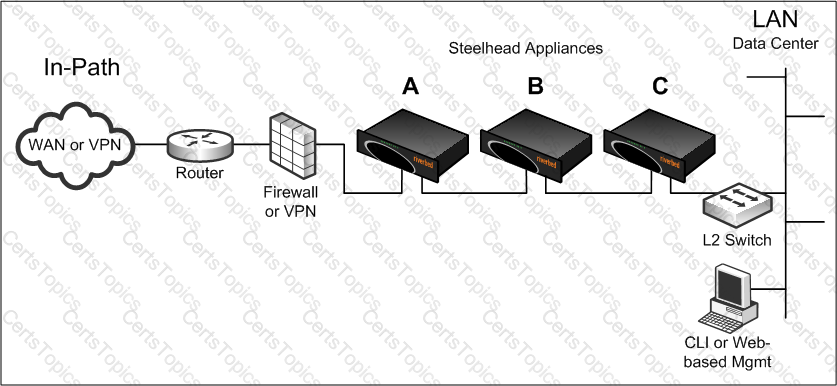
The exhibit shows a data center side serial clustering deployment. In this organization, not every remote site has a Steelhead appliance deployed, and all remote locations will be connecting to the data center.

For connections initiated from the data center, there is a possibility that the Steelhead appliances shown in the exhibit will end up peering with each other, rather than the intended remote Steelhead appliances. Where are peering rules needed to prevent this problem?

Options:

A.

A only

B.

B only

C.

B and C

D.

A and B

Question 3

Place the following commands to upgrade a Steelhead appliance from the CLI in the correct order. (NotE. include only the necessary steps)

1) SH (config) image install image.img 2

2) SH (config) image fetch

3) SH (config) boot system 2

4) SH (config) restart clean

5) SH (config) reload

6) SH (config) write memory

Options:

A.

1, 2, 3, 4, 5, 6

B.

2, 3, 5, 1, 6

C.

1, 2, 5, 4

D.

2, 1, 3, 6, 5

E.

1, 2, 3, 6, 5