New Year Sale 70% Discount Offer - Ends in 0d 00h 00m 00s - Coupon code: save70

71301X Exam Dumps : Avaya Aura Communication Applications Implement Certified Exam

PDF
71301X pdf
 Real Exam Questions and Answer
 Last Update: Jan 18, 2026
 Question and Answers: 68
 Compatible with all Devices
 Printable Format
 100% Pass Guaranteed
$25.5  $84.99
71301X exam
PDF + Testing Engine
71301X PDF + engine
 Both PDF & Practice Software
 Last Update: Jan 18, 2026
 Question and Answers: 68
 Discount Offer
 Download Free Demo
 24/7 Customer Support
$40.5  $134.99
Testing Engine
71301X Engine
 Desktop Based Application
 Last Update: Jan 18, 2026
 Question and Answers: 68
 Create Multiple Test Sets
 Questions Regularly Updated
  90 Days Free Updates
  Windows and Mac Compatible
$30  $99.99

Verified By IT Certified Experts

CertsTopics.com Certified Safe Files

Up-To-Date Exam Study Material

99.5% High Success Pass Rate

100% Accurate Answers

Instant Downloads

Exam Questions And Answers PDF

Try Demo Before You Buy

Certification Exams with Helpful Questions And Answers

Avaya Aura Communication Applications Implement Certified Exam Questions and Answers

Question 1

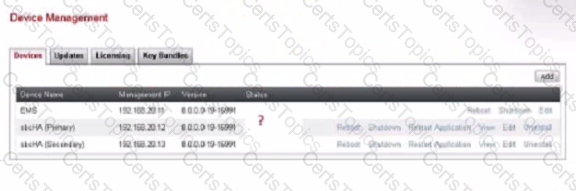
Refer to the exhibit.

Before you can begin configuring SIP Trunking, which status should all the Avaya Session Border Controller for Enterprise (ASBCE) components / devices show on the Device Management screen?

Options:

A.

Registered

B.

Provisioned

C.

Commissioned

D.

Ready

Buy Now
Question 2

A field engineer runs the Installation Wizard during the deployment of the Avaya Session Border Controller for Enterprise (ASBCE). Which statement about configuring Domain Name System (DNS) server address during the Installation Wizard is true?

Options:

A.

A DNS server address should not be configured during the Installation Wizard.

B.

A Primary DNS server address needs to be configured.

C.

A DNS server address is not required.

D.

Both the Primary and the Secondary DNS server addresses must be configured, even if only one DNS server is available.

Question 3

After running the Install wizard on the Avaya Session Border Controller for Enterprise (ASBCE), you add a Public (External) IP address to the Bl interface. You try to ping this IP address from a PC in the same subnet, but it fails.

What is the first step to resolve the problem?

Options:

A.

Navigate to Network & Flows > Network Management > Interfaces and enable the Bl interface.

B.

Navigate to Device Management, and click on Restart Application.

C.

Navigate to Device Management, and and click on Reboot.

D.

Connect to the ASBCE CLI and reboot the ASBCE.