Spring Sale 70% Discount Offer - Ends in 0d 00h 00m 00s - Coupon code: save70

Linux Foundation CKAD Exam With Confidence Using Practice Dumps

Exam Code:
CKAD
Exam Name:
Certified Kubernetes Application Developer (CKAD) Program
Questions:
48
Last Updated:
Feb 20, 2026
Exam Status:
Stable
Linux Foundation CKAD

CKAD: Kubernetes Application Developer Exam 2025 Study Guide Pdf and Test Engine

Are you worried about passing the Linux Foundation CKAD (Certified Kubernetes Application Developer (CKAD) Program) exam? Download the most recent Linux Foundation CKAD braindumps with answers that are 100% real. After downloading the Linux Foundation CKAD exam dumps training , you can receive 99 days of free updates, making this website one of the best options to save additional money. In order to help you prepare for the Linux Foundation CKAD exam questions and verified answers by IT certified experts, CertsTopics has put together a complete collection of dumps questions and answers. To help you prepare and pass the Linux Foundation CKAD exam on your first attempt, we have compiled actual exam questions and their answers. 

Our (Certified Kubernetes Application Developer (CKAD) Program) Study Materials are designed to meet the needs of thousands of candidates globally. A free sample of the CompTIA CKAD test is available at CertsTopics. Before purchasing it, you can also see the Linux Foundation CKAD practice exam demo.
Certified Kubernetes Application Developer (CKAD) Program Questions and Answers

Question 1

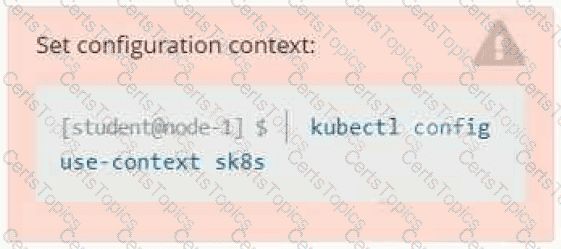
Set Configuration Context:

[student@node-1] $ | kubectl

Config use-context k8s

Context

A web application requires a specific version of redis to be used as a cache.

Task

Create a pod with the following characteristics, and leave it running when complete:

• The pod must run in the web namespace.

The namespace has already been created

• The name of the pod should be cache

• Use the Ifccncf/redis image with the 3.2 tag

• Expose port 6379

Options:

Buy Now
Question 2

Task:

A pod within the Deployment named buffale-deployment and in namespace gorilla is logging errors.

1) Look at the logs identify errors messages.

Find errors, including User “system:serviceaccount:gorilla:default” cannot list resource “deployment” […] in the namespace “gorilla”

2) Update the Deployment buffalo-deployment to resolve the errors in the logs of the Pod.

The buffalo-deployment ‘S manifest can be found at -/prompt/escargot/buffalo-deployment.yaml

Options:

Question 3

Task:

1) First update the Deployment cka00017-deployment in the ckad00017 namespace:

*To run 2 replicas of the pod

*Add the following label on the pod:

Role userUI

2) Next, Create a NodePort Service named cherry in the ckad00017 nmespace exposing the ckad00017-deployment Deployment on TCP port 8888

Options: