You have a hybrid Azure Active Directory (Azure AD) tenant.
You plan to deploy an Azure Virtual Desktop personal host pool. The host pool will contain 15 virtual machines that run Windows 10 Enterprise. The virtual machines will be joined to the on-premises Active Directory domain and used by the members of a domain group named Department1.
You need to ensure that each user is added automatically to the local Administrators group on the virtual machine to which the user signs in.
What should you configure?
You have an Azure Virtual Desktop deployment that contains a host pool named Pool1.
Pool1 contains 10 session hosts.
You need to enable screen capture protection on all the session hosts in Pool1. The solution must minimize administrative effort.
What should you do?
You have a Azure Virtual Desktop host pool in the East US region.
You need to implement a disaster recovery solution that meets the following requirements:
• If users cannot connect to the Azure Virtual Desktop resources in the East US region, the users must be able to connect to the equivalent resources in the West US region.
• Users must connect to the Azure Virtual Desktop resources in either the East US or the West US region by selecting a single icon in the Remote Desktop client
• In the event of a disaster, failover between the Azure regions must be initiated manually by an administrator.
• Failover times must be minimized.
What should you do?
Note: This question is part of a series of questions that present the same scenario. Each question in the series contains a unique solution that might meet the stated goals. Some question sets might have more than one correct solution, while others might not have a correct solution.
After you answer a question in this section, you will NOT be able to return to it. As a result, these questions will not appear in the review screen.
You have an Azure Virtual Desktop deployment.
You need to ensure that users are signed out automatically when they disconnect from a session.
Solution: From the Local Group Policy Editor, you configure the Remote Session Environment settings.
Does this meet the goal?
You have an Azure Virtual Desktop deployment.
You are configuring the outbound firewall settings for the host pool.
Which outbound URL and outbound port should you configure to ensure that the host machines maintain Windows activation? To answer, select the appropriate options In the answer area.
NOTE: Each correct selection is worth one point.

You have an Azure Active Directory (Azure AD) tenant named contoso.com.
You use a user account named Admin1 to deploy an Azure Active Directory Domain Services (Azure AD DS) managed domain named aaddscontoso.com to a virtual network named VNET1.
You plan to deploy an Azure Virtual Desktop host pool named Pool1 to VNET1.
You need to ensure that you can use the Admin1 user account to deploy Windows 10 Enterprise session hosts to Pool1.
What should you do first?
You have an Azure Virtual Desktop deployment that contains the host pools shown in the following table.

VNet1, VNet2, and VNet3 are peered.
You plan to use Azure Bastion to provide secure administrative access to all the session hosts. The solution must minimize costs.
How many Azure Bastion hosts should you deploy?
You have an Azure subscription that contains a virtual machine named VM1. VM1 runs a customized version of Windows 10 Enterprise.
You generalize the operating system on VM1 and shut down the virtual machine.
You need to deploy additional virtual machines based on an image of VM1 by using the Azure portal.
Which three actions should you perform in sequence? To answer, move the appropriate actions from the list of actions to the answer area and arrange them in the correct order.
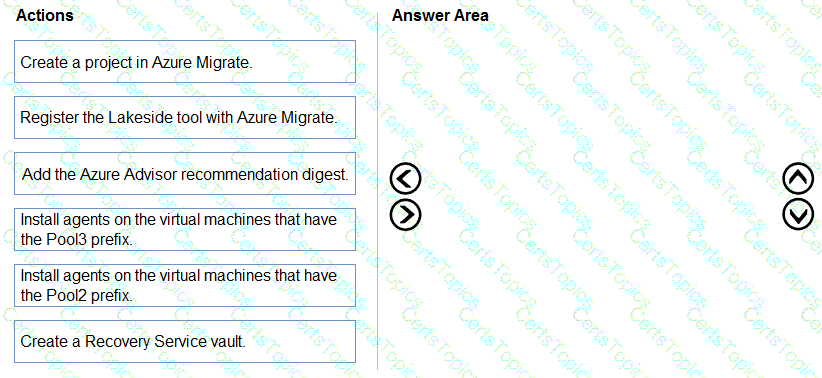
Select and Place:

You have an Azure Virtual Desktop deployment that contains a host pool named Pool1. You plan to create a Windows 10 image named Image1 to deploy new session hosts to Pool1.
You need to ensure that all the new session hosts deployed by using Image1 are onboarded to Microsoft Defender for Endpoint. What should you do?
You are automating the deployment of an Azure Virtual Desktop host pool.
You deploy the Azure Resource Manager (ARM) template shown in the following exhibit.

Use the drop-down menus to select the answer choice that completes each statement based on the information presented in the Dockerfile.
NOTE: Each correct selection is worth one point.

You have an Azure Virtual Desktop deployment that contains a host pool. The pool has the following settings:
* Resource group: RG1
* Host pool name: Pool1
* Location: East US
* Host pool type: Pooled
The deployment contains the workspaces shown in the following table.

For Pool1, you plan to create a RemoteApp application group named AppGroup1.
In which workspaces can you register AppGroup1?
You deploy an Azure Virtual Desktop session host pool.
You need to provide a group of pilot users access to the virtual machines in the pool.
What should you do?
You plan to deploy Windows Virtual Desktop session host virtual machines based on a preconfigured master image. The master image will be stored in a shared image.
You create a virtual machine named Image1 to use as the master image. You install applications and apply configuration changes to Image1.
You need to ensure that the new session host virtual machines created based on Image1 have unique names and security identifiers.
What should you do on Image1 before you add the image to the shared image gallery?
You have an Azure Virtual Desktop deployment that contains a host pool named Pool1. Pool1 contains two session hosts. Pool1 is configured as shown in the following exhibit.
Use the drop-down menus to select the answer choice that completes each statement based on the information presented in the graphic.
NOTE- Each correct selection is worth one point.


You have a Windows Virtual Desktop host pool named Pool1. Pool1 contains session hosts that use FSLogix profile containers hosted in Azure NetApp Files volumes.
You need to back up profile files by using snapshots.
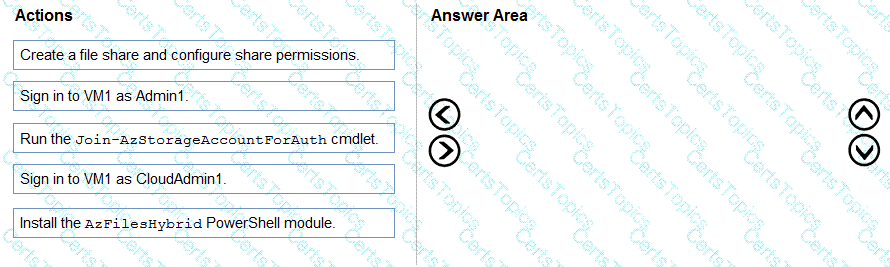
Which three actions should you perform in sequence? To answer, move the appropriate actions from the list of actions to the answer area and arrange them in the correct order.

You have an Azure Virtual Desktop deployment.
You use Hyper-V to create a virtual machine that runs Windows 11 and has the following configurations:
• Virtual machine generation: Generation 2
• Disk type: Dynamically expanding
• Disk format: VHDX
• Disk size: 2 TB
You need to prepare the virtual machine before uploading it to Azure.
Which two actions should you perform? Each correct answer presents part of the solution.
NOTE: Each correct selection is worth one point.
You have an Azure subscription that contains an Azure Virtual Desktop host pool. The host pool uses FSLogix profile containers.
You need to create a configuration file to prevent specific folders from syncing to the FSLogix profile containers when a user signs out.
How should you name the file?
You have an Azure Virtual Desktop deployment that contains a host pool named Pool1. Pool1 has the following settings:
• Host pool type: Pooled
• Load balancing algorithm: Breadth-first
• Max session limit: 5
• Start VM on connect: Yes
Pool1 contains the session hosts shown in the following table.

How many additional users must connect to Pool1 to start Host3?
You have an Azure Active Directory Domain Services (Azure AD D5) domain named contoso.com.
You have an Azure Storage account named storage1. Storage1 hosts a file share named share1 that has share and file system permissions configured. Share1 is configured to use contoso.com for authentication,
You create an Azure Virtual Desktop host pool named Pool1. Pool1 contains two session hosts that use the Windows 10 multi-session + Microsoft 365 Apps image.
You need to configure an FSLogix profile container for Pool1.
What should you do next?
You have the Azure Virtual Desktop deployment shown in the following table.

You plan to deploy a new host pool as shown in the following table.

You need to ensure that you can deploy the host pool.
What should you do?
You have an Azure Virtual Desktop deployment that contains a host pool named Pool1.
Pool1 contains a session host named Host1 that is Azure AD-joined.
You need to verify whether a Windows license is assigned to Host1.
What should you do?
You have an Azure Virtual Desktop deployment.
You have a Microsoft Entra tenant that contains the users shown in the following table.

The users have smart devices that have the Microsoft Authenticator app installed. You create a Conditional Access policy that has the following settings:
• Name: CAPolicy1
• Assignments
o Users: Group1
o Target resources: All resources (formerly All cloud apps)
• Access controls

For each of the following statements, select Yes if the statement is true. Otherwise, select No.
NOTE: Each correct selection is worth one point.

You have an Azure subscription.
You plan to deploy an Azure Virtual Desktop solution that will contain Windows 10 multi-session hosts in a single host pool. The solution has the requirements shown in the following table.

You need to configure the session host for the host pool. The solution must minimize costs.
How many session hosts should the host pool contain, and how many vCPUs should each session host have? To answer, select the appropriate options in the answer area.
NOTE: Each correct selection is worth one point.
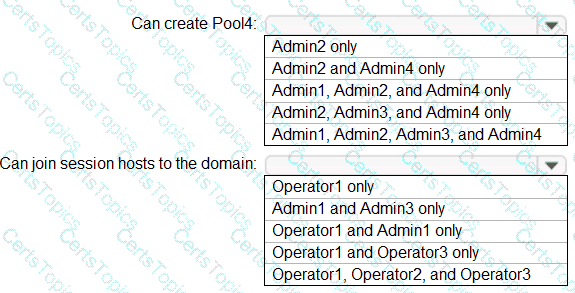
Hot Area:

You need to evaluate the RDS deployment in the Seattle office. The solution must meet the technical requirements.
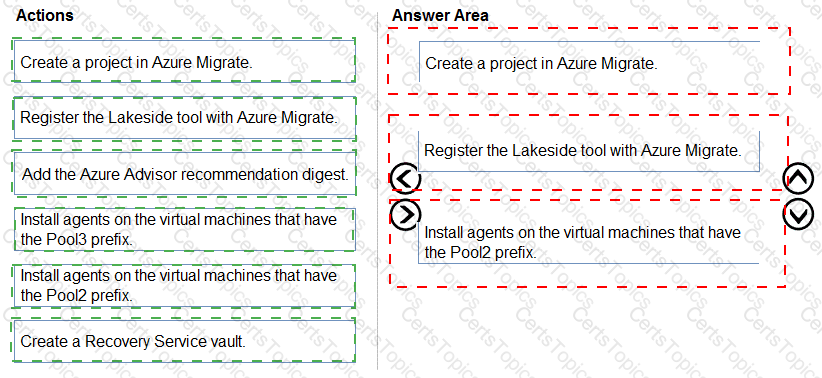
Which three actions should you perform in sequence? To answer, move the appropriate actions from the list of actions to the answer area and arrange them in the correct order.

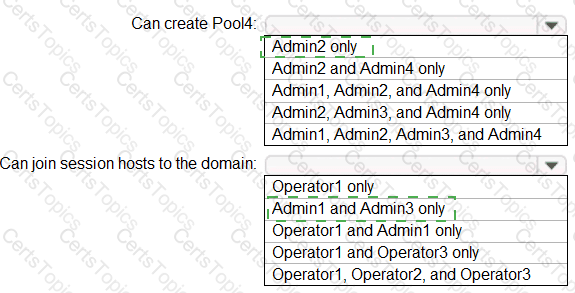
Which users can create Pool4, and which users can join session hosts to the domain? To answer, select the appropriate options in the answer area.
NOTE: Each correct selection is worth one point.
You need to configure the device redirection settings. The solution must meet the technical requirements.
Where should you configure the settings?
You need to configure the virtual machines that have the Pool1 prefix. The solution must meet the technical requirements.
What should you use?
You plan to implement the FSLogix profile containers for the Seattle office.
Which storage account should you use?
Which setting should you modify for VNET4 before you can deploy Pool4?
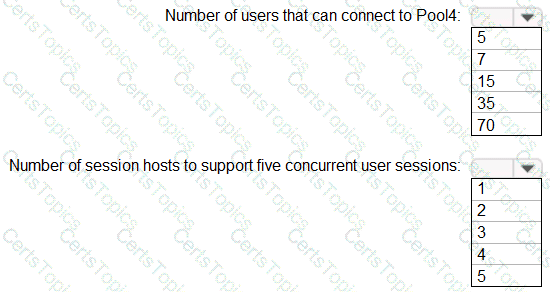
You are planning the deployment of Pool4.
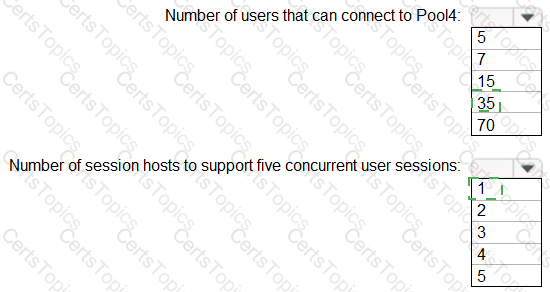
What will be the maximum number of users that can connect to Pool4, and how many session hosts are needed to support five concurrent user sessions? To answer, select the appropriate options in the answer area.
NOTE: Each correct selection is worth one point.

Which three PowerShell modules should you install on Server1 to meet the technical requirements? Each correct answer presents part of the solution.
NOTE: Each correct selection is worth one point.
Which role should you assign to Operator2 to meet the technical requirements?
Which two actions should you perform to meet the security requirements for Defender for Endpoint? Each correct answer presents a complete solution.
NOTE: Each correct selection is worth one point.
What should you do to ensure that the session hosts meet the application requirements for App1?
What should you configure to meet the networking requirements?
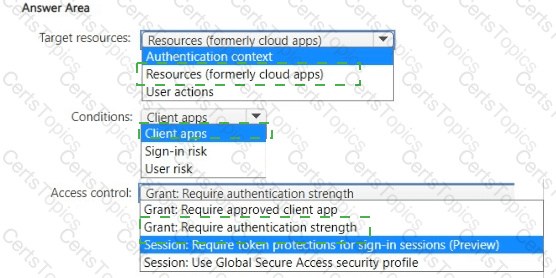
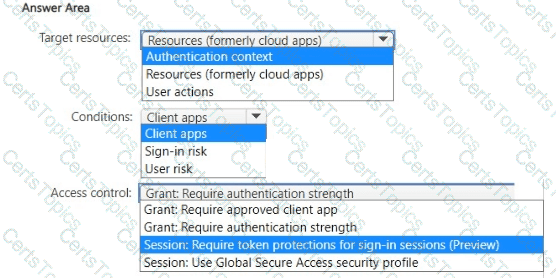
You need to create a Conditional Access policy to meet the security require-ments.
How should you configure the policy? To answer, select the appropriate options in the answer area.
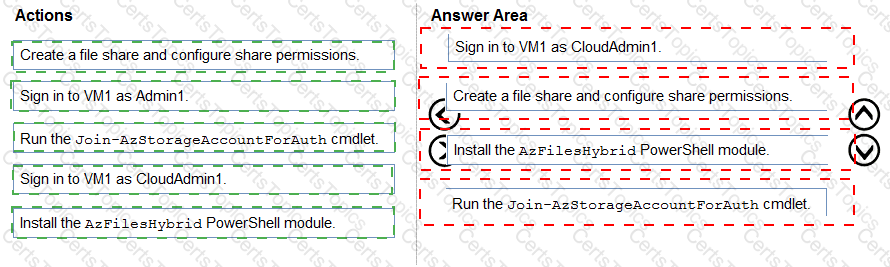
What should you do to meet the user profile requirements?
Which settings should you configure to meet the performance requirements?
Which host pool design and which service should you configure to meet the disaster recovery requirements? To answer, drag the appropriate solution to the correct requirements. Each solution may be used once, more than once, or not at all. You may need to drag the split bar between panes or scroll to view content
NOTE: Each correct selection is worth one point.

You need to prepare the disk on VM1 for use with the Azure Virtual Desktop deployment. Which two actions should you perform? Each correct answer presents part of the solution. NOTE: Each correct selection is worth one point.
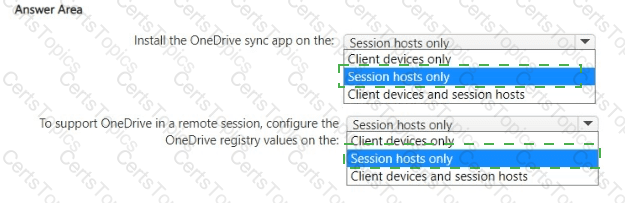
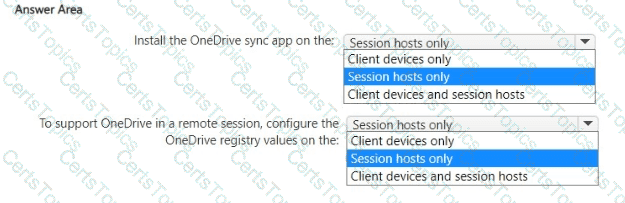
What should you do to meet the application requirements? To answer, select the appropriate options in the answer area.
NOTE: Each correct selection is worth one point.
Which monitoring solution should you configure to meet the security requirements?
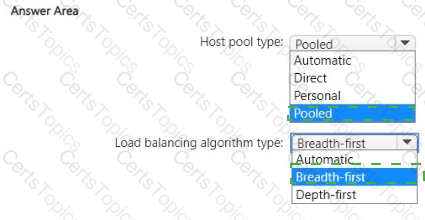
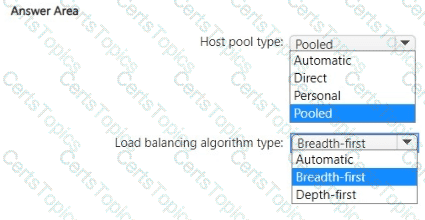
Which type of host pool and load balancing algorithm should you configure to meet the performance requirements? To answer, select the appropriate options in The answer area.
NOTE: Each correct selection is worth one point.
You need to recommend an authentication solution that meets the performance requirements.
Which two actions should you include in the recommendation? Each correct answer presents part of the solution.
NOTE: Each correct selection is worth one point.
You need to modify the custom virtual machine images to meet the deployment requirements.
What should you install?
You need to configure the user settings of Admin1 to meet the user profile requirements.
What should you do?