You have an Azure Virtual Desktop deployment that contains a host pool named Pool1. You plan to create a Windows 10 image named Image1 to deploy new session hosts to Pool1.
You need to ensure that all the new session hosts deployed by using Image1 are onboarded to Microsoft Defender for Endpoint. What should you do?
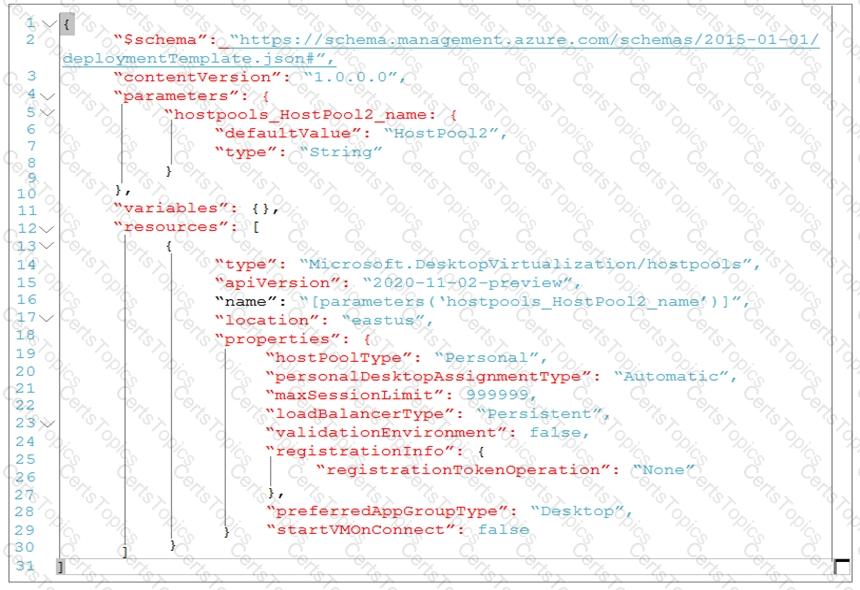
You are automating the deployment of an Azure Virtual Desktop host pool.
You deploy the Azure Resource Manager (ARM) template shown in the following exhibit.
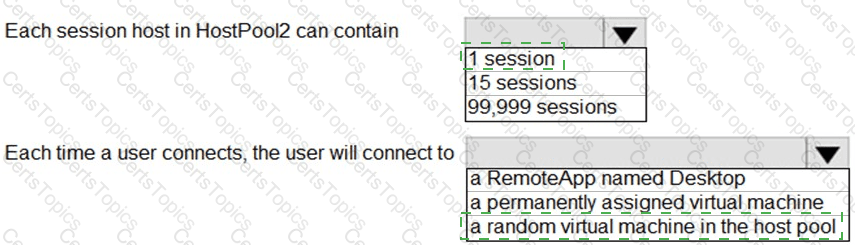
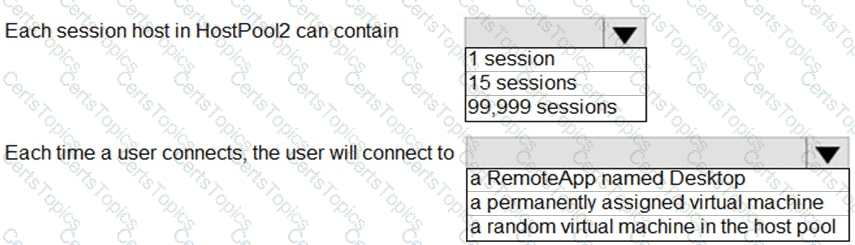
Use the drop-down menus to select the answer choice that completes each statement based on the information presented in the Dockerfile.
NOTE: Each correct selection is worth one point.
You have an Azure Virtual Desktop deployment that contains a host pool. The pool has the following settings:
* Resource group: RG1
* Host pool name: Pool1
* Location: East US
* Host pool type: Pooled
The deployment contains the workspaces shown in the following table.
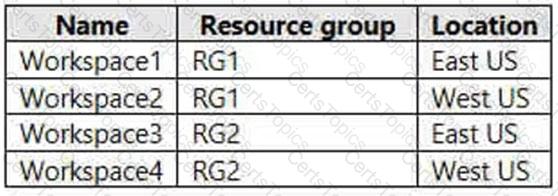
For Pool1, you plan to create a RemoteApp application group named AppGroup1.
In which workspaces can you register AppGroup1?
You deploy an Azure Virtual Desktop session host pool.
You need to provide a group of pilot users access to the virtual machines in the pool.
What should you do?
Copyright © 2021-2026 CertsTopics. All Rights Reserved