
You have an Azure subscription that contains an Azure Virtual Desktop host pool. The host pool uses FSLogix profile containers.
You need to create a configuration file to prevent specific folders from syncing to the FSLogix profile containers when a user signs out.
How should you name the file?
You have an Azure Virtual Desktop deployment that contains a host pool named Pool1. Pool1 has the following settings:
• Host pool type: Pooled
• Load balancing algorithm: Breadth-first
• Max session limit: 5
• Start VM on connect: Yes
Pool1 contains the session hosts shown in the following table.
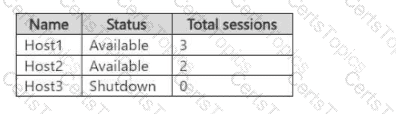
How many additional users must connect to Pool1 to start Host3?
You have an Azure Active Directory Domain Services (Azure AD D5) domain named contoso.com.
You have an Azure Storage account named storage1. Storage1 hosts a file share named share1 that has share and file system permissions configured. Share1 is configured to use contoso.com for authentication,
You create an Azure Virtual Desktop host pool named Pool1. Pool1 contains two session hosts that use the Windows 10 multi-session + Microsoft 365 Apps image.
You need to configure an FSLogix profile container for Pool1.
What should you do next?
You have the Azure Virtual Desktop deployment shown in the following table.
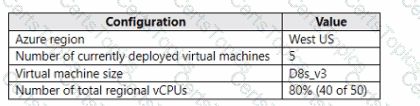
You plan to deploy a new host pool as shown in the following table.
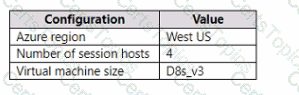
You need to ensure that you can deploy the host pool.
What should you do?
Copyright © 2021-2026 CertsTopics. All Rights Reserved
