
Spring Sale 70% Discount Offer - Ends in 0d 00h 00m 00s - Coupon code: save70

F5 F5CAB1 Exam With Confidence Using Practice Dumps

Exam Code:
F5CAB1
Exam Name:
BIG-IP Administration Install, Initial Configuration, and Upgrade
Certification:
Vendor:
Questions:
46
Last Updated:
Apr 3, 2026
Exam Status:
Stable
F5 F5CAB1

F5CAB1: F5-CA Exam 2025 Study Guide Pdf and Test Engine

Are you worried about passing the F5 F5CAB1 (BIG-IP Administration Install, Initial Configuration, and Upgrade) exam? Download the most recent F5 F5CAB1 braindumps with answers that are 100% real. After downloading the F5 F5CAB1 exam dumps training , you can receive 99 days of free updates, making this website one of the best options to save additional money. In order to help you prepare for the F5 F5CAB1 exam questions and verified answers by IT certified experts, CertsTopics has put together a complete collection of dumps questions and answers. To help you prepare and pass the F5 F5CAB1 exam on your first attempt, we have compiled actual exam questions and their answers. 

Our (BIG-IP Administration Install, Initial Configuration, and Upgrade) Study Materials are designed to meet the needs of thousands of candidates globally. A free sample of the CompTIA F5CAB1 test is available at CertsTopics. Before purchasing it, you can also see the F5 F5CAB1 practice exam demo.

BIG-IP Administration Install, Initial Configuration, and Upgrade Questions and Answers

Question 1

An administrator is in the process of reactivating the license using the interface displayed in the exhibit.

What is the address of the license server to which the BIG-IP device must be able to establish an outbound connection in order to use theAutomatic Activation Method?

Options:

A.

license.f5.com

B.

callhome.f5.com

C.

ask.f5.com

D.

activate.f5.com

Buy Now
Question 2

Which configuration file can a BIG-IP administrator use to verify theprovisioned modules?

Options:

A.

/config/bigip.license

B.

/config/bigip_base.conf

C.

/config/bigip.conf

D.

/var/local/ucs/config.ucs

Question 3

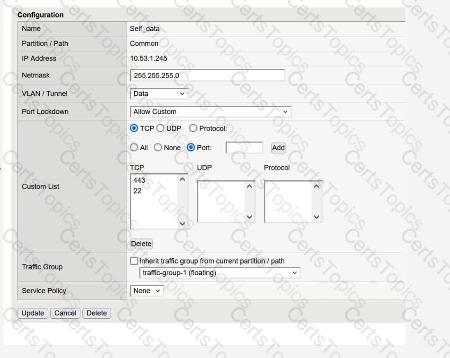
What will setting a Self IP to“Allow None”for Port Lockdown do?

Options:

A.

Block HA communications, causing the systems to report their peer as offline and go active-active.

B.

Block HA communications, causing the systems to report their peer as online ready.

C.

Default allow port 1026 access between peer devices and traffic processing across the network failover.