New Year Sale 70% Discount Offer - Ends in 0d 00h 00m 00s - Coupon code: save70

Free and Premium F5 F5CAB1 Dumps Questions Answers

Page: 1 / 3
Total 46 questions

BIG-IP Administration Install, Initial Configuration, and Upgrade Questions and Answers

Question 1

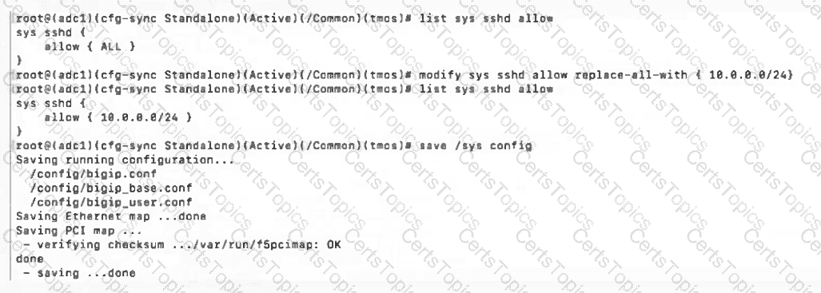
A BIG-IP Administrator discovers malicious brute-force attempts to access the BIG-IP device on themanagement interfacevia SSH.

The administrator needs to restrict SSH access to the management interface.

Where should this be accomplished?

Options:

A.

Network > Interfaces

B.

Network > Self IPs

C.

System > Configuration

D.

System > Platform

Buy Now
Question 2

An administrator is in the process of reactivating the license using the interface displayed in the exhibit.

What is the address of the license server to which the BIG-IP device must be able to establish an outbound connection in order to use theAutomatic Activation Method?

Options:

A.

license.f5.com

B.

callhome.f5.com

C.

ask.f5.com

D.

activate.f5.com

Question 3

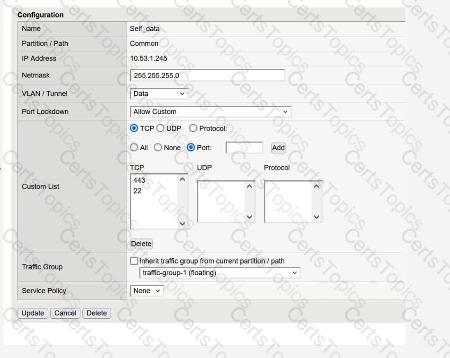
What will setting a Self IP to“Allow None”for Port Lockdown do?

Options:

A.

Block HA communications, causing the systems to report their peer as offline and go active-active.

B.

Block HA communications, causing the systems to report their peer as online ready.

C.

Default allow port 1026 access between peer devices and traffic processing across the network failover.

Question 4

A BIG-IP Administrator needs to install aHotFixon a standalone BIG-IP device.

The device currently hasHD1.1as the Active Boot Location.

The administrator has already reactivated the license and created a UCS archive.

In which sequence should the administrator perform theremaining steps?

Options:

A.

Install HotFix in HD1.2, Install base Image in HD1.2, Activate HD1.2

B.

Install HotFix in HD1.1, Reboot the BIG-IP device, Install UCS Archive

C.

Install base Image in HD1.2, Install HotFix in HD1.2, Activate HD1.2

D.

Activate HD1.2, Install base Image in HD1.2, Install HotFix in HD1.2

Question 5

The BIG-IP Administrator needs to update access to the Configuration Utility to include the172.28.31.0/24and172.28.65.0/24networks.

From the TMOS Shell (tmsh), which command should the BIG-IP Administrator use to complete this task?

Options:

A.

modify /sys httpd allow add { 172.28.31.0/255.255.255.0 172.28.65.0/255.255.255.0 }

B.

modify /sys httpd allow add { 172.28.31.0 172.28.65.0 }

C.

modify /sys httpd permit add { 172.28.31.0/255.255.255.0 172.28.65.0/255.255.255.0 }

Question 6

A BIG-IP Administrator needs to install a HotFix on a standalone BIG-IP device, which hasHD1.1as the Active Boot Location.

The administrator has already re-activated the license and created a UCS archive.

In which sequence should the administrator perform the remaining steps?

Options:

A.

Install HotFix in HD1.2, Install base Image in HD1.2, Activate HD1.2

B.

Install HotFix in HD1.1, Reboot the BIG-IP device, Install UCS Archive

C.

Install base Image in HD1.2, Install HotFix in HD1.2, Activate HD1.2

D.

Activate HD1.2, Install base Image in HD1.2, Install HotFix in HD1.2

Question 7

A BIG-IP Administrator upgrades the BIG-IP LTM to a newer software version. After the administrator reboots into the new volume, the configuration fails to load.

Why is the configuration failing to load?

Options:

A.

The upgrade was performed on the standby unit.

B.

The license needed to be reactivated before the upgrade.

C.

A minimum of at least two reboots is required.

D.

Connectivity to the DNS server failed to be established.

Question 8

What are the two options for securing a BIG-IP’s management interface?

(Choose two.)

Options:

A.

Limiting network access through the management interface to a trusted/secured network VLAN.

B.

Block all management-interface administrative HTTPS and SSH service ports to prevent access.

C.

Use the BIG-IP’s Self-IP addresses for administrative access rather than the management interface.

D.

Restrict administrative HTTPS and SSH access to specific IP addresses or IP ranges.

Question 9

The BIG-IP Administrator received a ticket that an authorized user is attempting to connect to the Configuration Utility from a jump host and is being denied.

The HTTPD allow list is configured as:

sys httpd {

allow { 172.28.31.0/255.255.255.0 172.28.65.0/255.255.255.0 }

}

The jump host IP is172.28.32.22.

What command should the BIG-IP Administrator use to allow HTTPD access for this jump host?

Options:

A.

modify /sys httpd allow replace-all-with { 172.28.32.22 }

B.

modify /sys httpd allow delete { 172.28.31.0/255.255.255.0 172.28.65.0/255.255.255.0 }

C.

modify /sys httpd allow add { 172.28.32.22 }

Question 10

The device is currently onv15.1.2.1.

The BIG-IP Administrator needs to boot the device back tov13.1.0.6to gather data for troubleshooting.

The system shows:

Sys::Software Status

Volume Product Version Build Active Status Allowed

HD1.1 BIG-IP 15.1.2.1 0.0.10 yes complete yes

HD1.2 BIG-IP 13.1.0.6 0.0.3 no complete yes

Which is the correct command-line sequence to boot the device to version13.1.0.6?

Options:

A.

Use tmsh to select a new boot volume, tmsh reboot HD1.2

B.

switchboot -b HD1.2, then reboot

C.

switchboot -I HD1.2, then reboot

D.

Use tmsh to select a new boot volume, tmsh switchboot HD1.2

Question 11

Which two items demonstrate thecreation of a new volumefor software images?

(Choose two.)

Options:

A.

tmsh install software image /shared/images/BIGIP-.iso volume HD1.5 create-volume

B.

tmsh install /sys software image BIGIP-.iso volume HD1.5 create-volume

C.

Using the GUI, go toSystem > Disk Management, selectNew Volume. In the pop-up window, type the name or number of the new volume and clickApply.

D.

tmsh install sys software image /shared/images/BIGIP-.iso volume HD1.5 create-volume

E.

Using the GUI, go toSystem > Software Management > Available Images > Install, and in the Install Software Image pop-up window, type the new volume name or number and clickInstall.

Question 12

Which configuration file can a BIG-IP administrator use to verify theprovisioned modules?

Options:

A.

/config/bigip.license

B.

/config/bigip_base.conf

C.

/config/bigip.conf

D.

/var/local/ucs/config.ucs

Question 13

The BIG-IP Administrator uses Secure Copy Protocol (SCP) to upload a TMOS image to the/shared/images/directory in preparation for a TMOS upgrade.

After the upload is completed, what will the system dobeforethe image is shown in the GUI under:

System » Software Management » Image List?

Options:

A.

The system performs a reboot into a new partition

B.

The system verifies the internal checksum

C.

The system copies the image to /var/local/images/

Page: 1 / 3
Total 46 questions