You are configuring a new Microsoft Sentinel workspace named Workspace1.
You have an external IT Service Management (ITSM) system that is NOT supported by any Microsoft Sentinel solutions in Azure Marketplace.
You need to ensure that Workspace1 creates service tickets in the ITSM system for all new security incidents.
What should you create?
You have an Azure key vault named KV1.
You have an Azure App Service web app named App1. App1 is integrated with a virtual network named VNet1 that is linked to an Azure Private DNS zone. App1 accesses secrets stored in KV1.
You need to configure KV1 so that:
App1 accesses the secrets by using a private IP address on VNet1.
Requests from outside VNet1 are denied.
Which two actions should you perform? sc new
An application run2 on VM1 and VM2. The application is being migrated from storage account key authentication to Microsoft Entra authentication.
You review the current configuration and identify the following:
• VM1 and VM2 each have a system-assigned managed identity.
• Each application instance requests tokens by using only the local system-assigned managed identity.
• Network access to storage 1 from VMI and VM2 is allowed.
• No Azure RBAC data roles are assigned to the managed identities on storage1.
You need to enable the application on VM1 and VM2 to read and write blob data in storage1 by using Microsoft Entra authentication without changing how the application requests tokens.
Solution: You create a private endpoint for the blob service of storage1.
Does this meet the goal?
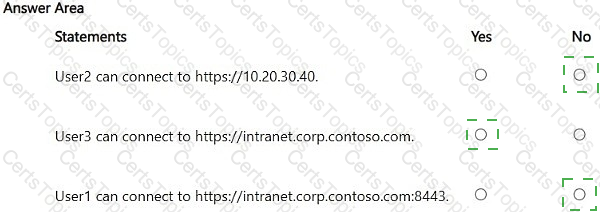
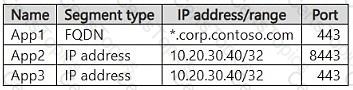
You have three on-premises apps named App1, App2, and App3 that are configured in Microsoft Entra Private Access as shown in the following table.
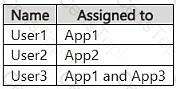
You have the users shown in the following table.
The Global Secure Access client is deployed to all user devices.
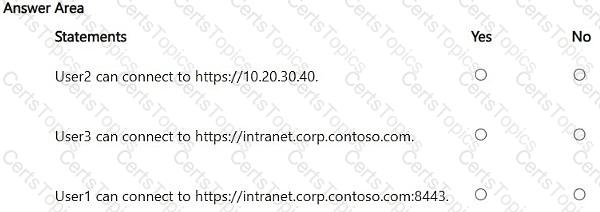
For each of the following statements, select Yes if the statement is true. Otherwise, select No.
NOTE: Each correct selection is worth one point.
Copyright © 2021-2026 CertsTopics. All Rights Reserved