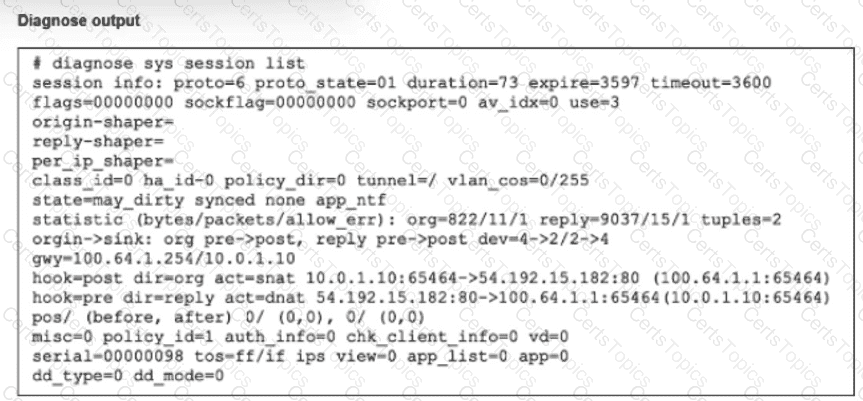
The output of the diagnose sys session list command provides the critical evidence needed to determine the behavior during a failover:
Session Synchronization (synced):
The most important indicator in the exhibit is the synced flag located in the state= line (state=may_dirty synced none app_ntf).
In FortiOS HA (High Availability), the synced flag confirms that this specific session has been successfully synchronized from the primary device to the secondary (backup) device.
Session synchronization (Session Pickup) ensures that if the primary unit fails, the secondary unit already has the session in its table and can resume traffic processing immediately.
TCP State (proto_state=01):
The output shows proto=6 (TCP) and proto_state=01.
In the FortiGate session table, proto_state=01 for TCP indicates that the session is in the ESTABLISHED state (post-three-way handshake).
This invalidates Option B, which claims the TCP session is not fully established.
Failover Outcome:
Because the session is ESTABLISHED and SYNCED, the secondary device will seamlessly take over the session upon primary failure.
The traffic continues to flow through the new primary without requiring the user/client to restart the connection. This is the primary function of HA Session Pickup.
Why other options are incorrect:
A: While the output shows app_ntf (Application Control notification) and may_dirty, the presence of the synced flag overrides this concern regarding failover. If the session type were not supported for failover (e.g., certain proxy sessions in older versions), it would not be marked as synced. Since it is synced, it persists.
B: As noted, proto_state=01 means established, not " not fully established " .
D: While the kernel updates routing tables, the purpose of syncing the session is to preserve the state so it does not need to be re-evaluated as a new packet would, preventing traffic drops.
[Reference:, FortiGate Security 7.6 Study Guide (High Availability): "If session pickup is enabled, the primary unit synchronizes its session table... to the backup unit. If the primary unit fails, the backup unit... continues to process the sessions with no interruption.", , , ]