


Halloween Sale Special - 75% Discount Offer - Ends in 0d 00h 00m 00s - Coupon code: big75certs

MB-230 Exam Dumps : Microsoft Dynamics 365 for Customer Service

PDF
MB-230 pdf
 Real Exam Questions and Answer
 Last Update: Oct 21, 2026
 Question and Answers: 369 With Explanation
 Compatible with all Devices
 Printable Format
 100% Pass Guaranteed
$23.75  $94.99
MB-230 exam
PDF + Testing Engine
MB-230 PDF + engine
 Both PDF & Practice Software
 Last Update: Oct 21, 2026
 Question and Answers: 369
 Discount Offer
 Download Free Demo
 24/7 Customer Support
$36.25  $144.99
Testing Engine
MB-230 Engine
 Desktop Based Application
 Last Update: Oct 21, 2026
 Question and Answers: 369
 Create Multiple Test Sets
 Questions Regularly Updated
  90 Days Free Updates
  Windows and Mac Compatible
$27.5  $109.99

Verified By IT Certified Experts

CertsTopics.com Certified Safe Files

Up-To-Date Exam Study Material

99.5% High Success Pass Rate

100% Accurate Answers

Instant Downloads

Exam Questions And Answers PDF

Try Demo Before You Buy

Certification Exams with Helpful Questions And Answers

Microsoft Dynamics 365 for Customer Service Questions and Answers

Question 1

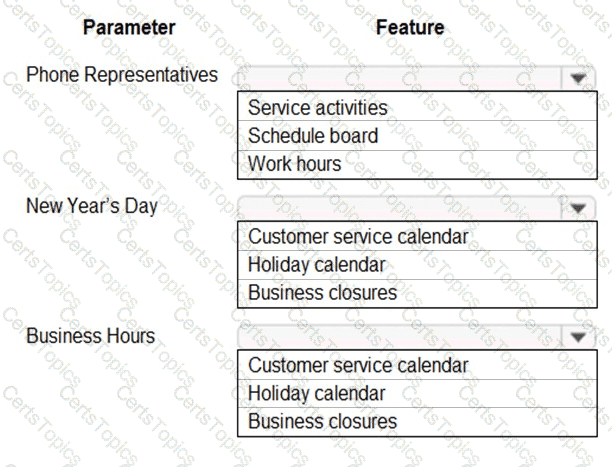
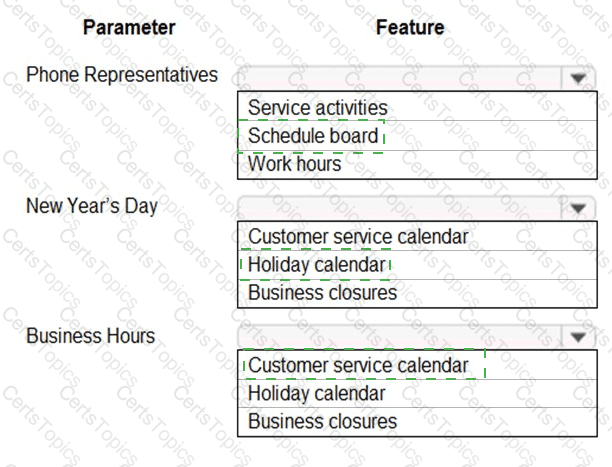
You need to select the feature for each parameter.

Which feature should you use for each parameter? To answer, select the appropriate options in the answer area.

NOTE: Each correct selection is worth one point.

Options:

Buy Now
Question 2

You need to recommend how to configure the FAQ website Knowledge Search.

Which five actions should you recommend be performed in sequence? To answer, move the appropriate actions from the list of actions to the answer area and arrange them in the correct order.

NOTE: More than one order of answer choices is correct. You will receive credit for any of the correct orders you select.

Options:

Question 3

You need to enable relevance search for the custom entity.

Which two actions should you perform? Each correct answer presents part of the solution.

NOTE: Each correct selection is worth one point.

Options:

A.

Add Quick Find to the case form.

B.

Add custom entities to Configure Relevance Search in Customizations and Entities.

C.

Add Knowledge Base Search control to the forms case.

D.

Enable Relevance Search in System Settings.