You need to meet the retention requirement for the users ' Microsoft 365 data.
What is the minimum number of retention policies required to achieve the goal?
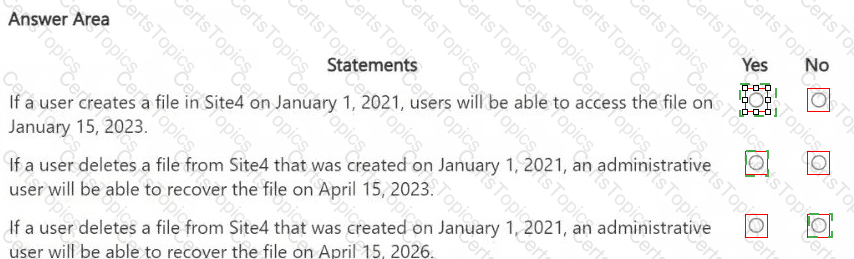
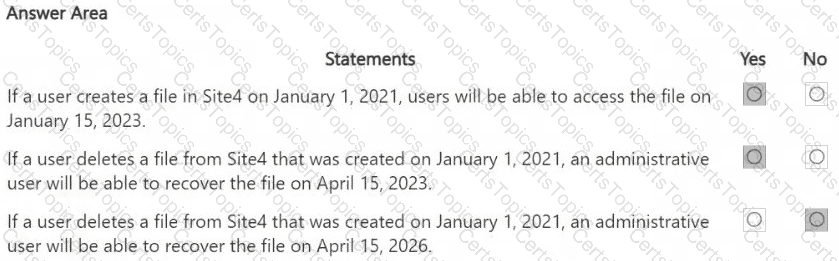
HOTSPOT
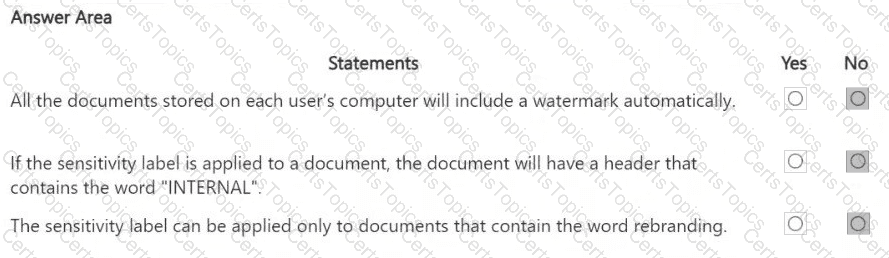
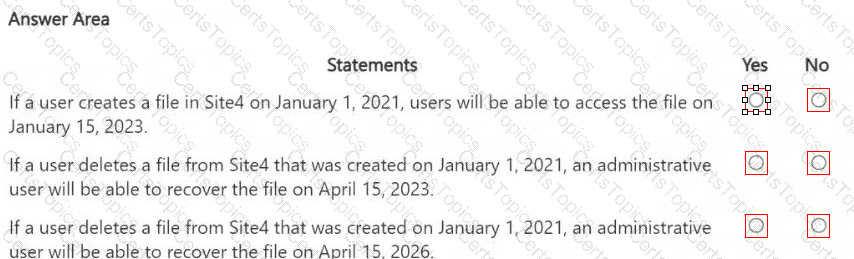
You are reviewing policies for the SharePoint Online environment.
For each of the following statements, select Yes if the statement is true. Otherwise, select No.
NOTE: Each correct selection is worth one point.
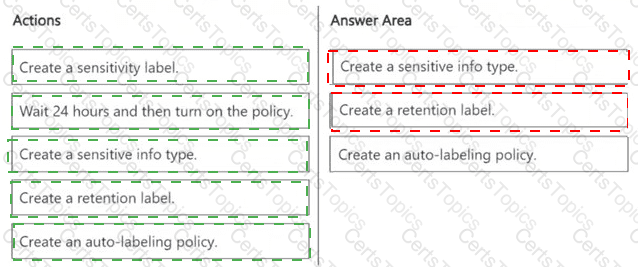
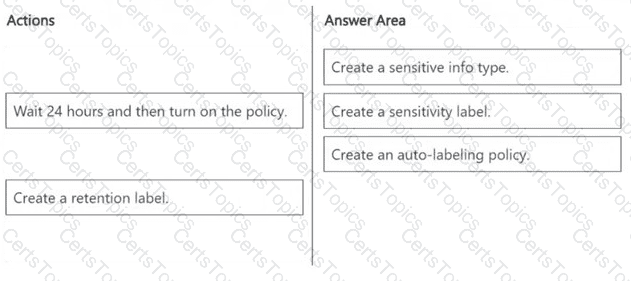
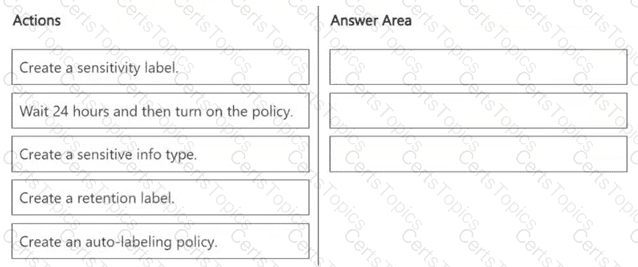
You need to meet the technical requirements for the Site1 documents.
Which three actions should you perform in sequence? To answer, move the appropriate actions from the list of actions to the answer area and arrange them in the correct order.
HOTSPOT
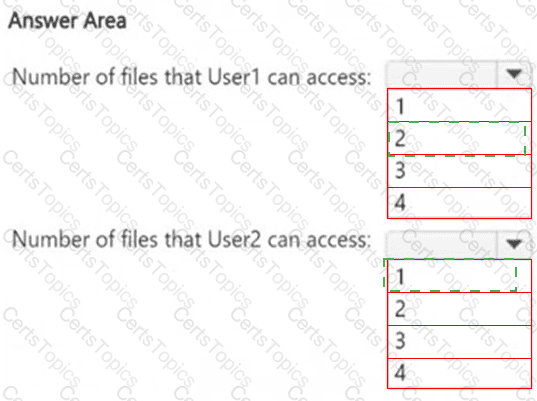
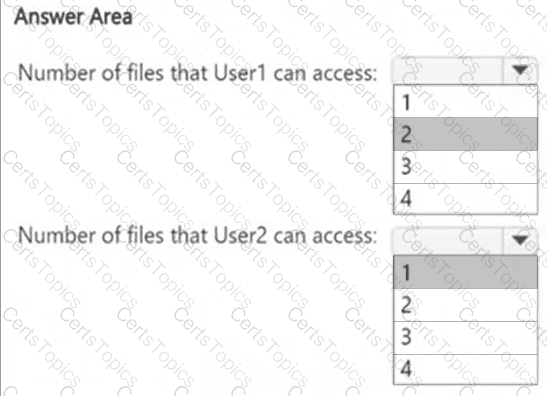
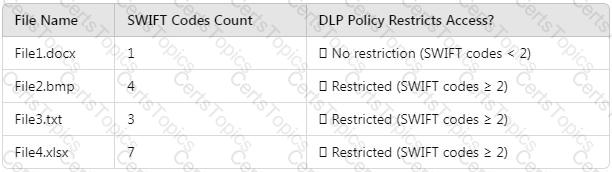
How many files in Site2 can User1 and User2 access after you turn on DLPpolicy1? To answer, select the appropriate options in the answer area.
NOTE: Each correct selection is worth one point.
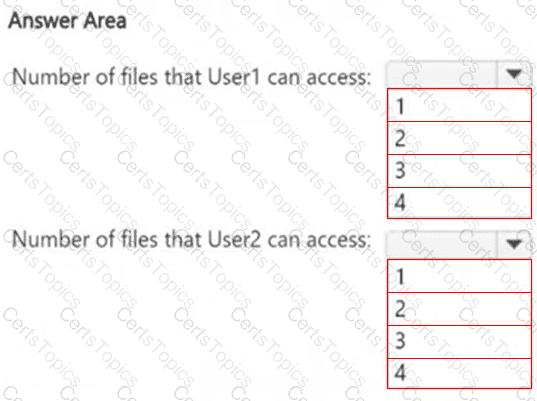
HOTSPOT
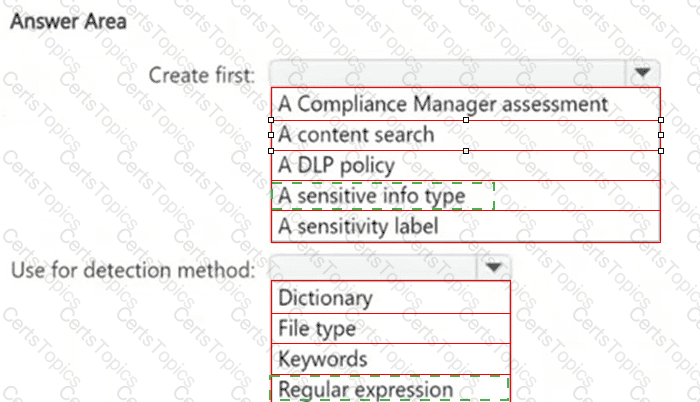
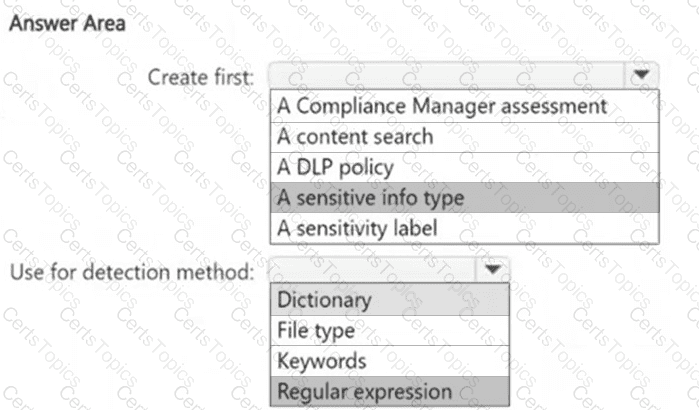
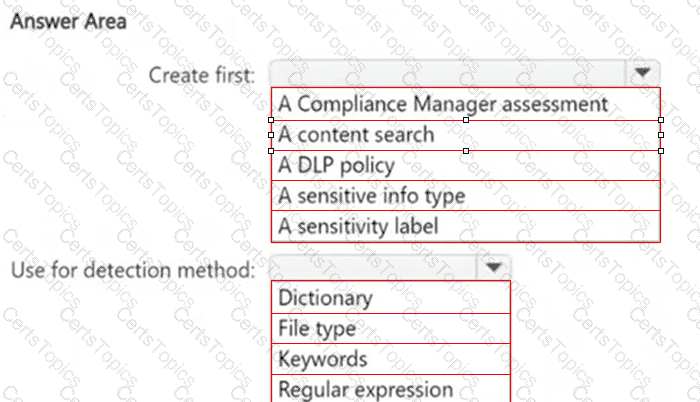
You need to meet the technical requirements for the confidential documents.
What should you create first, and what should you use for the detection method? To answer, select the appropriate options in the answer area.
NOTE: Each correct selection is worth one point.
You need to meet the technical requirements for the creation of the sensitivity labels.
To which user or users must you assign the Sensitivity Label Administrator role?
You have a Microsoft 365 E5 subscription.
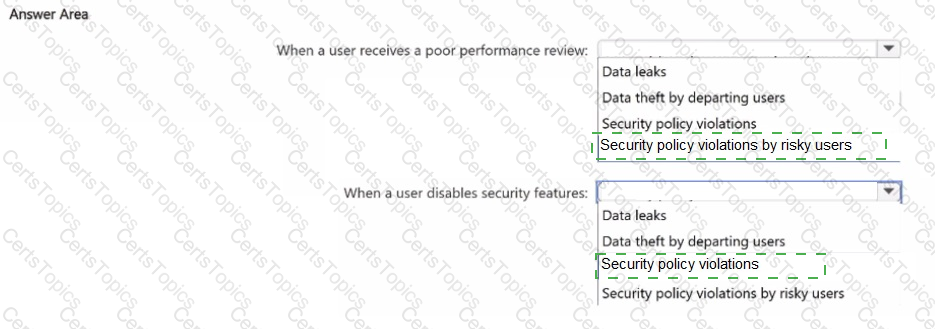
You plan to implement Microsoft Purview insider risk management.
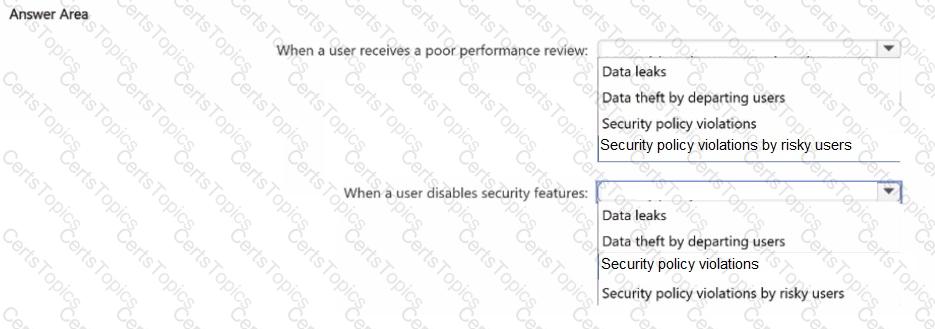
You need to recommend policy templates that meet the following requirements:
• Contain risk indicators and scoring for when a user receives a poor performance review
• Contain risk indicators and scoring for when a user disables security features on a device.
Which template should you use for each requirement? To answer, select the appropriate options in the answer area.
NOTE: Each correct selection is worth one point.
You have a Microsoft 365 ES subscription.
A security manager receives an email message every time a data loss prevention (DIP) policy match occurs. You need to limit alert notifications to actionable DLP events. What should you do?
You have a Microsoft 365 subscription.
You have a user named User1 Several users have full access to the mailbox of User1.
Some email messages sent to User 1 appeal to have been read and deleted before the user viewed them
When you search the audit log in the Microsoft Purview portal to identify who signed in to the mailbox of User l. the results are blank.
You need to ensure that you can view future sign-ins to the mailbox of User1.
Solution: You run the Set-AuditConfig -Workload Exchange command.
Does that meet the goal?
You have Microsoft 365 E5 subscription that uses data loss prevention (DLP) to protect sensitive information.
You have a document named Form.docx.
You plan to use PowerShell to create a document fingerprint based on Form.docx.
You need to first connect to the subscription.
Which cmdlet should you run?
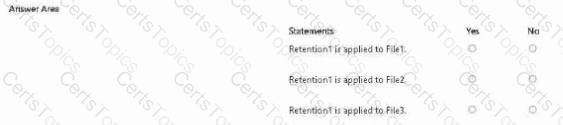
You have a Microsoft 365 subscription that has a retention label named Retention1. The subscription contains the files shown in the following table.
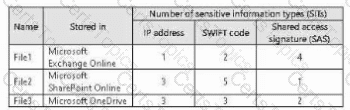
You create an auto-labeling policy named Policy1 that will automatically apply Retention1 as shown in the Auto-labeling policy
Exhibit. (Click the Auto-labeling policy tab.)
You configure Policy1 to apply Retention1 as shown in the Locations exhibit. (Click the Locations tab.)
For each of the following statements, select Yes if the statement is true. Otherwise, select No.
NOTE: Each correct selection is worth one point.
You are planning a data loss prevention (DLP) solution that will apply to Windows Client computers.
You need to ensure that when users attempt to copy a file that contains sensitive information to a USB storage device, the following requirements are met:
● If the users are members of a group named Group1, the users must be allowed to copy the file, and an event must be recorded in the audit log.
● All other users must be blocked from copying the file.
What should you create?
Nate: This question is part of a series of questions that present the same scenario. Each question in the series contains a unique
solution that might meet the stated goals. Some question sets might have more than one correct solution, while others might
not have a correct solution.
After you answer a question in this section, you will NOT be able to return to it. As a result, these questions will not appear in the
review screen.
You implement Microsoft 365 Endpoint data loss prevention (Endpoint DLP).
You have computers that run Windows 11 and have Microsoft 365 Apps installed. The computers are joined to a Microsoft Entra tenant.
You need to ensure that Endpoint DLP policies can protect content on the computers.
Solution: You onboard the computers to Microsoft Defender for Endpoint.
Does this meet the goal?
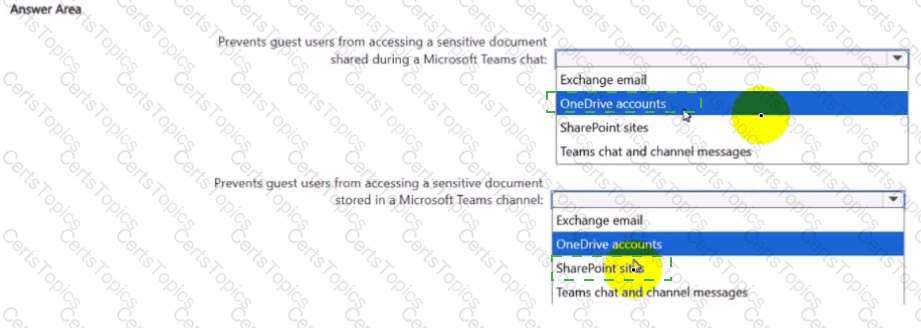
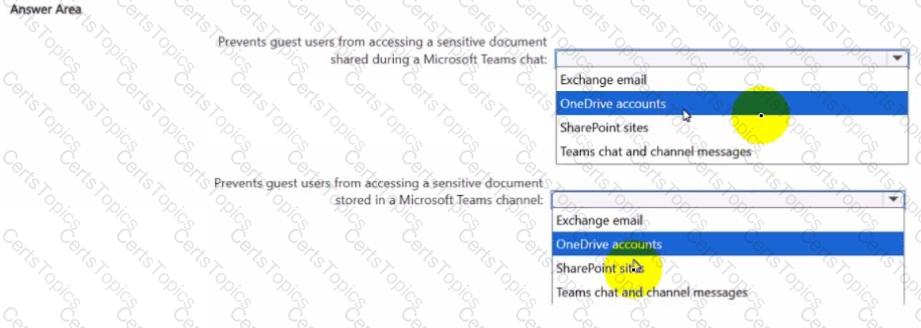
You create a data loss prevention (DIP) policy that meets the following requirements:
• Prevents guest users from accessing a sensitive document shared during a Microsoft Teams chat
• Prevents guest users from accessing a sensitive document stored in a Microsoft Team? channel
Which location should you select for each requirement? To answer, select the appropriate options in the answer area NOTE: Each correct selection is worth one point.
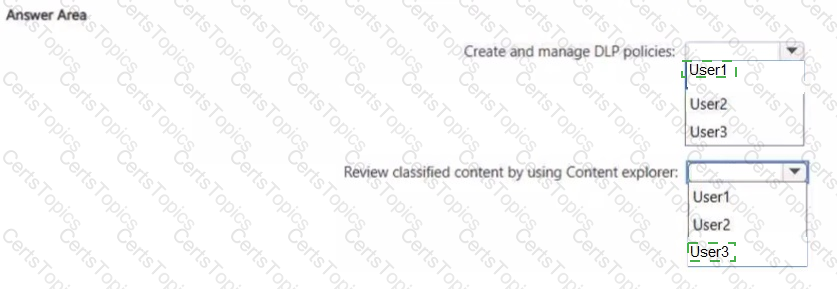
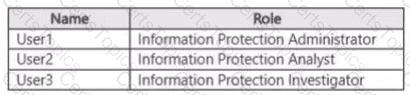
You have a Microsoft 365 E5 subscription that contains the users shown in the following table.
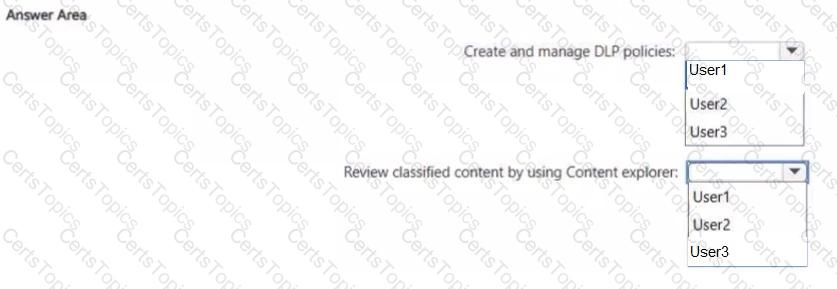
You need to delegate the following tasks:
• Create and manage data loss prevention (DIP) policies.
• Review classified content by using Content explorer.
The solution must use the principle of least privilege.
Which user should perform each task? To answer, select the appropriate options in the answer area.
NOTE: Each correct selection is worth one point.
You need to be alerted when users share sensitive documents from Microsoft OneDrive to any users outside your company.
What should you do?
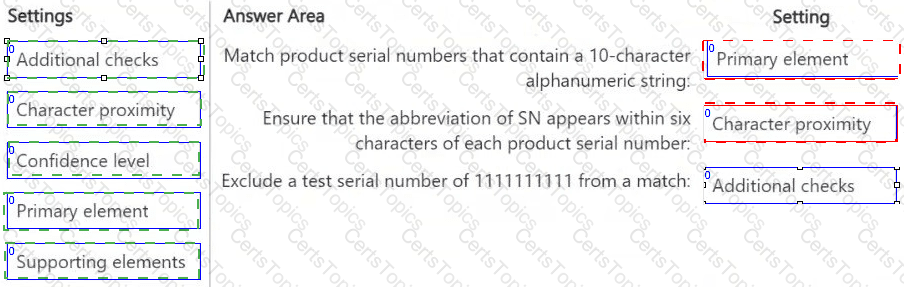
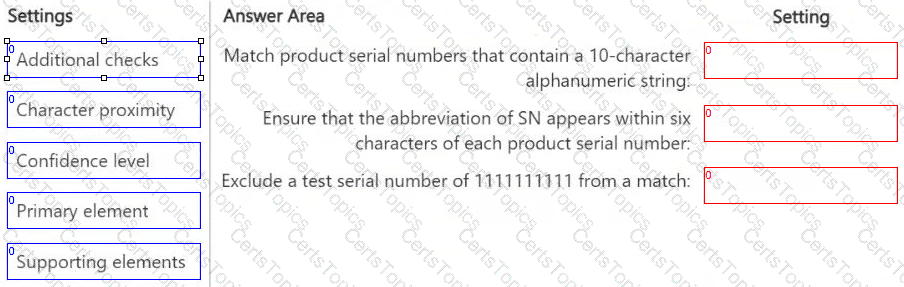
DRAG DROP
You have a Microsoft 365 E5 subscription that has data loss prevention (DLP) implemented.
You need to create a custom sensitive info type. The solution must meet the following requirements:
● Match product serial numbers that contain a 10-character alphanumeric string.
● Ensure that the abbreviation of SN appears within six characters of each product serial number.
● Exclude a test serial number of 1111111111 from a match.
Which pattern settings should you configure for each requirement? To answer, drag the appropriate settings to the correct requirements. Each setting may be used once, more than once, or not at all. You may need to drag the split bar between panes or scroll to view content.
NOTE: Each correct selection is worth one point.
You have a Microsoft 365 subscription.
You need to customize encrypted email for the subscription. The solution must meet the following requirements.
● Ensure that when an encrypted email is sent, the email includes the company logo.
● Minimize administrative effort.
Which PowerShell cmdlet should you run?
You have a Microsoft 365 E5 subscription that contains two users named User1 and User2.
On January 1, you create the sensitivity label shown in the following table.

On January 2, you publish Label1 to User1.
On January 3, User1 creates a Microsoft Word document named Doc1 and applies Label! to the document. On January 4. User2 edits Doc1.
On January 15. you increase the content expiry period for Label1to 28 days. When will access to Doc1 expire for User2?
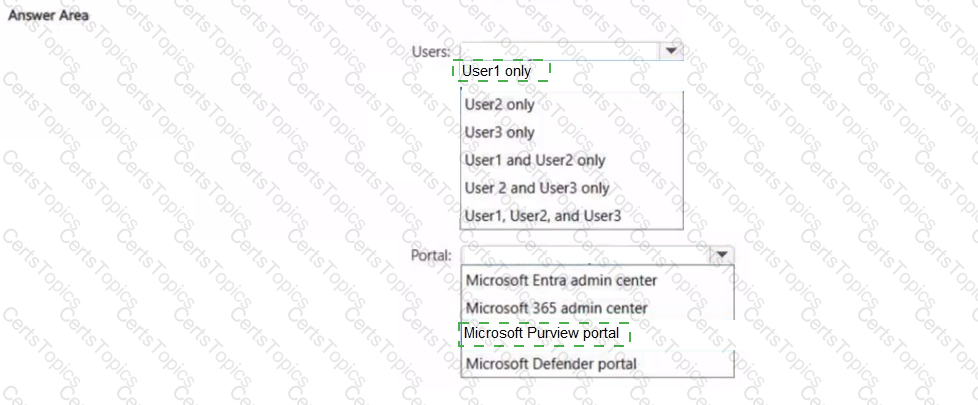
You have a Microsoft 365 E5 tenant that contains the users shown in the following table.
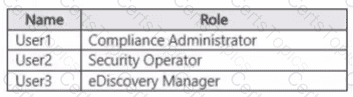
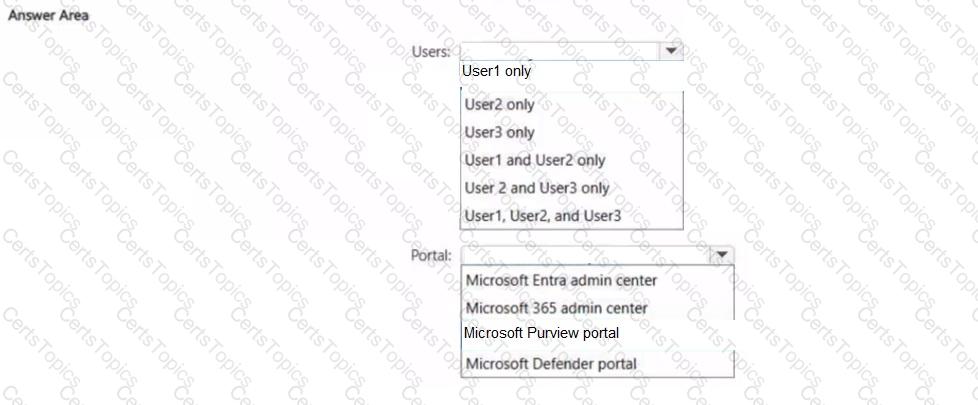
You need to implement sensitivity labels.
Which users can create sensitivity labels, and which portal should the users use? To answer, select the appropriate options in the answer area.
NOTE: Each correct selection is worth one point.
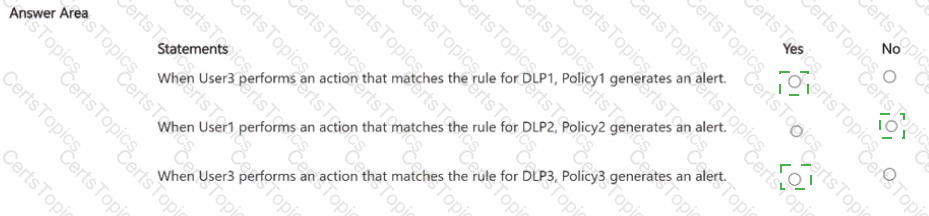
You have a Microsoft 365 E5 subscription that contains the users shown in the following table.
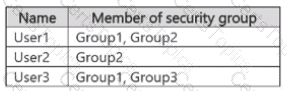
You have the data loss prevention (DLP) policies shown in the following table.

From Insider risk management, you configure a priority user group named PriGroup1 that contains User3 as a member. You have the insider risk policies shown in the following table.
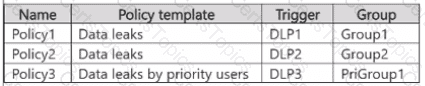
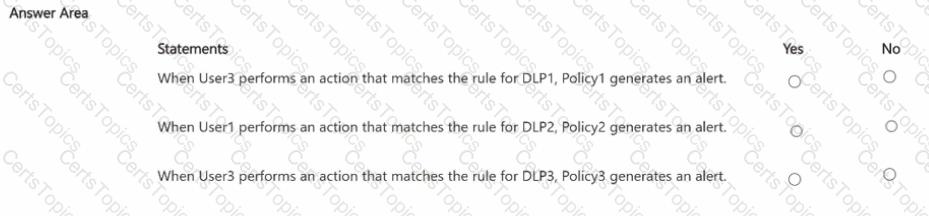
For each of the following statements, select Yes if the statement is true. Otherwise, select No.
NOTE: Each correct selection is worth one point.
You have a Microsoft 365 E5 subscription.
Users access their mailbox by using the following apps.
• Outlook for Microsoft 365
• Outlook on the web
• Outlook Mobile fiOS. Android)
You create a data loss prevention (DLP) policy named DLP1 that has the following settings:
• Location; Exchange email
• Status: On
• User notifications: On
• Notify users with a policy tip: Enabled
Which apps display a policy tip when content is matched by using DIP1 ?
You have a Microsoft 365 E5 subscription. The subscription contains a user named User1 and the sensitivity labels shown in the following table.

You publish the labels to User1.
The subscription contains the files shown in the following table.
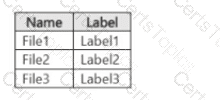
Which files can Microsoft 365 Copilot summarize for User1?
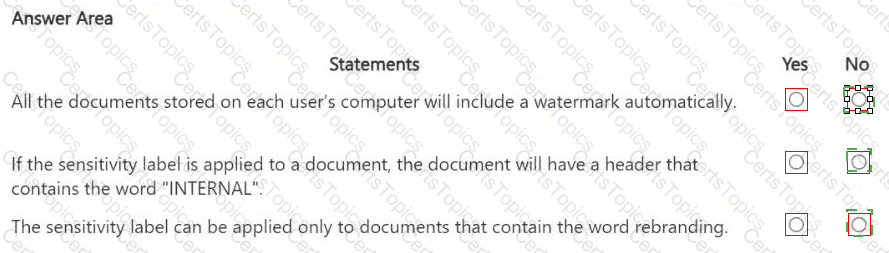
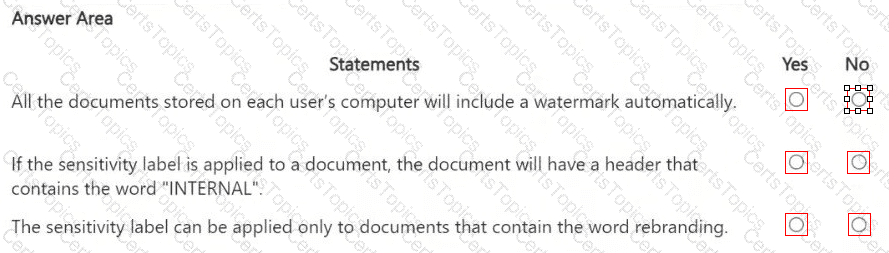
You have a Microsoft 365 sensitivity label that is published to all the users in your Microsoft Entra tenant as shown in the following exhibit.
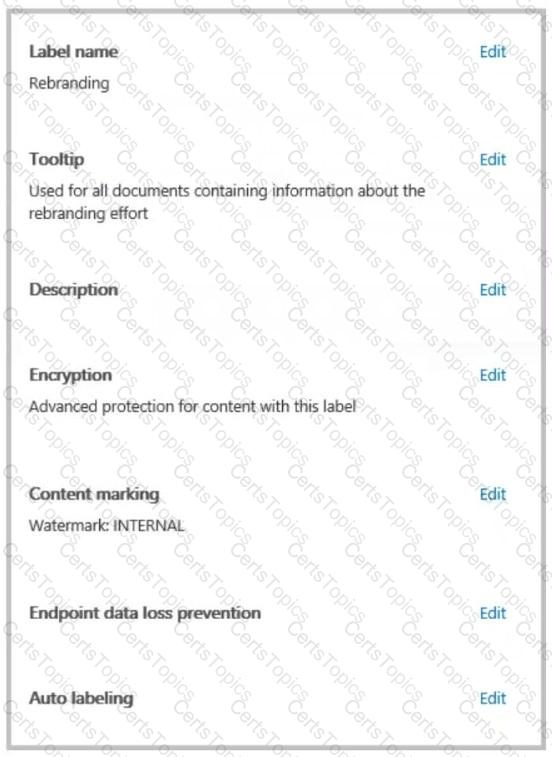
For each of the following statements, select Yes if the statement is true. Otherwise, select No.
HOTSPOT
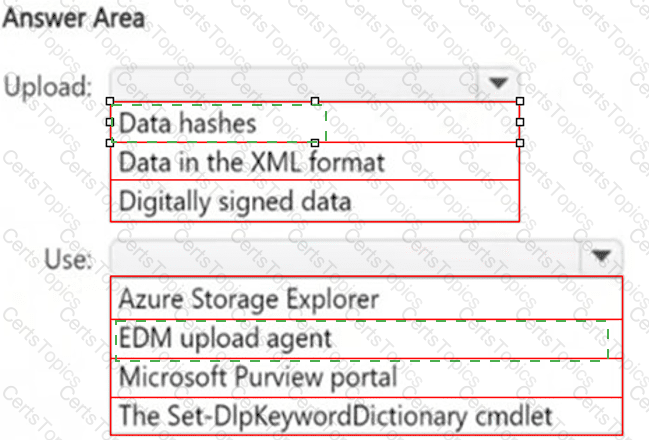
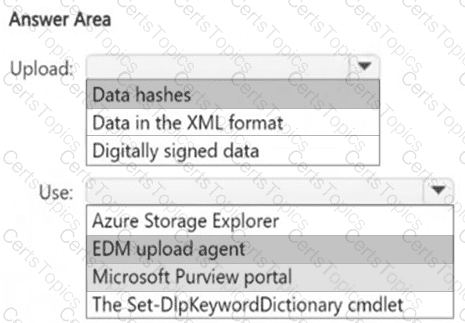
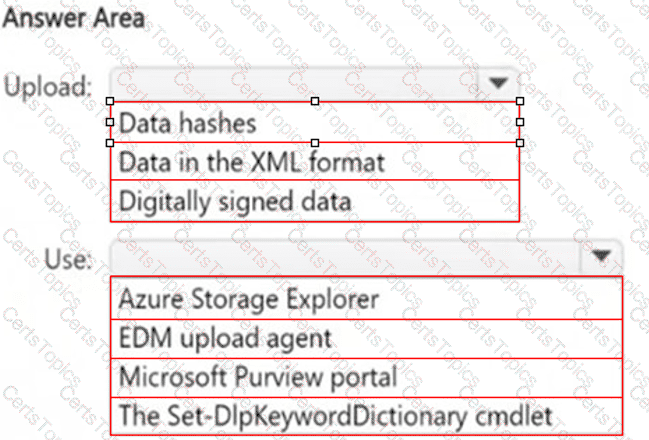
You plan to create a custom sensitive information type that will use Exact Data Match (EDM).
You need to identify what to upload to Microsoft 365, and which tool to use for the upload.
What should you identify? To answer, select the appropriate options in the answer area.
NOTE: Each correct selection is worth one point.
Note: This question is part of a series of questions that present the same scenario. Each question in the series contains a unique solution that might meet the stated goals. Some question sets might have more than one correct solution, while others might not have a correct solution.
After you answer a question in this section, you will NOT be able to return to it. As a result, these questions will not appear in the review screen.
You have a Microsoft 365 tenant and 500 computers that run Windows 11. The computers are onboarded to Microsoft Purview.
You discover that a third-party application named Tailspin_scanner.exe accessed protected sensitive information on multiple computers. Tailspin_scanner.exe is installed locally on the computers.
You need to block Tailspin_scanner.exe from accessing sensitive documents without preventing the application from accessing other documents.
Solution: From the Microsoft 365 Endpoint data loss prevention (Endpoint DLP) settings, you add a folder path to the file path exclusions.
Does this meet the goal?
You have a Microsoft 365 E5 subscription that contains a user named User1.
You deploy Microsoft Purview insider risk management.
You need ensure that insider risk management events related to User1 are visible only to specific users.
What should you create?
You have a Microsoft 36S ES subscription
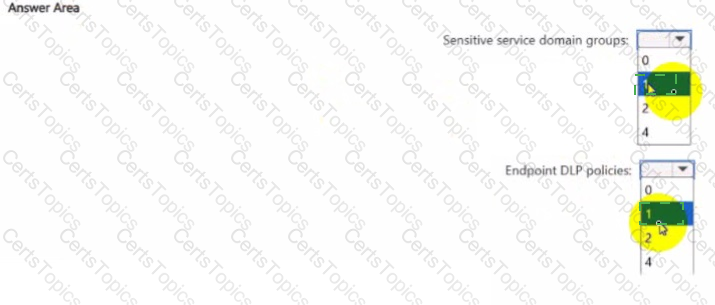
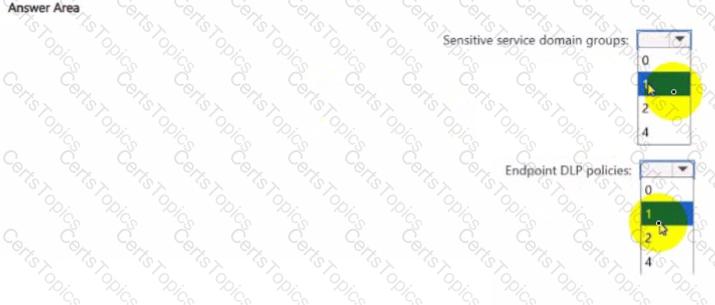
You need to implement Endpoint data loss prevention (Endpoint DLP) to meet the following requirements:
• Ensure that users can upload data to only two sites named Site1 and Site2.
• Prevent users from pasting data to two search engines named Search1 and Search2.
• Minimize the number of policies and groups.
What If the minimum number of sensitive service domain groups and Endpoint DIP policies required? To answer, select the appropriate options in the answer area.
NOTE: Each correct selection is worth one point.
You have a Microsoft 36S ES subscription
You plan to create an met data match (EDM) classifier named EDM1.
You need to grant permissions to hash and upload the sensitive ^formation source table for EDMI. What should you create first?
You have a Microsoft 36S E5 subscription that has a Microsoft Purview exact data match (EDM) classifier named EDM1.
You plan to create the Microsoft Purview policies shown in the following table.
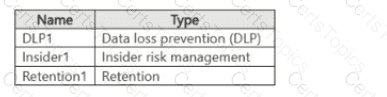
Which policies can use EDM1?
You have Microsoft 365 E5 subscription.
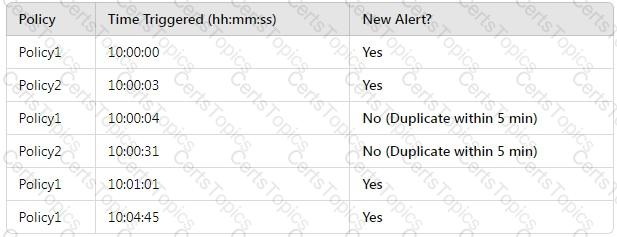
You create two alert policies named Policy1 and Policy2 that will be triggered at the times shown in the following table.
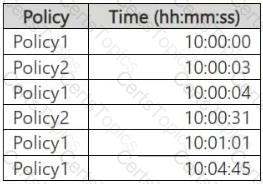
How many alerts will be added to the Microsoft Purview portal?
You have a Microsoft 365 E5 subscription that uses Microsoft Purview.
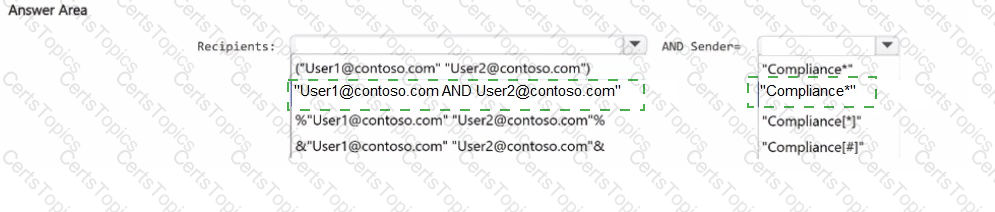
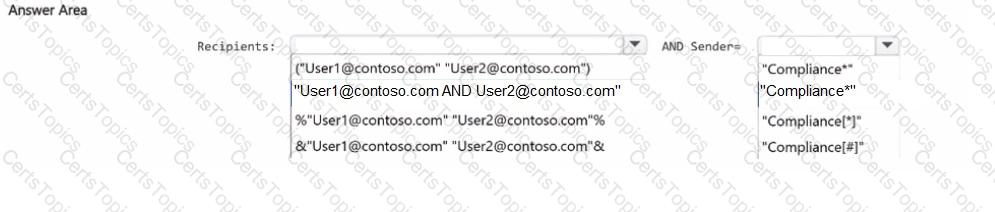
You need to perform a content search for email messages that meet the following requirements:
• Are delivered to both user1@contoso.com and user2@contoso.com
• Are sent from a user account that has a name that starts with the word Compliance
How should you complete the query in the KQL editor? To answer, select the appropriate options in the answer area.
NOTE: Each correct selection is worth one point.
You have a Microsoft 365 E5 subscription that contains a trainable classifier named Trainable1.
You plan to create the items shown in the following table.
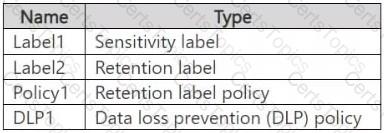
Which items can use Trainable 1?
Copyright © 2021-2026 CertsTopics. All Rights Reserved