You have a Microsoft 365 subscription.
You have a user named User1 Several users have full access to the mailbox of User1.
Some email messages sent to User 1 appeal to have been read and deleted before the user viewed them
When you search the audit log in the Microsoft Purview portal to identify who signed in to the mailbox of User l. the results are blank.
You need to ensure that you can view future sign-ins to the mailbox of User1.
Solution: You run the Set-AuditConfig -Workload Exchange command.
Does that meet the goal?
You have Microsoft 365 E5 subscription that uses data loss prevention (DLP) to protect sensitive information.
You have a document named Form.docx.
You plan to use PowerShell to create a document fingerprint based on Form.docx.
You need to first connect to the subscription.
Which cmdlet should you run?
You have a Microsoft 365 subscription that has a retention label named Retention1. The subscription contains the files shown in the following table.
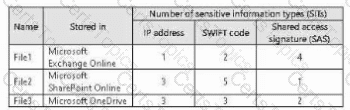
You create an auto-labeling policy named Policy1 that will automatically apply Retention1 as shown in the Auto-labeling policy
Exhibit. (Click the Auto-labeling policy tab.)
You configure Policy1 to apply Retention1 as shown in the Locations exhibit. (Click the Locations tab.)
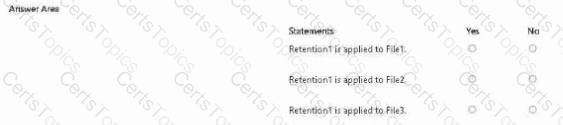
For each of the following statements, select Yes if the statement is true. Otherwise, select No.
NOTE: Each correct selection is worth one point.
You are planning a data loss prevention (DLP) solution that will apply to Windows Client computers.
You need to ensure that when users attempt to copy a file that contains sensitive information to a USB storage device, the following requirements are met:
● If the users are members of a group named Group1, the users must be allowed to copy the file, and an event must be recorded in the audit log.
● All other users must be blocked from copying the file.
What should you create?
Copyright © 2021-2026 CertsTopics. All Rights Reserved