
You are configuring a monthly schedule for an EIB integration that runs on the last day of each month.
What is the maximum end date you can use in this configuration?
You need to filter a custom report to only show workers that have been terminated after a user-prompted date.
How do you combine conditions in the filter to meet this requirement?
Refer to the following scenario to answer the question below.
You are configuring a filename sequence generator for a connector. Below are common pattern tokens for timestamps ranging from the year to the millisecond.
Define the sequence format using a combination of string constants and pattern tokens to create a unique identifier. Note the example tokens include the square brackets.
For the next sequence number: [Seq] or [seq]
Assume date of September 21, 2022, 12:35:59:123 PM. Some common tokens:
Year: [yyyy] = 2022, [yy] = 22
Month: [MMM] = Sep, [MM] = 09, [M] = 9
Day: [d] = 21, [E] = Wed, [D] = 265
Hours: [k] = 13, [h] = 1
Minutes: [m] = 35
Seconds: [s] = 59
Milliseconds: [S] = 123
What pattern will generate the hour minute second timestamp format of “4:35:15”?
Refer to the following scenario to answer the question below.
You are configuring a Core Connector: Worker integration to send data to a new external compliance and certification tracking vendor. You have begun to configure the connector with the Data Initialization Service (DIS) enabled. Your goal is to extract worker qualification data, but the vendor has three specific requirements:
The file must only include Active workers who are in the “Clinical Staff” Job Family.
The vendor has specified that for each worker’s Education data, they only want to receive the Institution Name, Institution Type and Degree.
The vendor requires a custom “License ID” that must combine the Certification Name and Issuing State, for example, “RN-CA”. A Calculated Field that provides this custom “License ID” already exists in the tenant.
The License ID calculated field is not displaying in the output however you have confirmed the calculated field exists and is functional in the tenant.
What configuration step should you complete to include this field in the output?
What is the Related Action path that allows you to reconfigure the three core components of an existing EIB?
You have successfully configured an ISU and an ISSG with the correct security policies and have assigned them to an EIB.
What task do you need to run before you can launch the EIB?
Refer to the scenario. You are configuring a Core Connector: Worker integration with the Data Initialization Service (DIS) enabled that runs once daily. The integration must extract only active worker records with changes to compensation, home address, or business title since the last run 24 hours ago, using Workday’s change detection to avoid full extracts.
During testing, an employee’s home address is updated, but the integration does not detect the change in the output. The employee is eligible, the connector uses the correct integration field attributes, and the launch parameters are properly configured for a Full-Diff extract.
What configuration task must you modify from the integration system to ensure the expected change is included in the output?
What is the relationship between the Integration System User (ISU), Integration System Security Group (ISSG), and domain security policies?
What is the purpose of granting an ISU modify access to the Integration Event domain via an ISSG?
Refer to the following scenario to answer the question below.
You need to configure a Core Connector: Candidate Outbound integration for your vendor. The connector requires the data initialization service (DIS).
The vendor needs a value on the output file which contains the average number of jobs a candidate applied to. This value is not delivered by Workday so you have identified that you will need to build a calculated field to generate this value.
What steps do you follow to output the calculated field?
What is the workflow to chain a Document Transformation system to a Connector integration for the purpose of transforming the output?
What are the two valid data source options for an Outbound EIB?
You are configuring a Core Connector: Worker integration to send data to a new external compliance and certification tracking vendor. You have begun to configure the connector with the Data Initialization Service (DIS) enabled. Your goal is to extract worker qualification data, but the vendor has three specific requirements:
The file must only include Active workers who are in the “Clinical Staff” job family.
The vendor has specified that for each worker’s Education data, they want to receive the Institution Name, Institution Type, and Degrees.
The vendor requires a custom “License ID” that must combine the Certification Name and Issuing State, for example “RN-CA”. A Calculated Field that provides this custom “License ID” already exists in the tenant.
What configuration step should you modify to ensure the integration only includes Active workers in the Clinical Staff job family?
A vendor needs an EIB that uses a custom report to output a list of new hires and their child dependent(s). You have been asked to create a calculated field that will be used to add only child dependent(s).
Which calculated field functions do you need to accomplish this?
Refer to the scenario. You are configuring a Core Connector: Worker integration to extract worker demographic and contact information. The integration uses the Data Initialization Service (DIS) and must include worker fields such as name, address, and a calculated field identifying workers eligible for a phone allowance.
During a Full File test run, the output file is missing all address-related information, even though the Address Line Data, Municipality, Region, and Postal Code fields were configured in the Configure Integration Field Attributes step. You also confirmed that the Worker Personal Data Section is marked as Include in Output.
What should you do to resolve this issue?
Refer to the following scenario to answer the question below.
You are configuring a filename sequence generator for a connector. Below are common pattern tokens for timestamps ranging from the year to the millisecond.
Define the sequence format using a combination of string constants and pattern tokens to create a unique identifier. Note the example tokens include the square brackets.
For the next sequence number: [Seq] or [seq]
Assume date of September 21, 2022, 12:35:59:123 PM. Some common tokens:
Year: [yyyy] = 2022, [yy] = 22
Month: [MMM] = Sep, [MM] = 09, [M] = 9
Day: [d] = 21, [E] = Wed, [D] = 265
Hours: [k] = 13, [h] = 1
Minutes: [m] = 35
Seconds: [s] = 59
Milliseconds: [S] = 123
What configuration would generate a filename matching the day month year format for “File-14-1-2024.xml”?
You have an existing EIB that you configured with a filename sequence generator that is associated with the EIB in the Deliver section. However, after testing the EIB, you notice that the filename is not using the configured sequence generator.
What is causing the sequence generator to not be used?
The following XML code was generated through a RaaS that will be used in an EIB.
You want to use predicated templates that will process USA workers one way, GBR workers another way, and all other countries a standard way.
What XML code will create these templates?
Refer to the following scenario to answer the question below.
You have been asked to build an integration using the Core Connector: Worker template and should leverage the Data Initialization Service (DIS). The integration will be used to export a full file (no change detection) for employees only and will include personal data. The vendor receiving the file requires marital status values to be sent using a list of codes that they have provided instead of the text values that Workday uses internally and if a text value in Workday does not align with the vendors list of codes the integration should report " OTHER " .
What configuration is required to output the list of codes required from by the vendor instead of Workday ' s values in this integration?
A vendor needs to create a Date Difference calculated field. However, the two dates needed for that calculation are on two separate business objects.
What additional calculated field do you need to create that Date Difference calculated field?
You are configuring a Core Connector integration that will send data to an external vendor. The vendor requires that the integration output file includes a unique Batch ID in its filename.
This ID must follow the format VNDR_YEARMONTH_seq.xml, where YEAR is the four-digit year, MONTH is the two-digit month, and seq is a five-digit sequence number that must reset to 00001 at the beginning of each new month.
Which settings must you configure on the integration Filename Sequence Generator to produce this Batch ID filename?
When creating an XSLT file to transform the XML output of an EIB, you must have the XSL namespace. What other namespace(s) do you need to process any part of the source XML file?
What task is needed to build a sequence generator for an EIB integration?
Refer to the following scenario to answer the question below.
You need to configure a Core Connector: Candidate Outbound integration for your vendor. The connector requires the data initialization service (DIS).
The vendor requests additional formatting of the candidate Country field. For example, if a candidate ' s country is the United States of America, the output should show USA.
What steps do you follow to meet this request?
Refer to the following scenario to answer the question below.
You are implementing a Core Connector: Worker integration to send employee data to a third-party active employee directory. The external vendor requires the following:
The Employee ' s Active Directory User Principal Name.
A mapping from Worker Type values to external worker type codes.
A specific filename format that includes a timestamp and sequence number.
You also need to ensure the document transformation occurs before the file is delivered to the endpoint. The connector ' s output must be transformed before the file is delivered to the vendor.
What step must be taken to ensure this occurs correctly?
What is the relationship between an ISU (Integration System User) and an ISSG (Integration System Security Group)?
Refer to the following XML to answer the question below.
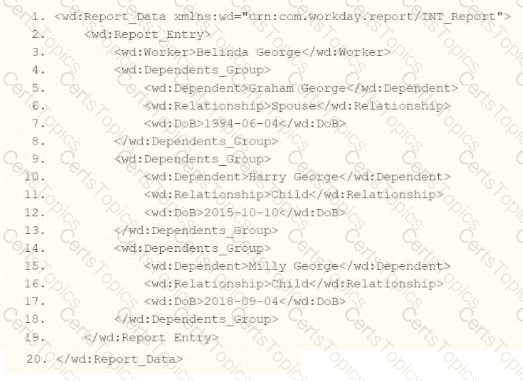
You are an integration developer and need to write XSLT to transform the output of an EIB which is using a web service enabled report to output worker data along with their dependents. You currently have a template which matches on wd:Dependents_Group to iterate over each dependent. Within the template which matches on wd:Dependents_Group you would like to output a relationship code by using an < xsl:choose > statement.
What XSLT syntax would be used to output SP when the dependent relationship is spouse, output CH when the dependent relationship is child, otherwise output OTHER?


What items must a report have for you to use it as a data source for an integration?
What is the purpose of the < xsl:template > element?
A calculated field used as a field override in a Connector is not appearing in the output. Assuming the field has a value, what could cause this to occur?
Refer to the following XML data source to answer the question below.
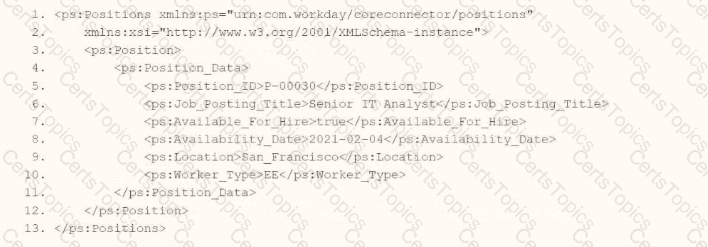
You need the integration file to format the ps:Position_ID field to 10 characters, truncate the value if it exceeds, and align everything to the left.
How will you start your template match on ps:Position to use Document Transformation (DT) to do the transformation using XTT?


You are building an outbound EIB integration that uses a custom report to send worker data to a new Active Directory system. You must create a calculated field for the User ID, which the report will output. The User ID must follow the company’s new standard format: the first three letters of the worker’s first name, followed by the first three letters of their last name, with the entire string in lowercase.
Example: A worker named “Logan McNeil” must have a User ID of “logmcn”.
Which combination of calculated fields should you use?
Copyright © 2021-2026 CertsTopics. All Rights Reserved
