
Some time ago, an EKS cluster was attached to be managed with NKP (Fleet Management). Now, a Platform Engineer has been asked to disconnect the EKS cluster from NKP for licensing reasons. After disconnecting the cluster, the developers realized that application changes are still being reflected in the EKS cluster, despite the fact that the EKS cluster was successfully detached from NKP. How should the engineer resolve this issue?
An administrator has been trying to deploy an initial AHV-based NKP cluster in a dark site (no Internet connectivity) environment using the command shown in the question.
nkp create cluster nutanix \
--cluster-name=$CLUSTER_NAME \
--control-plane-prism-element-cluster=$PE_NAME \
--worker-prism-element-cluster=$PE_NAME \
--control-plane-subnets=$SUBNET_ASSOCIATED_WITH_PE \
--worker-subnets=$SUBNET_ASSOCIATED_WITH_PE \
--control-plane-endpoint-ip=$AVAILABLE_IP_FROM_SAME_SUBNET \
--csi-storage-container=$NAME_OF_YOUR_STORAGE_CONTAINER \
--endpoint=$PC_ENDPOINT_URL \
--control-plane-vm-image=$NAME_OF_OS_IMAGE_CREATED_BY_NKP_CLI \
--worker-vm-image=$NAME_OF_OS_IMAGE_CREATED_BY_NKP_CLI \
--registry-url=${REGISTRY_URL} \
--registry-mirror-username=${REGISTRY_USERNAME} \
--registry-mirror-password=${REGISTRY_PASSWORD} \
--kubernetes-service-load-balancer-ip-range $START_IP-$END_IP \
--self-managed
Which missing attribute needs to be added in order for the deployment?
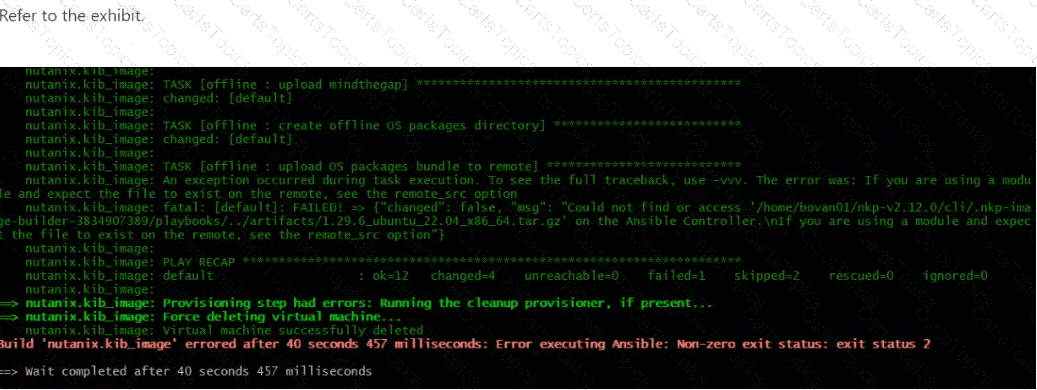
A Platform Engineer is preparing to deploy a new NKP cluster on Nutanix infrastructure into an air-gapped environment. As part of the preparation process, the engineer is supplying a Ubuntu 22.04 instance to be used for NKP cluster nodes that conforms to the corporate OS image hardening standards. However, during the NIB preparation process, the error shown in the exhibit is received.
What is the likely reason the NIB preparation attempt has failed?
In a telecom company, two teams were working on the development of two different applications:
ApplicationA
ApplicationBApplicationA’s development team was excited about the release of their new functionality. However, upon deploying their application, they noticed that performance was slow. After investigating, they discovered that the ApplicationB team was consuming the majority of the cluster’s resources, affecting all other teams. How can this problem be mitigated?
Copyright © 2021-2026 CertsTopics. All Rights Reserved
