Exact Extract: “Action: Click the edit icon to define the incident attributes and triggered attributes that this rule must generate. You must define at least one incident before you can save a rule.”
Exact Extract: “Triggered Attributes: Select the attributes from the triggering events that you want to include as columns in the Dashboard and Incidents interfaces for this event.”
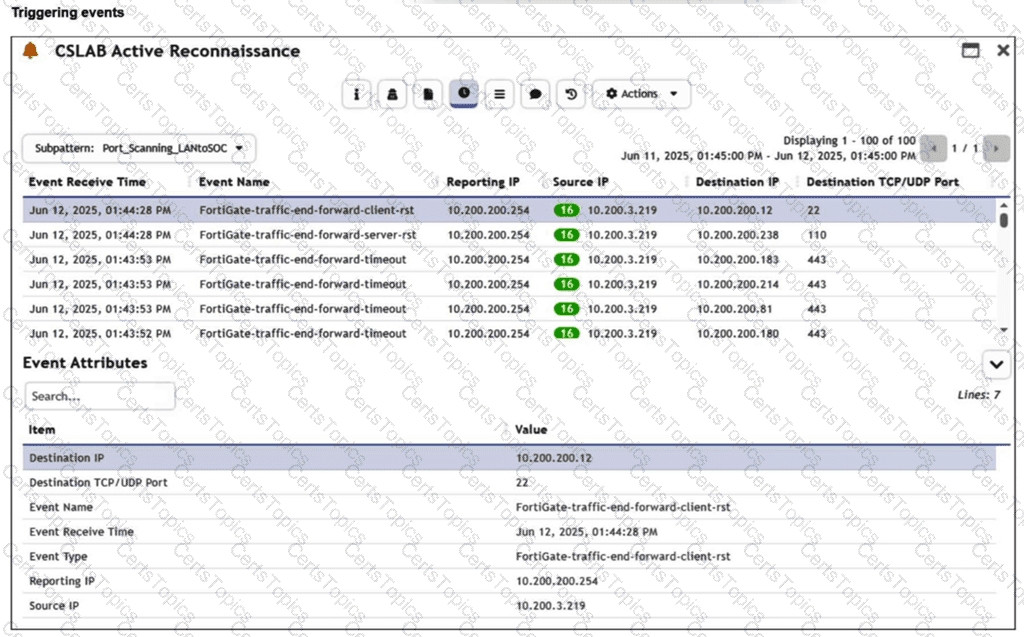
The correct answer is A . The Reporting IP column is controlled by the rule’s Triggered Attributes configuration under the Define Action / Incident Action settings. If Reporting IP is selected there, FortiSIEM includes it as a displayed incident-related column. Since the topology has only one firewall, the Reporting IP value is repetitive and provides little analytical value, so you remove it by clearing Reporting IP from the Triggered Attributes list.
Option B is wrong because correlation/grouping logic is configured in the rule condition or subpattern, not used to hide columns. Option C is reckless and incorrect; Reporting IP is a normalized event attribute and should not be removed from raw logs or parser output just to change a display column. Option D is only a display-level idea and does not address the rule-generated triggered attributes that define which event attributes are exposed for the incident.
Technical Deep Dive: FortiSIEM separates rule detection logic from incident presentation metadata. The subpattern filter and aggregate decide whether an incident triggers. The Triggered Attributes decide which matching event fields analysts see as incident columns. In this case, you do not change parsing, event normalization, or correlation. You only tune the incident action output so analysts focus on useful fields such as Source IP, Destination IP, and Destination Port. FortiGate NP/CP acceleration is irrelevant because this is FortiSIEM event presentation logic, not firewall packet forwarding or ASIC offload behavior.