
Pre-Summer Sale 70% Discount Offer - Ends in 0d 00h 00m 00s - Coupon code: save70

Changed FCSS_EFW_AD-7.6 Exam Questions

Fortinet NSE 7 - Enterprise Firewall 7.6 Administrator Questions and Answers

Question 25

Refer to the exhibits.
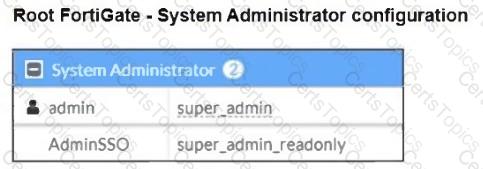
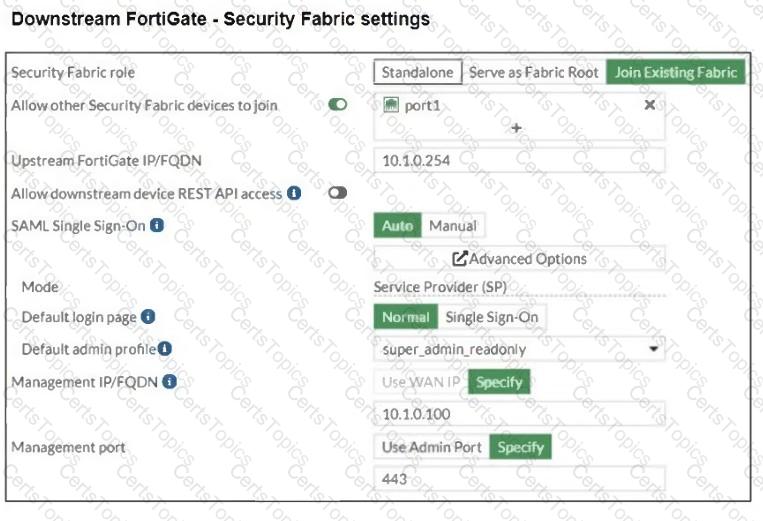
The Administrators section of a root FortiGate device and the Security Fabric Settings section of a downstream FortiGate device are shown.

When prompted to sign in with Security Fabric in the downstream FortiGate device, a user enters the AdminSSO credentials.

What is the next status for the user?

Options:

A.

The user is prompted to create an SSO administrator account for AdminSSO.

B.

The user receives an authentication failure message.

C.

The user accesses the downstream FortiGate with super_admin_readonly privileges.

D.

The user accesses the downstream FortiGate with super_admin privileges.

Question 26

Refer to the exhibit, which shows a partial enterprise network.
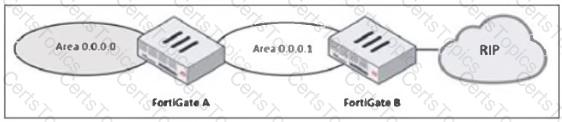
An administrator would like the area 0.0.0.0 to detect the external network.

What must the administrator configure?

Options:

A.

Enable RIP redistribution on FortiGate B.

B.

Configure a distribute-route-map-in on FortiGate B.

C.

Configure a virtual link between FortiGate A and B.

D.

Set the area 0.0.0.l type to stub on FortiGate A and B.

Question 27

Refer to the exhibit, which shows an enterprise network connected to an internet service provider.
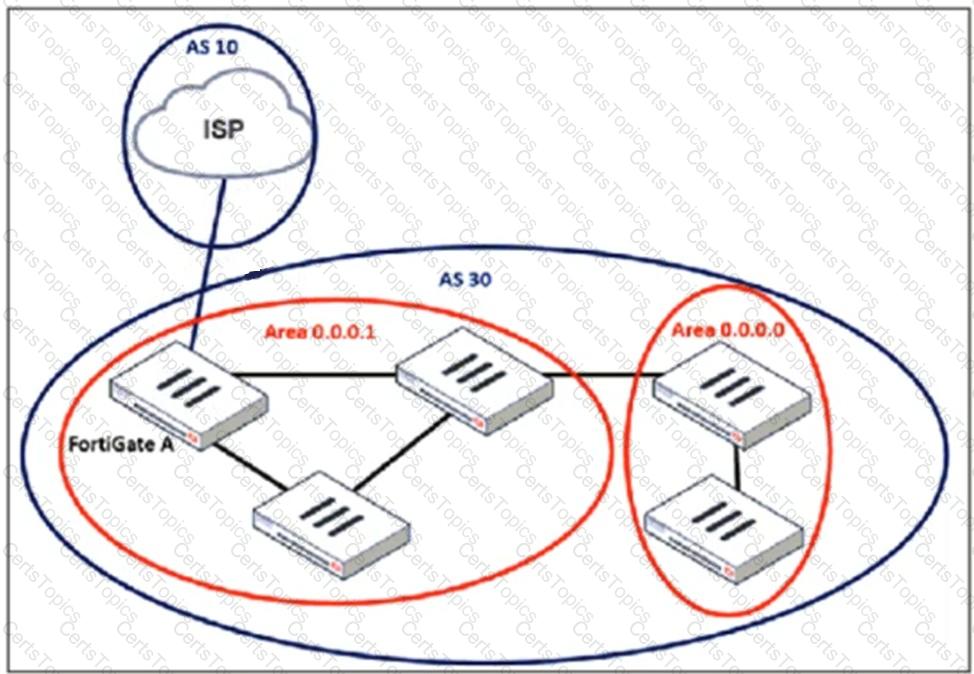
An administrator must configure a loopback as a BGP source to connect to the ISP.

Which two commands are required to establish the connection? (Choose two.)

Options:

A.

ebgp-enforce-multihop

B.

update-source

C.

ibgp-enforce-multihop

D.

recursive-next-hop

Question 28

An administrator applied a block-all IPS profile for client and server targets to secure the server, but the database team reported the application stopped working immediately after.

How can an administrator apply IPS in a way that ensures it does not disrupt existing applications in the network?

Options:

A.

Use an IPS profile with all signatures in monitor mode and verify patterns before blocking.

B.

Limit the IPS profile to server targets only to avoid blocking connections from the server to clients.

C.

Select flow mode in the IPS profile to accurately analyze application patterns.

D.

Set the IPS profile signature action to default to discard all possible false positives.
