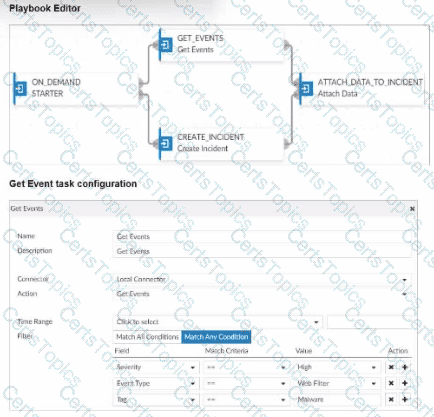
You created a playbook on FortiAnalyzer that uses a FortiOS connector.
When configuring the FortiGate side, which type of trigger must be used so that the actions in an automation stich are available in the FortiOS connector?
FortiAnalyzer Event Handler
Fabric Connector event
FortiOS Event Log
Incoming webhook
When using FortiAnalyzer to create playbooks that interact with FortiOS devices, anIncoming Webhooktrigger is required on the FortiGate side to make the actions in an automation stitch accessible through the FortiOS connector. The incoming webhook trigger allows FortiAnalyzer to initiate actions on FortiGate by sending HTTP POST requests to specified endpoints, which in turn trigger automation stitches defined on the FortiGate.
Here’s an analysis of each option:
Option A: FortiAnalyzer Event Handler
This is incorrect. The FortiAnalyzer Event Handler is used within FortiAnalyzer itself for handling log events and alerts, but it does not trigger automation stitches on FortiGate.
Option B: Fabric Connector event
This is incorrect. Fabric Connector events are related to Fortinet's Security Fabric integrations but are not specifically used to trigger FortiGate automation stitches from FortiAnalyzer.
Option C: FortiOS Event Log
This is incorrect. While FortiOS event logs can be used for monitoring, they are not designed to trigger automation stitches directly from FortiAnalyzer.
Option D: Incoming webhook
This is correct. The Incoming Webhook trigger on FortiGate enables it to receive requests fromFortiAnalyzer, allowing playbooks to activate automation stitches defined on the FortiGate device. This method is commonly used to integrate actions from FortiAnalyzer to FortiGate via the FortiOS connector.
After generating a report, you notice the information you where expecting to see is not included in it. However, you confirm that the logs are there.
Check the time frame covered by thereport.
Disable auto-cache.
Increase the report utilization quota.
Test the dataset
When a generated report does not contain the expected information even though the logs are confirmed to be present, it typically indicates anissue with the report's configuration. There are a few common reasons this might happen:
Option A - Check the Time Frame Covered by the Report:
Reports are generated based on a specific time frame. If the report’s time frame does not cover the period when the relevant logs were collected, those logs won’t appear in the report output. Verifying and adjusting the time frame is essential to ensure the report includes all relevant data.
Conclusion:Correct.
Option B - Disable Auto-Cache:
Auto-cache is designed to improve report generation speed by using cached data. Disabling auto-cache would typically only be relevant if the report is pulling outdated data from cache, but it doesn’t directly affect whether specific logs are included in a report.
Conclusion:Incorrect.
Option C - Increase the Report Utilization Quota:
The report utilization quota is related to the resource limits for generating reports. It does not directly influence whether certain data appears in a report. Increasing this quota would help only if there are resource issues preventing the report from completing, not if specific logs are missing from the report.
Conclusion:Incorrect.
Option D - Test the Dataset:
Datasets determine which logs and data fields are pulled into the report. If a dataset is configured incorrectly or does not include the required log fields, it could lead to missing information. Testing the dataset allows you to verify that it’s correctly configured and pulling the expected data.
Conclusion:Correct.
Conclusion:
Correct Answer:A. Check the time frame covered by the reportandD. Test the dataset.
These steps directly address the issues that could lead to missing information in a report when logs are available but not displayed.
(An analyst is using FortiAI on FortiAnalyzer to simplify certain tasks but is worried about exceeding the monthly token limit. Which query will take the fewest FortiAI tokens? (Choose one answer))
Show logs for 192.168.1.10 (past week)
Show all logs from the past week
Can you show me all the log entries for the endpoint 192.168.1.10?
Show logs for 192.168.1.10
Comprehensive and Detailed Explanation From Exact Extract of knowledge of FortiAnalyzer 7.6 Study guide documents:
The study guide explains that FortiAI token usage includesboth the prompt (input) and the response (output), and that “generally, more text in the query and response results in using more tokens.” It provides two comparison examples and concludes that the more verbose request for “all the log entries” consumes more tokens because it hasmore textand also triggers alarger response; whereas limiting the query to a time range (for example, “(past week)”) reduces output volume and therefore token usage.
Applying that guidance to the options:
Cis the most verbose and explicitly requests “all the log entries,” which drives higher input and output token usage.
Brequests “all logs” for the week (broad scope), which typically increases output tokens.
Dis short, but it doesnotconstrain the time range, which can increase the response size (output tokens).
Ais concise and includes a time constraint “(past week),” matching the study guide’s example of a lower-token query pattern.
As part of your analysis, you discover that a Medium severity level incident is fully remediated.
You change the incident status to Closed:Remediated.
Which statement about your update is true?
The incident can no longer be deleted.
The corresponding event will be marked as Mitigated.
The incident dashboard will be updated.
The incident severity will be lowered.
Which two statements about playbook execution are true? (Choose two)
FortiAnalyzer will not commit changes made by a Failed playbook
The Playbook Monitor provides troubleshooting logs
You can run the default debugging playbook to investigate playbook errors.
Even I the playbook status is Failed, individual tasks may have succeeded.
What are two effects of enabling auto-cache in a FortiAnalyzer report? (Choose two.)
The generation time for reports is decreased.
When new logs are received, the hard-cache data is updated automatically.
FortiAnalyzer local cache is used to store generated reports.
The size of newly generated reports is optimized to conserve disk space.
Enablingauto-cachein FortiAnalyzer reports is designed to improve the efficiency and speed of report generation by leveraging cached data. Let’s analyze each option to determine which effects are correct.
Option A - The Generation Time for Reports is Decreased:
When auto-cache is enabled, FortiAnalyzer can use previously cached data instead of reprocessing all log datafrom scratch each time a report is generated. This results in faster report generation times, especially for recurring reports that use similar datasets.
Conclusion:Correct.
Option B - Hard-Cache Data is Automatically Updated When New Logs are Received:
Enabling auto-cache does not immediately update the cache with every new log received. Instead, the cache is updated when reports are generated, based on the existing logs up to that point. Therefore, auto-cache does not constantly refresh with each incoming log, which would be inefficient.
Conclusion:Incorrect.
Option C - FortiAnalyzer Local Cache is Used to Store Generated Reports:
Auto-cache utilizes FortiAnalyzer’s local cache to store data used in reports, reducing the need to retrieve and process logs repeatedly. This cached data can be reused for subsequent report generation, enhancing performance.
Conclusion:Correct.
Option D - The Size of Newly Generated Reports is Optimized to Conserve Disk Space:
Auto-cache does not directly impact the size ofthe report files themselves. It focuses on performance optimization through cached data for faster access, but it does not compress or optimize the storage size of the generated report.
Conclusion:Incorrect.
Conclusion:
Correct Answer:A. The generation time for reports is decreasedandC. FortiAnalyzer local cache is used to store generated reports.
Enabling auto-cache helps reduce report generation time by using locally cached data and optimizes report processing, though it does not impact report size or continuously update with each new log.
Exhibit.

What can you conclude about the output?
The message ratebeing lower that the log rate is normal.
Both messages and logs are almost finished indexing.
There are more traffic logs than event logs.
The output is ADOM specific
In this output, we see two diagnostic commands executed on a FortiAnalyzer device:
diagnose fortilogd lograte: This command shows the rate at which logs are being processed by the FortiAnalyzer in terms of log entries per second.
diagnose fortilogd msgrate: This command displays the message rate, or the rate at which individual messages are being processed.
The values provided in the exhibit output show:
Log rate (lograte): Consistently high, showing values such as 70.0, 132.1, and 133.3 logs per second over different time intervals.
Message rate (msgrate): Lower values, around 1.4 to 1.6 messages per second.
Explanation
Interpretation of log rate vs. message rate: In FortiAnalyzer, the log rate typically refers to the rate of logs being stored or indexed, while the message rate refers to individual messages within these logs. Given that a single log entry can contain multiple messages, it's common to see a lower message rate relative to the log rate.
Understanding normal operation: In this case, the message rate being lower than the log rate is expected and typical behavior. This discrepancy can arise because each log entry may bundle multiple related messages, reducing the message rate relative to the log rate.
Conclusion
Correct Answer:A. The message rate being lower than the log rate is normal.
This aligns with thenormal operational behavior of FortiAnalyzer in processing logs and messages.
There is no indication that both logs and messages are nearly finished indexing, as that would typically show diminishing rates toward zero, which is not the case here. Additionally, there’s no information in this output about specific ADOMs or a comparison between traffic logs and event logs. Thus, options B, C, and D are incorrect.
Why must you wait for several minutes before you run a playbook that you just created?
FortiAnalyzer needs that time to parse the new playbook.
FortiAnalyzer needs that time to debug the new playbook.
FortiAnalyzer needs that time to back up the current playbooks.
FortiAnalyzer needs that time to ensure there are no other playbooks running.
When a new playbook is created on FortiAnalyzer, the system requires some time toparse and validatethe playbook before it can be executed. Parsing involves checking the playbook's structure, ensuring that all syntax and logic are correct, and preparing the playbook for execution within FortiAnalyzer’s automation engine. This initial parsing step is necessary for FortiAnalyzer to load the playbook into its operational environment correctly.
Here’s why the other options are incorrect:
Option A: FortiAnalyzer needs that time to parse the new playbook
This is correct. The delay is due to the parsing and setup process required to prepare the new playbook for execution. FortiAnalyzer’s automation engine checks for any issues or dependencies within the playbook, ensuring that it can run without errors.
Option B: FortiAnalyzer needs that time to debug the new playbook
This is incorrect.Debugging is not an automatic process that FortiAnalyzer undertakes after playbook creation. Debugging, if necessary, is a manual task performed by the administrator if there are issues with the playbook execution.
Option C: FortiAnalyzer needs that time to back up the current playbooks
This is incorrect. FortiAnalyzer does not automatically back up playbooks every time a new one is created. Backups of configuration and playbooks are typically scheduled as part of routine maintenance and are not triggered by playbook creation.
Option D: FortiAnalyzer needs that time to ensure there are no other playbooks running
This is incorrect. FortiAnalyzer can manage multiple playbooks running simultaneously, so it does not require waiting for other playbooks to finish before initiating a new one. The waiting time specifically relates to the parsing process of the newly created playbook.
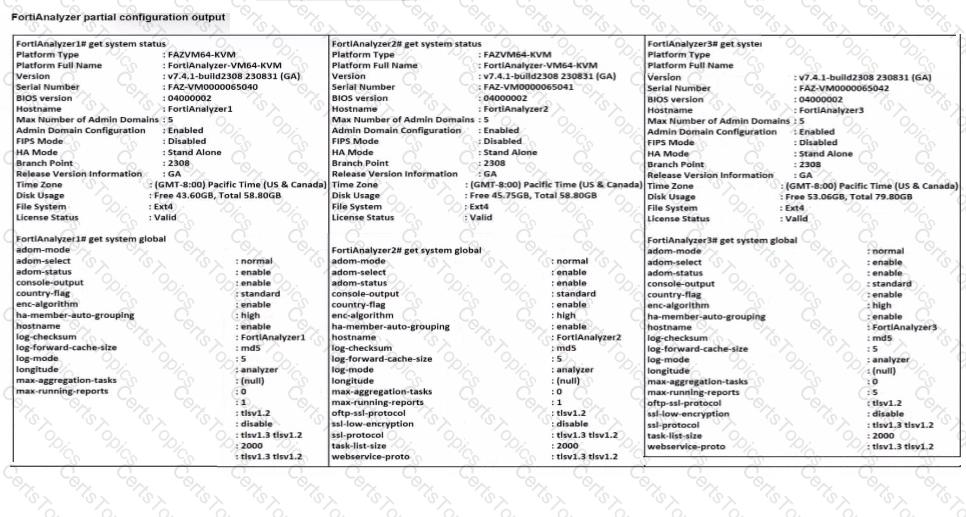
Refer to the exhibit.
What can you conclude about the output?
The low indexing values require investigation.
The output is not ADOM specific.
There are more event logs thantraffic logs.
The log rate higher than the message rate is not normal.
You mustfind a specific security event log in the FortiAnalyzer logs displayed in FortiView, but, so far, you have been uncuccessful.
Which two tasks should you perform to investigate why you are having this issue? (Choose two.)
Open .gz log files in FortiView.
Rebuild the SQL database and check FortiView.
Review the ADOM data policy
Check logs in the Log Browse
What is the purpose of using data selectors when configuring event handlers?
They filter the types of logs that FortiAnalyzer can accept from registered devices.
They download new filters can be used in event handlers.
They apply their filter criteria to the entire event handler so that you don’t have to configure the same criteria in the individual rules.
They are common filters that can be appliedsimultaneously to all event handlers.
(Which two statements about FortiAnalyzer Fabric deployments are true? (Choose two answers))
Supervisors can be in high availability (HA) for redundancy purposes only.
Fabric members can operate in analyzer mode only.
Fabric members do not forward their logs to the supervisor.
Supervisors and members must be in the same time zone.
Comprehensive and Detailed Explanation From Exact Extract of knowledge of FortiAnalyzer 7.6 Study guide documents:
B is true (members operate in analyzer mode, not collector mode):The study guide defines Fabric members as FortiAnalyzer devices that “retain access to the features described in the FortiAnalyzer Administration Guide” and that “each member can create or raise incidents and events.” In contrast, it states that a FortiAnalyzer operating incollector mode“does not provide capabilities for event management or reporting,” and also notes that “in collector mode, the GUI doesn’t include FortiView, Reports, or Incidents & Events.” Since Fabric members must be able to generate/manage incidents and events, they must be operating with analyzer capabilities rather than collector-only functionality.
C is true (members do not forward their logs to the supervisor):The supervisor provides centralized visibility, but the study guide describes the supervisor’s log access asviewing logs collected on members, not receiving/storing forwarded log files. It states: “In the FortiAnalyzer Fabric supervisor, Log View displays logs collected on all FortiAnalyzer Fabric members,” and clarifies “the logs contain the same information as displayed in the host FortiAnalyzer device they were collected on.” This indicates the logs remain on the member (host) and are made visible to the supervisor for centralized monitoring rather than being forwarded and stored on the supervisor.
For completeness, the study guide also explicitly states“HA is not available on the supervisor”(so A is false) andmembers do not need the same time zone as the supervisor(so D is false).
Which statement regarding macros on FortiAnalyzer is true?
Macros are predefined templates for reports and cannot be customized.
Macros are useful in generating excel log files automatically based on the report settings.
Macros are ADOM-specific and each ADOM type have unique macros relevant to that ADOM.
Macros are supported only on the FortiGate ADOMs.
Macros in FortiAnalyzer are used to streamline reporting tasks by automating dataextraction and report generation. Here’s a breakdown of each option to determine the correct answer:
Option A - Macros are Predefined Templates for Reports and Cannot be Customized:
This statement is incorrect. Macros in FortiAnalyzer are not simply fixed templates; they allow for customization to tailor data extraction and reporting based on specific needs and configurations.
Conclusion:Incorrect.
Option B - Macros are Useful in Generating Excel Log Files Automatically Based on the Report Settings:
This statement is accurate. Macros in FortiAnalyzer can be configured to automate the generation of reports, including outputting log data to Excel format based on predefined report settings. This makes them especially useful for scheduled reporting and data analysis.
Conclusion:Correct.
Option C - Macros are ADOM-Specific and Each ADOM Type Has Unique Macros Relevant to that ADOM:
Macros are not limited to specific ADOMs, nor are they ADOM-specific. Macros can be applied across various ADOMs based on report configurations but are not inherently tied to or unique for each ADOM type.
Conclusion:Incorrect.
Option D - Macros are Supported Only on the FortiGate ADOMs:
This is not true. Macros in FortiAnalyzer are not restricted to FortiGate ADOMs; they can be utilized across different ADOMs that FortiAnalyzer manages.
Conclusion:Incorrect.
Conclusion:
Correct Answer:B. Macros are useful in generating excel log files automatically based on the report settings.
This answer correctly describes thefunctionality of macros in FortiAnalyzer, emphasizing their role in automating report generation, especially for Excel log files.
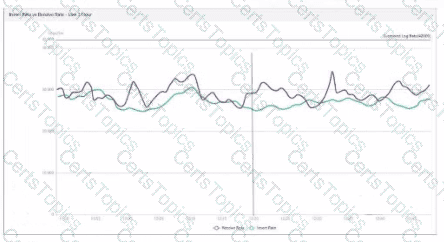
Refer to Exhibit:
Whatdoes the data point at 21:20 indicate?
FortiAnalyzer is indexing logs faster than logs are being received.
The fortilogd daemon is ahead in indexing by one log.
The SQL database requires a rebuild because of high receive lag.
FortiAnalyzer is temporarily buffering received logs so older logs can be indexed first.
The exhibit shows a graph that tracks two metrics over time:Receive RateandInsert Rate. These two rates are crucial for understanding the log processing behavior in FortiAnalyzer.
Understanding Receive Rate and Insert Rate:
Receive Rate: This is the rate at which FortiAnalyzer is receiving logs from connected devices.
Insert Rate: This is the rate at which FortiAnalyzer is indexing (inserting) logs into its database for storage and analysis.
Data Point at 21:20:
At 21:20, theInsert Rateline is above theReceive Rateline, indicating that FortiAnalyzer is inserting logs into its database at a faster rate than it is receiving them. This situation suggests that FortiAnalyzer is able to keep up with the incoming logs and is possibly processing a backlog or temporarily received logs faster than new logs are coming in.
Option Analysis:
Option A - FortiAnalyzer is Indexing Logs Faster Than Logs are Being Received: This accurately describes the scenario at 21:20, where the Insert Rate exceeds the Receive Rate. This indicates that FortiAnalyzer is handling logs efficiently at that moment, with no backlog in processing.
Option B - The fortilogd Daemon is Ahead in Indexing by One Log: The data does not provide specific information about the fortilogd daemon’s log count, only the rates. This option is incorrect.
Option C - SQL Database Requires a Rebuild: High receive lag would imply a backlog in receiving and indexing logs, typically visible if the Receive Rate were significantly above the Insert Rate, which is not the case here.
Option D - FortiAnalyzer is Temporarily Buffering Logs to Index Older Logs First: There is no indication of buffering in this scenario. Buffering would usually occur if the Receive Rate were higher than the Insert Rate, indicating that FortiAnalyzer is storing logs temporarily due to indexing lag.
Conclusion:
Correct Answer:A. FortiAnalyzer is indexing logs faster than logs are being received.
The graph at 21:20 shows a higher Insert Rate than Receive Rate, indicating efficient log processing by FortiAnalyzer.
Exhibit.

What does the data point at 12:20 indicate?
The loginsert log time is increasing.
FortiAnalyzer is using its cache to avoid dropping logs.
The performance of FortiAnalyzer is below the baseline.
The sqiplugind service is caught up with the logs
Which statement correctly describes one Difference between templates and reports?
Reports provide mora configuration options than templates
Templates can becloned, but reports cannot be cloned.
Reports support macros, but templates do not.
Template are mapped to device groups. while reports are mapped to ADOMs
Which SQL query is in the correct order to query to database in the FortiAnalyzer?
SELECT devid FROM $log GROUP BY devid WHERE ‘user’,,’ users1’
SELECT FROM $log WHERE devid ‘user’,, USER1’ GROUP BY devid
SELCT devid WHERE ’user’-‘ USER1’ FROM $log GROUP By devid
SELECT devid FROM $log WHERE ‘user’=’ GROUP BY devid
In FortiAnalyzer’s SQL query syntax, the typical order for querying the database follows the standard SQL format, which is:
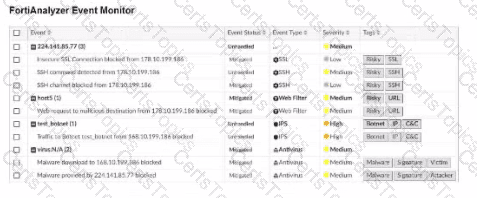
SELECT Option Dcorrectly follows this structure: SELECT devid FROM $log: This specifies that the query is selecting the devid column from the $log table. WHERE 'user' = ': This part of the query is intended to filter results based on a condition involving the user column. Although there appears to be a minor typographical issue (possibly missing the user value after =), it structurally adheres to the correct SQL order. GROUP BY devid: This groups the results by devid, which is correctly positioned at the end of the query. Let’s briefly examine why the other options are incorrect: Option A: SELECT devid FROM $log GROUP BY devid WHERE 'user', 'users1' This is incorrect because the GROUP BY clause appears before the WHERE clause, which is out of order in SQL syntax. Option B: SELECT FROM $log WHERE devid 'user', USER1' GROUP BY devid This is incorrect because it lacks a column in the SELECT statement and the WHERE clause syntax is malformed. Option C: SELCT devid WHERE 'user' - 'USER1' FROM $log GROUP BY devid This is incorrect because the SELECT keyword is misspelled as SELCT, and the WHERE condition syntax is invalid. (Refer to the exhibit. Which statement about the displayed event is correct? (Choose one answer)) The security risk was dropped. The risk source is isolated. The security risk was blocked. The security event risk is from an application control log. Comprehensive and Detailed Explanation From Exact Extract of knowledge of FortiAnalyzer 7.6 Study guide documents: The exhibit shows the eventEvent Status = MitigatedandEvent Type = Web Filter, with the event message indicating the web request wasblocked. The study guide definesMitigatedevents as follows:“Mitigated: The security risk is mitigated by being blocked or dropped.”This means a mitigated status corresponds to enforcement that prevented the risk (block/drop), not a condition where the source is isolated. It also distinguishesContainedevents from mitigated ones:“Contained: The risk source is isolated.”Since the exhibit clearly showsMitigated(not Contained), optionBis incorrect. Additionally, the study guide notes:“Generally, you can acknowledge mitigated events because the related traffic was blocked by the firewall.”This aligns directly with the exhibit’s “blocked” wording and supports that the correct interpretation is that the security risk was blocked. Finally, the event type displayed isWeb Filter, not application control, so optionDis incorrect. Therefore, the correct statement isC. The security risk was blocked. Exhibit. Which statement about the event displayed is correct? The risk source is isolated. The security risk was blocked or dropped. The security event risk is considered open. An incident was created from this event. (You created a playbook on FortiAnalyzer that uses a FortiOS connector. When you configure FortiGate, which type of trigger must you use so that the actions in an automation stitch are available in the FortiOS connector? (Choose one answer)) FortiAnalyzer Event Handler Incoming webhook Fabric Connector event IP ban Comprehensive and Detailed Explanation From Exact Extract of knowledge of FortiAnalyzer 7.6 Study guide documents: The study guide explains that FortiAnalyzer playbook tasks rely on connectors, and that the FortiOS connector will not show its available actions until FortiGate is configured with the correct automation trigger. The guide states:“For example, the FortiOS connector will be listed as soon as the first FortiGate device is added to FortiAnalyzer. However, to see the actions related to that FortiOS connector, you must enable an automation rule using the Incoming Webhook Call trigger on FortiGate.” This is why the required FortiGate trigger type isIncoming webhook(option B): it is the specific trigger FortiOS must use so FortiAnalyzer can expose and use the FortiOS connector actions within the playbook workflow. Copyright © 2021-2025 CertsTopics. All Rights Reserved WHERE

Options:
Answer:
C
Explanation:

Options:
Answer:
C
Options:
Answer:
B
Explanation:
Unlock FCP_FAZ_AN-7.6 Features
Questions & Answers PDF Demo
Practice Tesitng Engine Demo
CompTIA
Fortinet
Microsoft
Salesforce