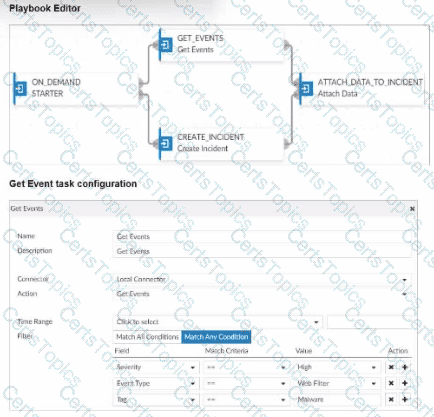
Which SQL query is in the correct order to query to database in the FortiAnalyzer?
SELECT devid FROM $log GROUP BY devid WHERE ‘user’,,’ users1’
SELECT FROM $log WHERE devid ‘user’,, USER1’ GROUP BY devid
SELCT devid WHERE ’user’-‘ USER1’ FROM $log GROUP By devid
SELECT devid FROM $log WHERE ‘user’=’ GROUP BY devid
In FortiAnalyzer’s SQL query syntax, the typical order for querying the database follows the standard SQL format, which is:
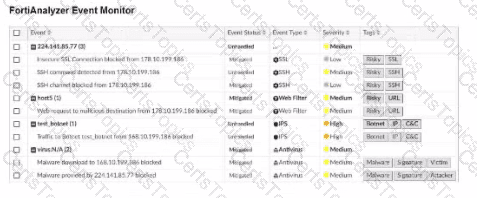
SELECT Option Dcorrectly follows this structure: SELECT devid FROM $log: This specifies that the query is selecting the devid column from the $log table. WHERE 'user' = ': This part of the query is intended to filter results based on a condition involving the user column. Although there appears to be a minor typographical issue (possibly missing the user value after =), it structurally adheres to the correct SQL order. GROUP BY devid: This groups the results by devid, which is correctly positioned at the end of the query. Let’s briefly examine why the other options are incorrect: Option A: SELECT devid FROM $log GROUP BY devid WHERE 'user', 'users1' This is incorrect because the GROUP BY clause appears before the WHERE clause, which is out of order in SQL syntax. Option B: SELECT FROM $log WHERE devid 'user', USER1' GROUP BY devid This is incorrect because it lacks a column in the SELECT statement and the WHERE clause syntax is malformed. Option C: SELCT devid WHERE 'user' - 'USER1' FROM $log GROUP BY devid This is incorrect because the SELECT keyword is misspelled as SELCT, and the WHERE condition syntax is invalid. (Refer to the exhibit. Which statement about the displayed event is correct? (Choose one answer)) The security risk was dropped. The risk source is isolated. The security risk was blocked. The security event risk is from an application control log. Comprehensive and Detailed Explanation From Exact Extract of knowledge of FortiAnalyzer 7.6 Study guide documents: The exhibit shows the eventEvent Status = MitigatedandEvent Type = Web Filter, with the event message indicating the web request wasblocked. The study guide definesMitigatedevents as follows:“Mitigated: The security risk is mitigated by being blocked or dropped.”This means a mitigated status corresponds to enforcement that prevented the risk (block/drop), not a condition where the source is isolated. It also distinguishesContainedevents from mitigated ones:“Contained: The risk source is isolated.”Since the exhibit clearly showsMitigated(not Contained), optionBis incorrect. Additionally, the study guide notes:“Generally, you can acknowledge mitigated events because the related traffic was blocked by the firewall.”This aligns directly with the exhibit’s “blocked” wording and supports that the correct interpretation is that the security risk was blocked. Finally, the event type displayed isWeb Filter, not application control, so optionDis incorrect. Therefore, the correct statement isC. The security risk was blocked. Exhibit. Which statement about the event displayed is correct? The risk source is isolated. The security risk was blocked or dropped. The security event risk is considered open. An incident was created from this event. (You created a playbook on FortiAnalyzer that uses a FortiOS connector. When you configure FortiGate, which type of trigger must you use so that the actions in an automation stitch are available in the FortiOS connector? (Choose one answer)) FortiAnalyzer Event Handler Incoming webhook Fabric Connector event IP ban Comprehensive and Detailed Explanation From Exact Extract of knowledge of FortiAnalyzer 7.6 Study guide documents: The study guide explains that FortiAnalyzer playbook tasks rely on connectors, and that the FortiOS connector will not show its available actions until FortiGate is configured with the correct automation trigger. The guide states:“For example, the FortiOS connector will be listed as soon as the first FortiGate device is added to FortiAnalyzer. However, to see the actions related to that FortiOS connector, you must enable an automation rule using the Incoming Webhook Call trigger on FortiGate.” This is why the required FortiGate trigger type isIncoming webhook(option B): it is the specific trigger FortiOS must use so FortiAnalyzer can expose and use the FortiOS connector actions within the playbook workflow. Copyright © 2021-2025 CertsTopics. All Rights Reserved WHERE

Options:
Answer:
C
Explanation:

Options:
Answer:
C
Options:
Answer:
B
Explanation:
Unlock FCP_FAZ_AN-7.6 Features
Questions & Answers PDF Demo
Practice Tesitng Engine Demo
CompTIA
Fortinet
Microsoft
Salesforce