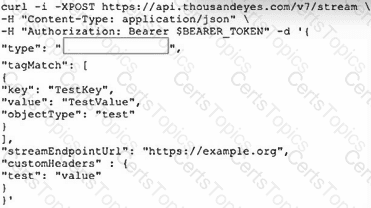
In the Designing and Implementing Enterprise Network Assurance (300-445 ENNA) curriculum, the evolution of network monitoring includes moving from periodic polling to real-time data streaming. The exhibit displays a curl command targeting the ThousandEyes API v7 /stream endpoint. When integrating ThousandEyes with high-performance observability platforms like Grafana , the standardized and recommended method for machine-to-machine data exchange is through OpenTelemetry (OTel) .
According to the ENNA architecture guidelines, the ThousandEyes Streaming API allows users to push granular test metrics (such as network latency, packet loss, and jitter) to external collectors in an OTel-compatible format. In the provided JSON payload, the " type " field is a mandatory parameter that defines the integration protocol. For Grafana, which natively supports OpenTelemetry Protocol (OTLP) via its OpenTelemetry Collector, the value must be set to " opentelemetry " (Option A). This tells the ThousandEyes streaming engine to encapsulate the data according to the OTel semantic conventions, ensuring that Grafana can correctly interpret and visualize the metrics without additional custom parsing logic.
While other options exist in the ThousandEyes ecosystem, they do not fit the specific API call shown for this use case:
Custom Webhooks (Option B) are typically used for event-driven alerts and notifications (e.g., sending a POST request when a threshold is breached) rather than continuous high-fidelity metric streaming.
Push-api and poll-api (Options C and D) are not valid " type " values within the context of the v7 /stream endpoint, as the streaming service specifically utilizes the OpenTelemetry framework for real-time delivery.
By selecting opentelemetry , the network engineer enables a robust " push-based " integration that provides real-time visibility into application performance and network health, leveraging Grafana ' s advanced dashboarding capabilities to analyze ThousandEyes telemetry data alongside other enterprise infrastructure metrics.
Introduction to ThousandEyes for OpenTelemetry
This video provides a foundational understanding of how ThousandEyes uses modern streaming frameworks to export critical performance data to external observability platforms.