Weekend Special - 75% Discount Offer - Ends in 0d 00h 00m 00s - Coupon code: big75certs

NSE6_FMG_AD-7.6 VCE Exam Download

Fortinet NSE 6 - FortiManager 7.6 Administrator Questions and Answers

Question 5

An administrator configures a new BGP peer in the FortiManager device-level database of FortiGate. They reinstall the policy package to the managed FortiGate device without any errors. However, when the administrator logs in to FortiGate, they do not see the BGP configuration changes.

What is the most likely reason why FortiManager did not push the BGP peer changes to FortiGate?

Options:

A.

The administrator must run a sanity check on FortiManager to make sure the database is not corrupted.

B.

Fortigate has a BGP template assigned on the FortiManager database.

C.

The administrator must use the Install Wizard and select Install device settings only to push BGP settings

D.

The FortiGate firmware version is different from the FortiManager ADOM version.

Question 6

Which two statements about the integrity of databases on FortiManager are correct? Choose two answers.

Options:

A.

Scheduled backups run database integrity commands automatically.

B.

The diagnose dvm check-integrity command attempts to fix a corrupted file system.

C.

The diagnose cdb check adom-integrity command can correct issues related to locked devices.

D.

You should fix all database integrity issues before performing a script.

E.

Not following the correct upgrade path may cause inconsistencies in the databases.

Question 7

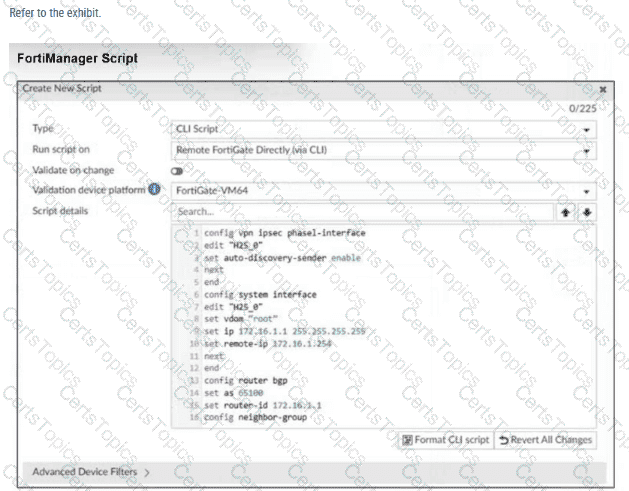
Refer to Exhibit:

Which two actions will occur if you run the script using the Remote FortiGate Directly via CLI option? Choose two answers

Options:

A.

FortiManager will provide a preview of CLI commands before executing this script on a managed FortiGate.

B.

FortiManager will create a new revision history.

C.

FortiGate will auto-updated the FortiManager device-level database.

D.

You will have to install these changes using the Install Wizard.

Question 8

What is the best explanation of how FortiManager helps with mass provisioning?

Options:

A.

It upgrades the OS of each FortiGate device.

B.

It provides local FortiGuard Distribution Server (FDS) services to the network.

C.

It uses templates to configure the same settings on many devices simultaneously.

D.

It sends email alerts when new devices connect.