Weekend Special - 75% Discount Offer - Ends in 0d 00h 00m 00s - Coupon code: big75certs

Fortinet NSE6_FMG_AD-7.6 Based on Real Exam Environment

Fortinet NSE 6 - FortiManager 7.6 Administrator Questions and Answers

Question 13

Refer to the exhibit.
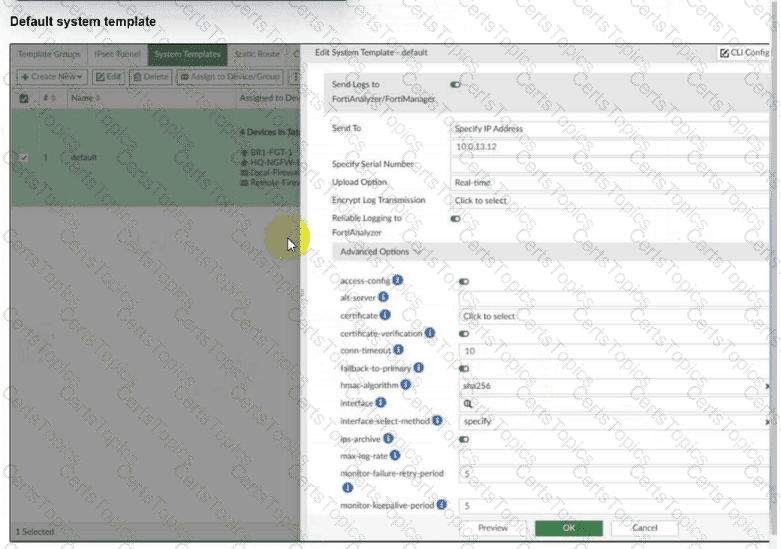
An administrator has assigned the default system template to install all devices with the FortiAnalyzer IP address 10.0.13.12. However, not all FortiGate devices can reach FortiAnalyzer using the default interface. Some devices may use the LAN interface, while others may use the WAN interface. How can the administrator change the source interface for FortiGate devices using the default system template? Choose one answer

Options:

A.

Use per-device dynamic object configurations at the ADOM level and apply them in the template.

B.

Configure a metadata variable at the ADOM level and use it in the template.

C.

Create a different system template for each FortiGate, if the configuration is different.

D.

Create a meta field on FortiManager system settings of type Device and use it in the template.

Question 14

Refer to the exhibits.

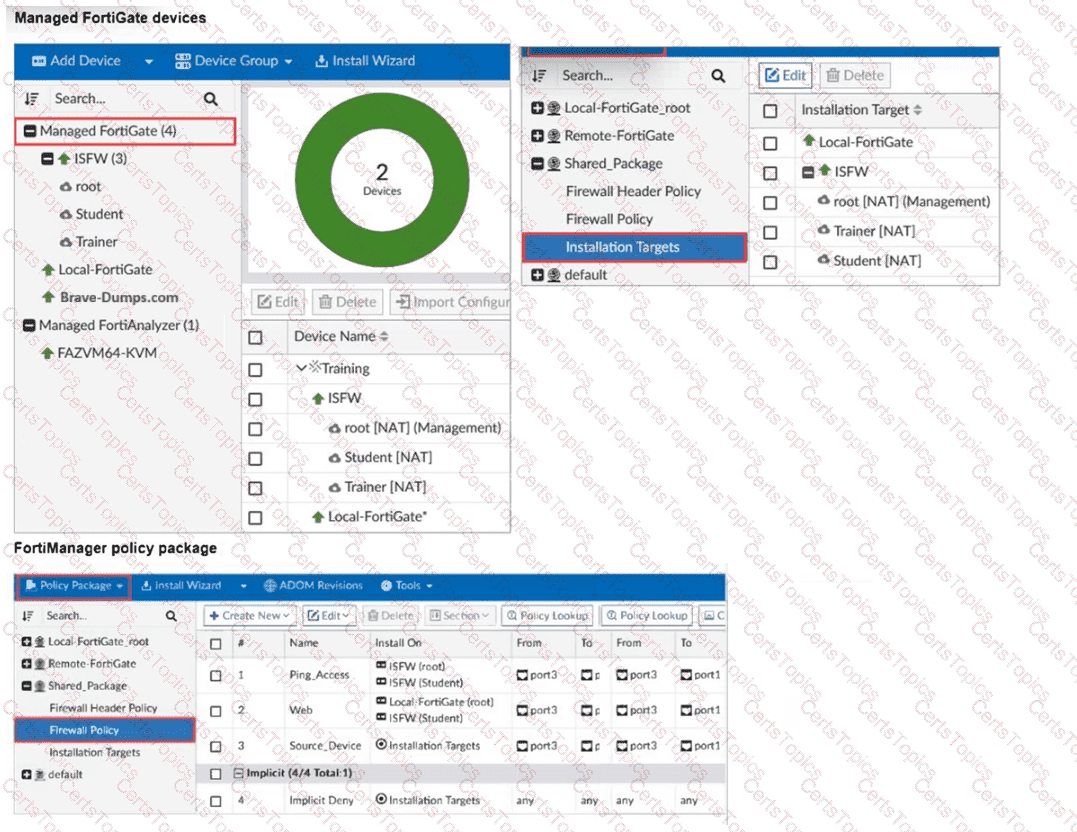
What can you conclude, based on the configuration shown in the exhibit? Choose one answer

Options:

A.

The administrator needs to retrieve the Local-FortiGate configuration to sync with the Security Fabric group, Training.

B.

Policy sequence #1 will be installed on the internal segmentation firewall ISFW device root NAT and Trainer NAT VDOMs.

C.

Policy sequence #3 must have devices or VDOMs listed in the Install On column; otherwise, it will cause errors.

D.

The global policy package will be added to the top of the ISFW policy package.

Question 15

An administrator assigned the Training global policy package to the Branches policy package in ADOM1. Later, the administrator created a new policy package named Remotes on ADOM1.

What should the administrator do to sync the Training global policy package with the Remotes policy package in ADOM1?

Options:

A.

Manually add and assign the Remotes policy package to the Training global policy package

B.

Use the automatically install policies to ADOM devices method to sync from the Training global policy package to the Remotes policy package

C.

Assign the Training global policy package to the Remotes policy package

D.

Unassign the Training policy package and reassign it to all policy packages within ADOM1

Question 16

Refer to the exhibits.

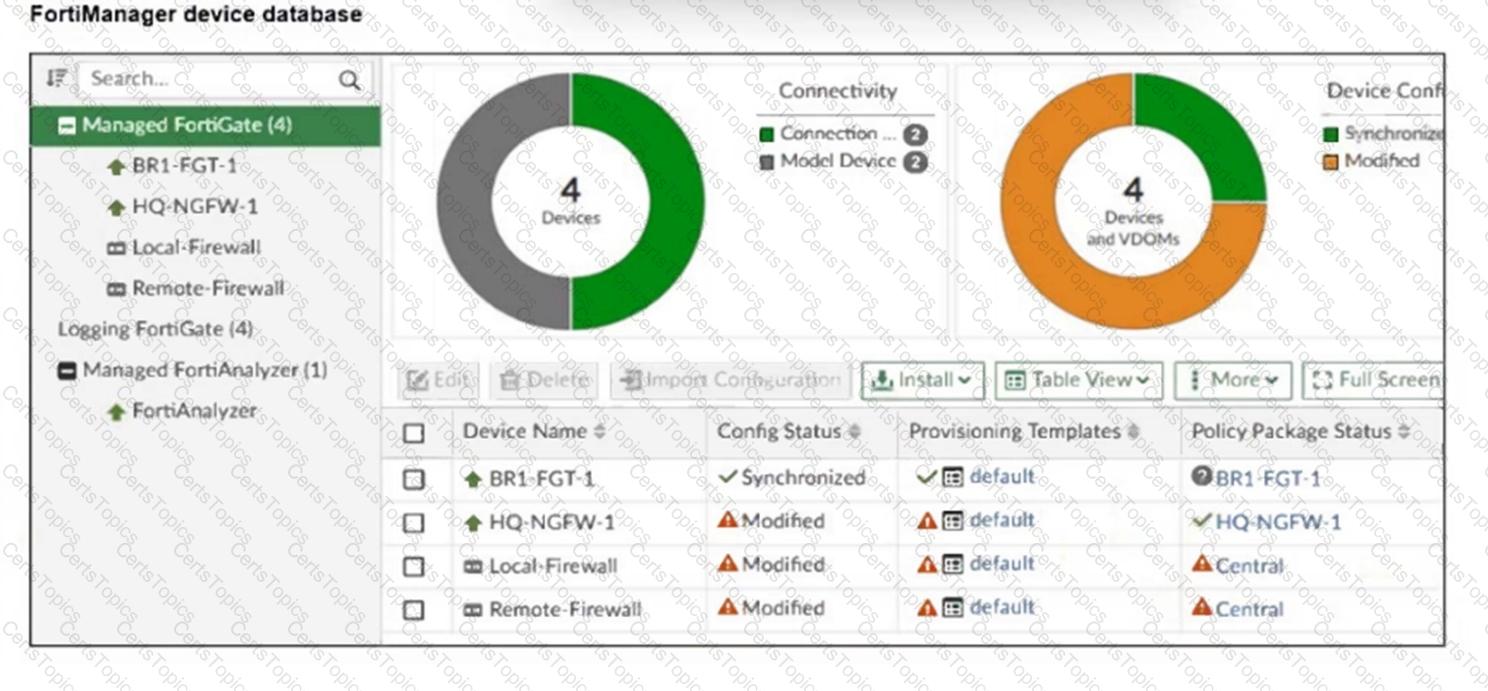
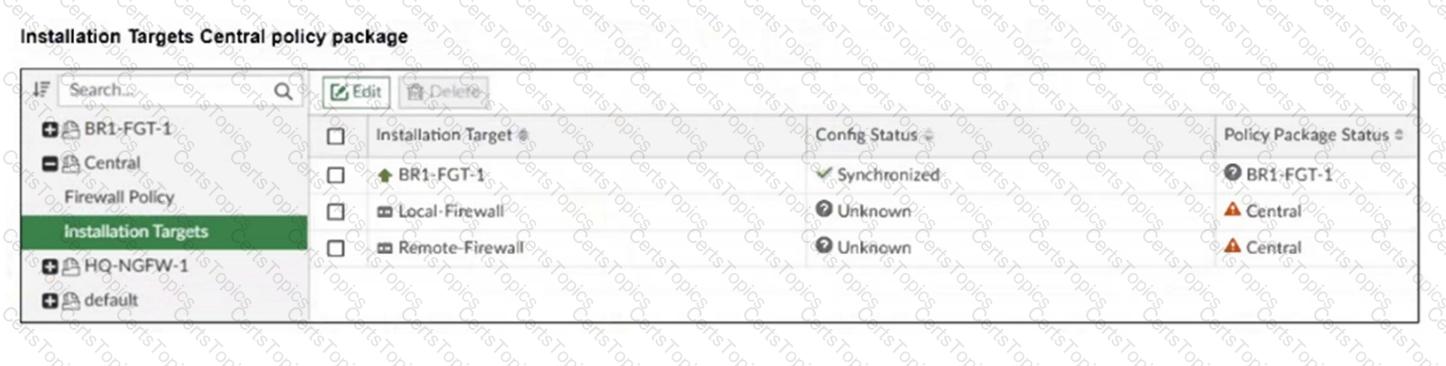
An administrator has been asked to install the same policies from a central policy package onto the BR1-FGT-1 firewall.

The administrator added BR1-FGT-1 as a target in the central policy package installation.

What should the administrator do when reinstalling the central policy package on the BR1-FGT-1 firewall?

Options:

A.

Assign only one policy package to the firewall because FortiManager does not allow more than one policy package assigned per device at the same time.

B.

Import the policy package to change the unknown status and synchronize the policy package.

C.

Use the install wizard to install the central policy package on the BR1-FGT-1 firewall.

D.

First resolve the modified status in the configuration and provisioning templates to allow a smooth installation.