New Year Sale 70% Discount Offer - Ends in 0d 00h 00m 00s - Coupon code: save70

KX3-003 Exam Dumps : Certified RapidResponse Author Level 3 Exam

PDF
KX3-003 pdf
 Real Exam Questions and Answer
 Last Update: Jan 3, 2026
 Question and Answers: 60 With Explanation
 Compatible with all Devices
 Printable Format
 100% Pass Guaranteed
$25.5  $84.99
KX3-003 exam
PDF + Testing Engine
KX3-003 PDF + engine
 Both PDF & Practice Software
 Last Update: Jan 3, 2026
 Question and Answers: 60
 Discount Offer
 Download Free Demo
 24/7 Customer Support
$40.5  $134.99
Testing Engine
KX3-003 Engine
 Desktop Based Application
 Last Update: Jan 3, 2026
 Question and Answers: 60
 Create Multiple Test Sets
 Questions Regularly Updated
  90 Days Free Updates
  Windows and Mac Compatible
$30  $99.99

Verified By IT Certified Experts

CertsTopics.com Certified Safe Files

Up-To-Date Exam Study Material

99.5% High Success Pass Rate

100% Accurate Answers

Instant Downloads

Exam Questions And Answers PDF

Try Demo Before You Buy

Certification Exams with Helpful Questions And Answers

Certified RapidResponse Author Level 3 Exam Questions and Answers

Question 1

You want to identify the buyer responsible for the component part in a worksheet based on the BillofMaterial table. Additionally, you want to have the option of inviting that buyer to a collaboration, messaging that buyer, and sharing a scenario with them.

Which set of column expressions and configuration changes will enable this capability?

Options:

A.

Create a column with an expression of Responsibility($Role_Buyers, Component). On the Column Formatting tab, Check the "Display as user name" checkbox.

B.

Create a column with an expression of Responsibility($Role_Buyers, Component). On the Column Formatting tab, Check the "Display as image" checkbox and select an appropriate image.

C.

Create a column with an expression of Responsibility($Role_Buyers, Component.Name). On the Column Formatting tab, Check the "Display as user name" checkbox.

D.

Create a column with an expression of Responsibility($Role_Buyers, Component.Name). On the Column Formatting tab, Check the "Display as image" checkbox and select an appropriate image.

Buy Now
Question 2

You are asked to create a workbook that identifies the change in IndependentDemandAvailableDate in workdays from a child scenario to its parent.

Which worksheet properties shown in the graphic identifies the correct configuration and expression?

Options:

A.

I

B.

II

C.

III

D.

IV

Question 3

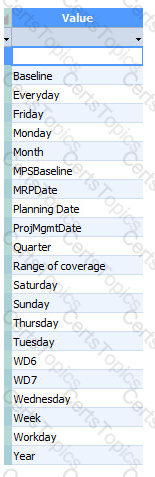
You need to create an expression that displays the number of the calendar week from the beginning of the year, for example, 01 January 2017 to 07 January 2017 = week 1. The calendar is based on a January to December fiscal year. The Calendar table has the values shown in the graphic.

Which expression would display the number of the calendar week?

Options:

A.

(today - (today + 0 Year) Week)

B.

(today - (today + 0 Year) Week) +1

C.

(today + 0 Week)

D.

(today + 0 Week) + 1