Exhibit:

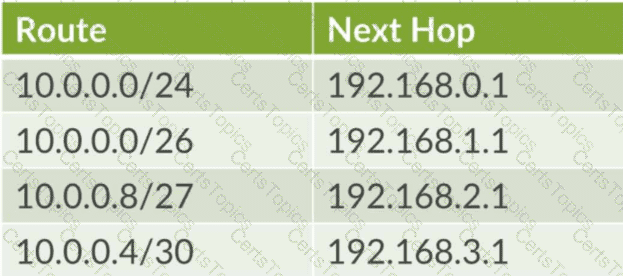
Referring to the exhibit, what is the next hop for IP address 10.0.0.9?
192.168.2.1
192.168.1.1
192.168.3.1
192.168.0.1
In Junos OS, the Packet Forwarding Engine (PFE) determines the next hop for a packet by performing a lookup in the forwarding table and identifying all valid matches for the destination IP address. When multiple routes encompass the same destination, the router strictly follows the Longest Prefix Match (LPM) rule to select the most specific entry.
For the destination address 10.0.0.9 , the following evaluation occurs based on the exhibit:
10.0.0.0/24 : This route matches, as the address falls within the 10.0.0.0–10.0.0.255 range.
10.0.0.0/26 : This route matches, as the address falls within the 10.0.0.0–10.0.0.63 range.
10.0.0.8/27 : This route matches, as the address falls within the 10.0.0.8–10.0.0.39 range.
10.0.0.4/30 : This route does not match, as its range ends at 10.0.0.7.
Among the matching entries, the prefix lengths are /24, /26, and /27. The longest prefix match is /27 , as it specifies the most granular network segment. Because 10.0.0.8/27 is the most specific match for the destination 10.0.0.9 , the router selects its associated next hop, which is 192.168.2.1 . This deterministic behavior ensures that traffic follows the most precise path calculated by the routing protocols or defined by the administrator, overriding broader routes like the default or summary advertisements.
After the factory default configuration is loaded, which configuration object must be created prior to the first commit?
host name
loopback IP address
out-of-band connectivity
root authentication
When a Junos device is initialized with its factory default configuration, it essentially exists in a " blank slate " state with minimal operational parameters. The most critical security requirement imposed by Junos OS during this initial setup phase is the mandatory configuration of a root-level password. Specifically, the root-authentication object must be defined within the [edit system] hierarchy before the system will allow the candidate configuration to be successfully committed for the first time.
This is a built-in safety mechanism designed to prevent the device from being deployed in an insecure state with an empty administrative password. If an administrator attempts to execute a commit command without having set the root password, the Junos OS parser will return an error and fail the commit process. While setting a host name or configuring management interfaces are best practices for operational readiness, they are not strictly required by the Junos commit-check logic. Only the root-authentication (typically a plain-text password or an encrypted string) is a hard prerequisite to transition the device from the factory-default state to an active, running configuration. Reference: Configuration Basics, Initial Configuration, Security Requirements.
According to HPE Juniper Networking, when should you use the replace pattern command instead of the rename command?
You want to create a private candidate configuration.
You want to disable a physical interface.
You need to edit a single component name in the configuration.
You want to globally replace all occurrences of a specific string.
In Junos OS configuration management, the rename and replace pattern commands serve distinct roles for modifying the candidate configuration. The rename command is used when an administrator needs to change the identifier of a specific, single configuration object—such as changing an interface name or a policy-term name—while keeping the underlying properties of that object intact. In contrast, the replace pattern command is a powerful utility designed for bulk modifications across the configuration hierarchy. It utilizes string matching or regular expressions to find every occurrence of a specific text string and substitute it with another.
This is particularly useful in scenarios involving mass updates, such as migrating an entire subnet across multiple interface descriptions, firewall filters, and routing policy terms simultaneously. While rename acts locally on a specific path, replace pattern can be applied globally from the root of the configuration or constrained to a specific sub-hierarchy. As a Senior Architect, it is critical to understand that replace pattern does not just change names; it can modify any part of the statement text, making it an essential tool for efficient large-scale configuration refactoring without the need for manual, line-by-line edits. Reference: Configuration Basics, Modifying Configuration, Command Line Editing.
An administrator wants to set up a remote user authentication service for the many users that access a Juniper security device. In this scenario, what are two supported authentication protocols? (Choose two.)
RADIUS
TACACS+
SHA
IPsec
For managing high volumes of administrative users, Junos OS supports externalizing the authentication, authorization, and accounting (AAA) process. The two primary industry-standard protocols supported for this purpose are RADIUS (Remote Authentication Dial-In User Service) and TACACS+ (Terminal Access Controller Access-Control System Plus).
Using these protocols allows an architect to maintain a centralized user database on an external server (like Cisco ACS, FreeRADIUS, or Microsoft NPS) rather than configuring every individual user account locally on every Junos device. When a user attempts to log in via SSH or the console, the Junos device acts as a client, forwarding the credentials to the remote server. RADIUS is often preferred for its broad compatibility and efficiency, while TACACS+ is frequently chosen for its ability to separate authentication from authorization and its support for granular command-level accounting. SHA (Secure Hash Algorithm) is a cryptographic hash function used within these processes but is not an authentication protocol itself. Similarly, IPsec is a suite for securing IP communications (VPNs) and is unrelated to the administrative login AAA sequence.
Which two statements describe rollback configuration behavior in Junos OS? (Choose two.)
Rollback configurations are applied automatically after a commit confirmed timeout.
Rollback 0 always refers to the factory default configuration.
Rollback files are stored automatically after each commit.
Up to 100 rollback configurations are maintained by default.
Junos OS incorporates a robust configuration versioning and recovery system designed to protect against configuration errors and human oversight. A key feature of this system is that rollback files are stored automatically by the device after each successful commit. These files represent a historical record of previous active configurations. By default, the system maintains a set number of these files, allowing an administrator to revert to a previous state (e.g., rollback 1) if the most recent changes result in unexpected network instability.
Another critical safety mechanism is the behavior associated with the commit confirmed command. If an administrator issues this command but fails to provide a subsequent confirmation within a designated timeframe (defaulting to 10 minutes), the system assumes a loss of management connectivity. Consequently, the rollback configurations are applied automatically after the commit confirmed timeout to restore the previous known-good state. This is an essential best practice for remote configuration management. It is important to note that rollback 0 refers to the currently active configuration, not the factory default, and that while Junos supports maintaining a large number of rollback files, the primary operational benefit lies in the automated storage and confirmation-based recovery processes that ensure the device remains reachable and stable. Reference: Configuration Basics, Rollback Configurations, Commit Confirmed Logic.
==========
Which two statements are correct about SNMPv3? (Choose two.)
It uses plain-text community strings.
It protects against tampering and eavesdropping.
It is simpler to configure than SNMPv2c.
It provides encrypted passwords for secure communication.
Simple Network Management Protocol version 3 (SNMPv3) represents a significant security evolution over its predecessors, SNMPv1 and SNMPv2c. While earlier versions relied on " community strings " sent in plain-text—which are easily intercepted and provide minimal security—SNMPv3 introduces a comprehensive security framework known as the User-based Security Model (USM). The primary benefit of SNMPv3 is that it protects against tampering and eavesdropping. It achieves this through two main mechanisms: message integrity (authentication), which ensures that a packet has not been altered in transit, and data confidentiality (privacy), which encrypts the payload of the SNMP packets using advanced algorithms like AES or DES.
Furthermore, SNMPv3 provides for secure communication by utilizing encrypted credentials rather than cleartext strings. Administrators define specific users and assign them security levels: noAuthNoPriv, authNoPriv, or authPriv. In the most secure mode (authPriv), the system requires both a password for authentication (validated via MD5 or SHA hashes) and a separate password for encryption. This architecture ensures that management traffic—including sensitive device telemetry and configuration data—remains confidential and authenticated as it traverses the network. While SNMPv3 is inherently more complex to configure than SNMPv2c due to these additional security parameters, it is the required standard for any production Junos environment where management plane integrity is a priority.
Which two statements are correct about Junos OS? (Choose two.)
Junos OS provides the ability to run unsigned third-party binaries.
Junos OS provides modularization of software processes.
Junos OS combines security and routing policies.
Junos OS separates the control plane and the forwarding plane.
Junos OS is built upon a highly stable and secure architecture that distinguishes it from many legacy network operating systems. Two of its most defining characteristics are software modularization and the separation of the control and forwarding planes .
Modularization means that Junos OS runs each major function—such as the routing protocol process (rpd), the management process (mgd), and the interface process (dcd)—as an independent software daemon in its own protected memory space. This ensures that if a single process crashes or needs to be restarted, it does not bring down the entire system or interrupt traffic forwarding.
Furthermore, the physical and logical separation of the Control Plane (Routing Engine) and the Forwarding Plane (Packet Forwarding Engine) is a cornerstone of Junos design. The Routing Engine handles complex intelligence, protocol calculations, and management, while the Packet Forwarding Engine performs high-speed packet switching in hardware. This ensures that a heavy management load or a complex routing recalculation won ' t cause " jitter " or packet loss for transit traffic. Conversely, Junos strictly prohibits unsigned third-party binaries to maintain system integrity, and it maintains a clear functional distinction between routing policies (path selection) and security policies (traffic permit/deny).
Exhibit:

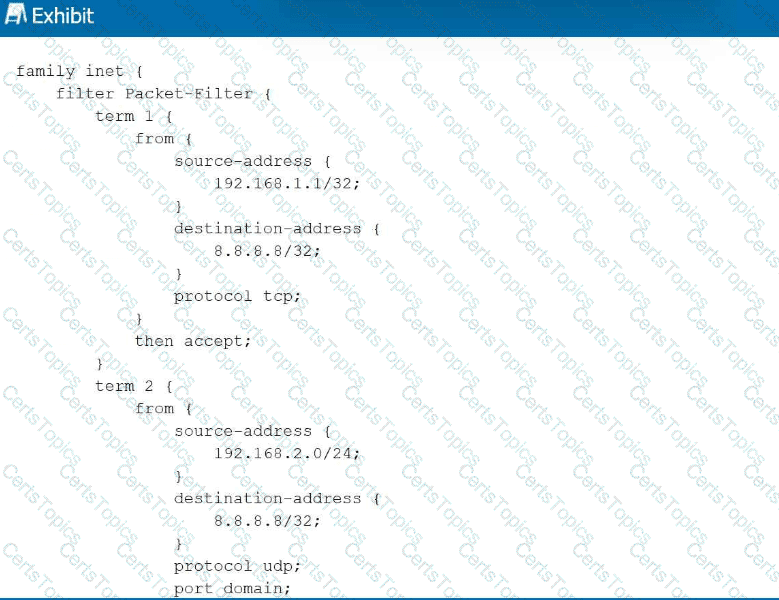
Referring to the exhibit, with firewall filter Packet-Filter attached to an interface, if traffic is sent from 192.168.1.1 to 8.8.8.8 for a UDP DNS query, what will happen to the traffic?
The traffic will match term 1 and be forwarded.
The traffic will match the default last term and be forwarded.
The traffic will match the default last term and be discarded.
The traffic will match term 3 and be forwarded.
Junos OS firewall filters operate on a first-match basis, evaluating terms sequentially from top to bottom. In this scenario, a UDP DNS packet (destination port 53) is sent from 192.168.1.1 to 8.8.8.8. Evaluation begins with term 1 , which matches the correct source and destination IP addresses but specifies protocol tcp . Because the actual traffic uses UDP, term 1 is not a match. Evaluation then moves to term 2 . While term 2 correctly identifies protocol udp and port domain (port 53), it requires the source-address to reside within the 192.168.2.0/24 subnet. Since the source is 192.168.1.1 , term 2 also fails to match.
When a packet fails to match any explicitly defined terms in a Junos firewall filter, it is subject to the implicit deny action. This default " last term " is a hardcoded safety mechanism that automatically discards all traffic that has not been explicitly permitted. Consequently, because neither term provides a match for the specific combination of source IP, protocol, and destination port, the DNS query is silently dropped by the Packet Forwarding Engine. This behavior ensures that Junos devices maintain a " deny-by-default " security posture, requiring administrators to define precise permit statements for all required transit or management traffic. Reference: Routing Policy and Firewall Filters, Firewall Filter Evaluation, Implicit Discard.
==========
Which statement describes the primary purpose of a routing policy in Junos OS?
It controls which routes are accepted or advertised by a routing protocol. B. It determines the physical interface used for forwarding traffic. C. It sets the maximum number of routes in the routing table. D. It enables automatic rollback of routing changes.
In Junos OS, a routing policy is a powerful tool used to manage the flow of routing information between the Routing Information Base (RIB) and routing protocols. Unlike forwarding decisions, which are handled by the Packet Forwarding Engine, routing policies function within the control plane on the Routing Engine. Their primary purpose is to define specific criteria for importing routes into the routing table from neighbors or exporting routes from the routing table to neighbors.
Routing policies consist of terms containing from (match) and then (action) statements. They allow administrators to filter prefixes (e.g., denying specific BGP routes), modify route attributes (e.g., changing OSPF metrics or BGP communities), and manipulate path selection behavior. For example, an export policy might be used to ensure that only specific internal subnets are advertised to an ISP via BGP, preventing the accidental leakage of private infrastructure addresses. By default, Junos applies " default policies " for each protocol (such as OSPF accepting all OSPF routes), but custom policies allow for granular control over how the device interacts with the rest of the network. This ensures that the routing table contains only the desired paths for optimal traffic engineering.
Which two statements about route preference in Junos OS are correct? (Choose two.)
Higher route preference values indicate higher priority.
Route preference is considered after evaluating the longest prefix match.
Lower route preference values indicate higher priority.
Route preference determines the forwarding table size.
In Junos OS, route preference (often referred to as administrative distance in other operating systems) is the mechanism used to select the " best " path when the routing table receives multiple advertisements for the exact same destination prefix from different routing sources. The core rule for preference is that lower values indicate a more preferred or " higher priority " route . For example, a direct route has a default preference of 0, a static route is 5, and OSPF internal routes are 10. If a router learns about the same network from both OSPF and a static entry, it will select the static route because 5 is lower than 10.
Crucially, route preference is only evaluated after the longest prefix match (LPM) has been determined. LPM is the absolute first step in packet forwarding; the router will always choose the most specific route available (e.g., a /28 over a /24). Only if there are multiple entries for that same /28 does the router look at preference to break the tie. It is a common misconception that a lower preference value can override a more specific prefix; in reality, a /32 route with a preference of 170 (BGP) will always win over a /24 route with a preference of 5 (Static). Understanding this hierarchy is vital for network architects when designing redundant paths and predictable failover behaviors.
Which two characteristics describe Junos OS software? (Choose two.)
Junos OS is a monolithic code base.
Junos OS supports automation features.
Junos OS runs only on routers.
Junos OS uses a modular architecture with independent processes.
Junos OS is distinguished from legacy network operating systems by its modern, modular architecture . Unlike a monolithic system where a single failure can crash the entire kernel, Junos runs various software functions—such as the routing protocol process (rpd), the interface process (dcd), and the management daemon (mgd)—as independent processes in their own protected memory spaces. This modularity ensures high availability; if one daemon encounters an error, it can be restarted without impacting the overall system stability or traffic forwarding.
Furthermore, Junos OS is a leader in automation features . It was built with a programmable foundation, utilizing an XML-based configuration database and supporting NETCONF for standardized remote management. This allows network architects to utilize modern DevOps tools like Ansible, Python (PyEZ), and SaltStack to automate complex configuration tasks, perform bulk upgrades, and enforce state compliance. By treating the network as code, Junos enables high-velocity operations that reduce human error. While Junos originally powered routers, it now runs across a vast portfolio including EX/QFX switches and SRX firewalls, proving its versatility far beyond just routing platforms.
What are two fiber-optic connector types? (Choose two.)
LC
RJ-45
SC
BNC
Physical layer connectivity for Junos devices involves a variety of media types, with fiber-optic cabling being the standard for high-speed, long-distance, or high-density uplink requirements. Two of the most prevalent connector types used in these environments are the LC (Lucent Connector) and the SC (Subscriber Connector) .
The LC connector is a small-form-factor (SFF) connector that uses a 1.25 mm ferrule. Due to its compact size and " push-and-latch " mechanism, it is the primary connector type found on SFP, SFP+, and XFP transceivers used in Juniper EX, MX, and QFX series hardware. Its high-density design allows for more ports in a limited space on a line card or chassis. The SC connector , often referred to as a " square connector, " utilizes a larger 2.5 mm ferrule and a " push-pull " snapping mechanism. While it was highly common in older legacy hardware and fiber patch panels, it has largely been superseded by the LC in modern data center and enterprise switching environments.
In contrast, the RJ-45 is a standard copper Ethernet connector (typically used with Category 5e/6 cables), and the BNC (Bayonet Neill–Concelman) is a miniature quick connect/disconnect RF connector used for coaxial cable. As a Senior Architect, distinguishing between these physical interfaces is critical when specifying the correct Small Form-factor Pluggable (SFP) modules and patch cables required to bring a Junos interface into an operational up/up state.
A network administrator must set up the initial configuration of the out-of-band management interface on a new Juniper router to ensure management traffic is isolated from the default routing table (inet.0). In this scenario, which configuration step is required to accomplish this task in Junos OS?
Configure an IP address on interface ge-0/0/0.0 and enable ethernet-switching family.
Configure the lo0.0 loopback interface with a management IP and apply it to the [edit system services] hierarchy.
Assign an IP address to the me0.0 interface and set the routing-options to instance-type virtual-router.
Assign an IP address to interface fxp0.0 or em0.0 and use the command set system management-instance to enable the management routing instance.
In modern Junos OS versions, the most efficient and standard way to isolate Out-of-Band (OOB) management traffic from transit traffic is by utilizing the management-instance . Historically, management interfaces like fxp0 (on M/MX/T series) or me0 (on EX/QFX series) shared the global routing table (inet.0), which could lead to routing conflicts if management subnets overlapped with production data.
To resolve this, Junos introduced the set system management-instance command. When this is enabled, the OS automatically creates a dedicated routing instance named mgmt_junos. The physical management interface (be it fxp0, em0, or me0) and its associated logical unit are moved into this private instance. This creates a complete separation: management protocols like SSH, SNMP, and NTP operate within mgmt_junos, while BGP, OSPF, and customer data remain in inet.0. This architecture ensures that even a massive routing loop or table exhaustion in the production plane will not prevent an administrator from accessing the device via the OOB port. Furthermore, it simplifies the configuration of default gateways for management traffic, as the mgmt_junos instance maintains its own independent routing table (mgmt_junos.inet.0), preventing management routes from ever being leaked into the provider core.
Which two functions are performed by the PFE? (Choose two.)
It maintains the routing table.
It implements firewall filters.
It selects active routes.
It forwards transit traffic.
The Packet Forwarding Engine (PFE) represents the data plane of a Junos device, responsible for the high-speed processing and movement of packets through the system. Its primary role is to forward transit traffic—data that enters one interface and exits another—at wire speed using specialized hardware such as Application-Specific Integrated Circuits (ASICs). To accomplish this, the PFE utilizes a local copy of the Forwarding Information Base (FIB) provided by the Routing Engine, ensuring that forwarding decisions are made locally without requiring the main CPU ' s intervention for every packet.
In addition to pure forwarding, the PFE is the functional component that implements and executes firewall filters and policing. Because firewall filters must be applied to transit traffic at line rate to prevent bottlenecks, the PFE evaluates incoming and outgoing packets against configured filter terms in hardware. This ensures that security policies and traffic shaping are applied with minimal latency. It is critical to note that the PFE does not maintain the master routing table (RIB) or perform route selection; those " intelligent " control plane functions are strictly the domain of the Routing Engine. By offloading the repetitive tasks of packet inspection and hardware forwarding to the PFE, Junos OS maintains consistent performance even under heavy traffic loads or complex security configurations. Reference: Junos OS Fundamentals, Packet Forwarding Engine Architecture.
==========
What is the purpose of an ARP packet?
to determine the MPLS label of a given IP address
to determine the IP address of a given URL
to determine the MAC address of a given IP address
to determine the IP address of a given MAC address
The Address Resolution Protocol (ARP) is a fundamental Layer 2 utility used within the IPv4 suite to resolve a known network-layer (Layer 3) address to its corresponding physical media access control (MAC) or hardware address (Layer 2). In a typical Ethernet environment, when a Junos device needs to forward a packet to a next-hop on a local subnet, the Packet Forwarding Engine (PFE) requires the destination MAC address to properly encapsulate the frame.
The process begins with an ARP Request, which is broadcast to all hosts on the segment asking, " Who owns this IP address? " The host assigned that specific IP responds with an ARP Reply containing its MAC address. The Junos device then stores this mapping in its ARP cache (viewable via the show arp command) to avoid repeated broadcasts for subsequent packets. This resolution is essential because while IP addresses facilitate end-to-end logical routing, the actual delivery of data across a physical wire or switch fabric relies entirely on hardware addresses. Without successful ARP resolution, the device cannot complete the Layer 2 header, and the traffic will be dropped as " encapsulation failed. "
You are using the factory default configuration on a new Juniper router. You must successfully commit the configuration and activate the device. Which component must be configured before Junos OS will allow you to accomplish this task?
a system hostname
a root-authentication password
at least one logical interface with family inet enabled
a management IP address on the fxp0 interface
When a Junos device is initialized for the first time or after a factory reset, it operates with a " factory-default " configuration. This configuration contains the minimum settings necessary for the device to boot, but it lacks essential security parameters. The Junos OS kernel enforces a strict security mechanism that prevents any administrator from successfully executing a commit command until a root-level password has been defined.
Specifically, the root-authentication object must be configured under the [edit system] hierarchy. This requirement ensures that no Junos device is deployed into a production environment with an open, unauthenticated root account. If an administrator attempts to commit changes without this setting, the configuration parser will return a " missing mandatory statement " error and the commit process will fail. While other settings—such as a system hostname, management IP address (on the fxp0 or me0 interfaces), or logical interface configurations—are critical for operational readiness, they are not strictly enforced by the system validation logic for the initial activation. Only the root-authentication (which can be a plain-text password or an encrypted key) is a hard prerequisite for transitioning the device from a default state to an active, running configuration.
What does the Junos CLI prompt indicate when it ends with a hash symbol (#)?
The user is in operational mode.
The user is in configuration mode.
The user is in shell mode.
The user is in recovery mode
In the Junos OS, the Command Line Interface (CLI) uses distinct prompt symbols to provide the administrator with immediate contextual awareness of their current operating environment. When the prompt ends with a hash symbol (#) , it indicates that the user is in configuration mode .
This mode is the " engine room " of the device, where you modify the candidate configuration. Here, you can add, delete, or modify statements across the various hierarchies like [edit system], [edit interfaces] , or [edit protocols]. It is important to remember that changes made while the # prompt is visible are not active until a commit command is successfully executed.
Contrast this with the operational mode , which is indicated by a greater-than symbol ( > ) . Operational mode is used for monitoring, troubleshooting, and viewing the system status (e.g., show commands). Moving between these modes is a fundamental part of the Junos workflow: you enter configuration mode by typing configure and return to operational mode by typing exit or quit. If you see a percent sign (%), you ' ve wandered into the FreeBSD shell mode , which is a lower-level Unix environment typically reserved for advanced system maintenance. Recognizing that # means you have the power to change the system ' s " brain " is a key safety check for any network architect.
Which Junos tool should you use to identify the path that packets take through the network to a destination?
monitor interface traffic
traceroute
SNMP
ping
When you need to visualize the hop-by-hop journey of a packet across a multi-vendor or Junos-based network, traceroute is the definitive operational tool. Unlike ping , which merely confirms end-to-end reachability by eliciting an Echo Reply, traceroute provides a clinical breakdown of every Layer 3 device (router or switch) in the path.
The mechanics of this tool are quite clever: it sends out a sequence of packets (usually UDP or ICMP) with an increasing Time-to-Live (TTL) value, starting at 1. When the first router receives the packet, it decrements the TTL to 0, discards the packet, and sends an ICMP " Time Exceeded " message back to the source. This informs your Junos device of the first hop ' s identity. This process repeats, incrementing the TTL each time, until the packet reaches the final destination. This path discovery is vital for identifying where traffic might be diverted by a misconfigured routing policy or where latency is being introduced in the network fabric. While monitor interface traffic gives you real-time throughput on a local port and SNMP provides historical telemetry to a management station, neither can map the external topological path like traceroute. In the Junos CLI, you can even specify the source address or bypass the routing table to test specific egress paths.
How are the Routing Engine and the Packet Forwarding Engine components connected?
They use shared memory access.
They use external breakout cables.
They use an MPLS connection.
They use an internal Ethernet link.
The fundamental architecture of Junos OS is built upon the clean separation of the Control Plane (Routing Engine or RE) and the Forwarding Plane (Packet Forwarding Engine or PFE). While these two components perform vastly different tasks, they must maintain a high-speed, reliable communication channel to synchronize the state of the device. This connection is achieved through an internal Ethernet link .
This internal link serves several critical functions. First, it allows the Routing Engine to " push " the distilled forwarding table (FIB) to the PFE, ensuring that the hardware knows exactly how to handle incoming transit traffic at wire speed. Second, it acts as a conduit for exception traffic . If the PFE receives a packet that it cannot handle alone—such as an OSPF hello, a BGP update, or an ICMP " Time Exceeded " message—it sends that packet over the internal Ethernet link to the RE for processing. This link is carefully policed by built-in rate limiters to ensure that a flood of transit-related exception traffic cannot overwhelm the Routing Engine ' s CPU, a mechanism known as control plane protection. By using a standard Ethernet-based internal fabric, Junos ensures a scalable and modular design where the RE can focus on complex protocol calculations while the PFE focuses on the heavy lifting of packet switching.
Which protocol is used to discover the Layer 2 (MAC) address of a next hop for IPv6 hosts?
DHCP
ARP
NDP
DNS
In the IPv6 protocol suite, the traditional Address Resolution Protocol (ARP) used in IPv4 has been deprecated and replaced by the Neighbor Discovery Protocol (NDP). NDP is a multifaceted protocol built upon the Internet Control Message Protocol version 6 (ICMPv6). Its primary purpose is to allow a host or router to determine the Layer 2 hardware (MAC) address of a neighbor on the same local link when only the neighbor ' s IPv6 address is known.
This specific process is known as Neighbor Solicitation and Neighbor Advertisement. When a Junos device needs to resolve a MAC address for an IPv6 next hop, it sends a Neighbor Solicitation (ICMPv6 Type 135) message to the solicited-node multicast address. The target host responds with a Neighbor Advertisement (ICMPv6 Type 136) containing its physical MAC address. Beyond address resolution, NDP also handles Router Discovery, Prefix Discovery, and Duplicate Address Detection (DAD). Unlike ARP, which relies on broadcasts that can impact all hosts on a segment, NDP utilizes efficient multicast communication. Understanding NDP is critical for Junos architects, as it is the foundational mechanism that facilitates logical-to-physical address mapping in modern IPv6 environments, ensuring that the Packet Forwarding Engine can properly encapsulate frames for local delivery.
What are two requirements for root password recovery in Junos? (Choose two.)
You must have console access to the device.
You must have saved the rescue configuration in advance.
You must load the factory default configuration.
You must reboot the device.
Root password recovery in Junos OS is a critical administrative procedure designed to regain access to the management plane when the root credentials are lost. This process is fundamentally tied to the physical security of the device, as it requires two specific conditions that cannot be met over a standard network connection. First, the administrator must have direct console access to the device. Because the recovery process involves interrupting the Junos boot sequence before the operating system kernel and its associated security services (such as SSH) are fully initialized, it must be performed through the serial management port.
Second, a system reboot is mandatory. The recovery mechanism is triggered by interrupting the boot loader (typically the " Loader " or " U-Boot " stage) by pressing the Space bar or a specific key sequence during power-on. This allows the administrator to enter " single-user mode " or boot into a " recovery " state. Once in this restricted environment, the device mounts its internal storage in a way that permits the modification of the root authentication parameters without requiring the existing password. This workflow intentionally bypasses the standard authentication database to restore management control while preserving the rest of the device configuration. This procedure underscores the importance of securing physical access to the chassis, as anyone with console access and the ability to cycle power can eventually gain root-level authority over the system.
You are creating a new user account on your Junos device. The user must be able to validate the routing table and interface statistics but should not be able to make any configuration changes. In this scenario, which permission flag would satisfy this requirement?
configure
all
view
network
User access control in Junos OS is managed through the application of permission flags within login classes. When an architect needs to define a role that allows for robust monitoring and troubleshooting without granting authority to alter the device ' s operational state, the view permission flag is the appropriate selection. This flag grants the user the ability to execute the majority of show commands in operational mode, which includes viewing the routing table, inspecting interface statistics, and checking hardware status.
The view permission is specifically designed for " read-only " access. It ensures that the user can observe all necessary telemetry data to validate network health—satisfying the requirement to check routing and interface stats—while strictly prohibiting access to configuration mode or any set commands. This contrasts with the configure flag, which allows modification of the candidate configuration, or the network flag, which provides specific permissions related to network-level operational tasks. By assigning a user to a class restricted with the view flag, an administrator maintains a secure environment where support personnel can diagnose issues without the risk of accidental or unauthorized configuration changes. This principle of least privilege is a cornerstone of Junos security management. Reference: User Interfaces, User Management and Access Control.
==========
Your routing policy has three terms. A route matches the first term with an accept action. In this scenario, what happens next?
The route is rejected by default.
The route is evaluated by the second term.
The route is sent to the next policy chain.
The route is accepted and no further terms are evaluated.
Junos OS routing policies are evaluated using a sequential, " first-match " logic. When a route is compared against a policy, the system evaluates the terms in the order they are defined. Once a route meets all the match criteria (the from statement) in a term, the router executes the associated action (the then statement).
If the action is a terminating action —such as accept or reject—the evaluation of that specific route for that specific policy ends immediately. In this scenario, since the route matched the first term and the action was accept, the route is successfully processed and the policy evaluation is complete. The system will not proceed to evaluate the second or third terms. This behavior is critical for network architects to understand when ordering terms; more specific " exceptions " must be placed at the top of the policy, while broader " catch-all " terms must be placed at the bottom. If the administrator wanted the evaluation to continue to the next term despite a match, they would need to explicitly include the next term action, which is a non-terminating action. Without it, a match on an accept action signifies the final decision for that route within that policy context.

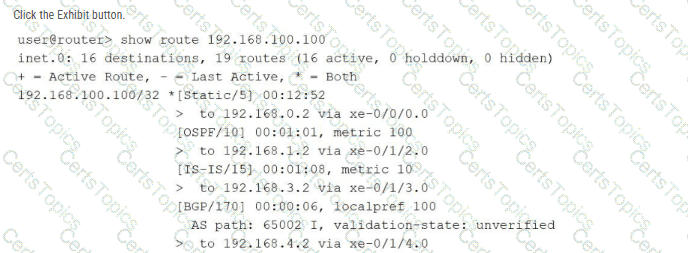
Referring to the exhibit using the show route 192.168.100.100 command output, over which interface will the traffic be forwarded?
xe-0/1/3.0
xe-0/0/0.0
xe-0/1/4.0
xe-0/1/2.0
In the Junos OS architecture, the Routing Engine (RE) manages path selection by evaluating multiple potential routes to a specific destination found within the Routing Information Base (RIB). When multiple routing sources (such as static configuration, OSPF, IS-IS, and BGP) provide information for the exact same destination prefix—in this case, 192.168.100.100/32 —the device utilizes route preference as the primary tie-breaker to determine which entry becomes the " active " route.
The provided exhibit displays the default preference values for each protocol: Static is 5 , OSPF is 10 , IS-IS is 15 , and BGP is 170 . Junos OS follows a " lower is better " logic for preference; therefore, the Static route is selected as the most trustworthy path. In the command output, the active route is explicitly identified by the asterisk (*) and plus sign (+) symbols located next to the [Static/5] entry. Looking at the specific next-hop information for this active static route, the output indicates the traffic is sent to 192.168.0.2 via xe-0/0/0.0 . Consequently, the Packet Forwarding Engine (PFE) will install this specific path into the forwarding table, causing all traffic destined for 192.168.100.100 to be egressed over the xe-0/0/0.0 interface.
Which two operational mode commands would you use to verify CPU and memory utilization on a Junos device? (Choose two.)
show chassis routing-engine
show chassis environment
show system processes extensive
show system resource-monitor summary
In the Junos OS architecture, maintaining visibility into the health of the Routing Engine (RE) is paramount for ensuring control plane stability. The command show chassis routing-engine is the primary tool for a high-level hardware status overview. It provides critical telemetry regarding the RE ' s current CPU utilization (broken down by user, background, and kernel tasks), memory usage statistics, and uptime. This command is essential for identifying if the device ' s " brain " is under significant stress due to heavy protocol processing or management tasks.
For a more granular, process-specific analysis, the show system processes extensive command is utilized. Similar to the ' top ' utility in Unix-based systems, it lists all active software daemons (such as rpd for routing, dcd for interfaces, and mgd for management) and ranks them by their real-time CPU and memory consumption. This allows an architect to pinpoint exactly which process might be causing a performance bottleneck. While show chassis environment focuses on physical hardware health like temperatures and fan speeds, and resource-monitor provides summary data, the combination of show chassis routing-engine and show system processes extensive offers the most comprehensive diagnostic view of the device ' s internal computational resources. Reference: Operational Monitoring and Maintenance, System Health Monitoring.
==========
You manage a Junos device with 20 interfaces. Each interface requires the same description and MTU setting. Which configuration approach would reduce repetitive commands and ensure consistency?
Use the wildcard delete command to remove duplicate settings.
Configure each interface individually.
Use a configuration group.
Use search and replace to apply settings across interfaces.
In the Junos OS architecture, configuration groups (defined under the [edit groups] hierarchy) provide a powerful mechanism for template-based management. This approach is specifically designed to handle scenarios where multiple configuration objects, such as twenty different Ethernet interfaces, require identical parameters like a specific description or MTU value. By defining these common settings once within a group, an administrator can then apply that group to multiple interfaces using the apply-groups statement.
This methodology drastically reduces the number of repetitive commands required and, more importantly, ensures strict consistency across the device. If the MTU needs to be adjusted in the future, the change is made in a single location—within the configuration group—and is automatically inherited by all interfaces to which the group is applied. This inheritance model prevents " configuration drift " where individual interfaces might otherwise end up with mismatched settings due to manual entry errors. Using configuration groups is considered a best practice for Senior Architects managing high-density platforms, as it simplifies the candidate configuration file and makes the management of bulk interface settings both scalable and error-resistant.
Which command would you use to gracefully power off a Junos device?
request system reboot
shutdown now
request system logout
request system halt
Maintaining the integrity of the Junos OS file system is a critical operational requirement, especially during maintenance that involves removing power from the hardware. To achieve a graceful power-down, the request system halt command must be used. This command initiates a systematic shutdown of all running software processes and daemons, flushes any pending data from the system ' s volatile memory (RAM) to the solid-state storage or hard disk, and unmounts the file systems correctly. Once the software has safely shut down, the console will typically display a message indicating that it is safe to turn off the physical power switch or remove the power cables.
Using request system halt prevents potential file system corruption that can occur if power is abruptly cut while the OS is actively writing logs or configuration data. This is distinct from request system reboot, which restarts the OS, or request system logout, which merely terminates the current CLI session. As a Senior Architect, it is essential to follow this procedure to ensure that the device remains in a reliable state for its next power-on cycle. For devices equipped with dual Routing Engines, the command can often be directed to a specific member or both simultaneously to ensure a synchronized and safe shutdown of the entire chassis. Reference: Operational Monitoring and Maintenance, System Halt and Reboot Procedures.
==========
You power on a new MX Series router for the first time and connect to the console. You notice that no transit interfaces are passing traffic. In this scenario, which statement is correct?
All interfaces are enabled with DHCP client enabled.
All interfaces are enabled and have an IP address of 10.0.0.1.
The interfaces are configured as Layer 2 trunk ports.
The interfaces are not configured.
When you initially unbox and power on a Juniper MX Series router, it loads a factory-default configuration . Unlike some consumer-grade or lower-end enterprise switches that might have all ports active in a default VLAN, high-performance routers like the MX Series prioritize security and intentionality. In the factory-default state, the transit interfaces are not configured .
While the physical hardware interfaces (such as ge-0/0/0 or xe-0/1/0) are detected by the Junos kernel, they lack any logical unit or protocol family definitions (like family inet or family inet6). Without a logical unit—even a simple unit 0—the Packet Forwarding Engine (PFE) will not accept or forward any traffic arriving on those ports. Furthermore, as discussed in previous questions, the device is essentially in a " locked " state; you cannot even commit new changes to enable these interfaces until you have defined a root-authentication password. This " blank slate " approach ensures that no traffic accidentally flows through a newly installed provider-edge device until an architect has explicitly defined the routing policies, firewall filters, and interface parameters required for the specific network environment. To begin passing traffic, you must manually define the logical units and assign the appropriate IP addresses or switching parameters to each interface.
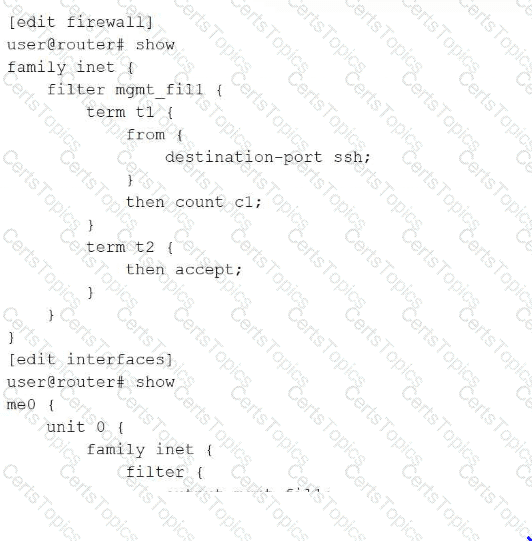
Which two statements are true about the firewall filter configuration shown in the exhibit? (Choose two.)
It applies the filter to a physical interface.
It counts the number of SSH packets that egress from the source SSH interface.
It evaluates SSH packets egressing from the management interface.
It sends filtered data to a syslog file.
The exhibit illustrates the configuration of a firewall filter named mgmt_fill and its subsequent application to an interface. The first true statement is that the filter is applied to a physical interface . The configuration shows the filter attached to me0 , which in Junos nomenclature represents the Management Ethernet port—a dedicated physical port for out-of-band management traffic. This is separate from logical or virtual interfaces, as me0 provides the physical link for administrative access.
The second true statement is that the filter evaluates SSH packets egressing from the management interface . In the provided snippet, term t1 specifically matches the destination-port ssh , and the filter is applied to the interface unit. When a filter is applied to an interface, it can monitor traffic entering or leaving the device. Furthermore, the filter utilizes a count action (count c1), which is a non-terminating action used to provide telemetry on specific traffic types passing through that physical port. There is no mention of a syslog or log action in the configuration, meaning that while packets are counted, they are not being written to the system log files. This configuration is a standard method for hardening the management plane and tracking administrative session activity on the Routing Engine. Reference: Routing Policy and Firewall Filters, Firewall Filter Actions, Management Interfaces.
==========
Copyright © 2021-2026 CertsTopics. All Rights Reserved