Pre-Winter Sale 70% Discount Offer - Ends in 0d 00h 00m 00s - Coupon code: save70

Pearson NSE4_FGT_AD-7.6 New Attempt

Fortinet NSE 4 - FortiOS 7.6 Administrator Questions and Answers

Question 5

Refer to the exhibit.
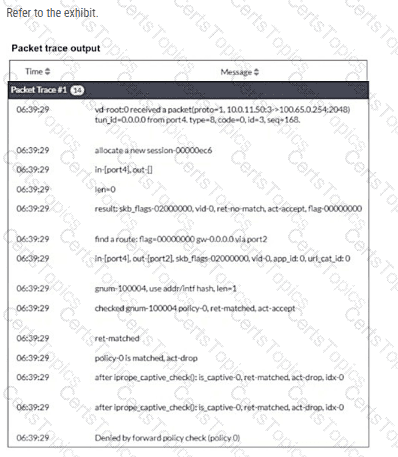
Why did the FortiGate device drop the packet?

Options:

A.

It matched the default implicit firewall policy.

B.

It failed the RPF check.

C.

It matched an explicitly configured firewall policy with the action DENY.

D.

It cannot reach the next-hop IP.

Question 6

A network administrator has enabled full SSL inspection and web filtering on FortiGate. When visiting any HTTPS websites, the browser reports certificate warning errors. When visiting HTTP websites, the browser does not report errors.

What is the reason for the certificate warning errors?

Options:

A.

The option invalid SSL certificates is set to allow on the SSL/SSH inspection profile.

B.

The matching firewall policy is set to proxy inspection mode.

C.

The browser does not trust the certificate used by FortiGate for SSL inspection.

D.

The certificate used by FortiGate for SSL inspection does not contain the required certificate extensions.

Question 7

An administrator wants to address shadow IT visibility challenges and prevent users from sending sensitive files outside the organization without proper approval. Which FortiSASE method should the administrator implement to achieve these goals? (Choose one answer)

Options:

A.

Secure SD-WAN access (SSD-WAN)

B.

Secure private access (SPA)

C.

Secure SaaS access (SSA)

D.

Secure internet access (SIA)

Question 8

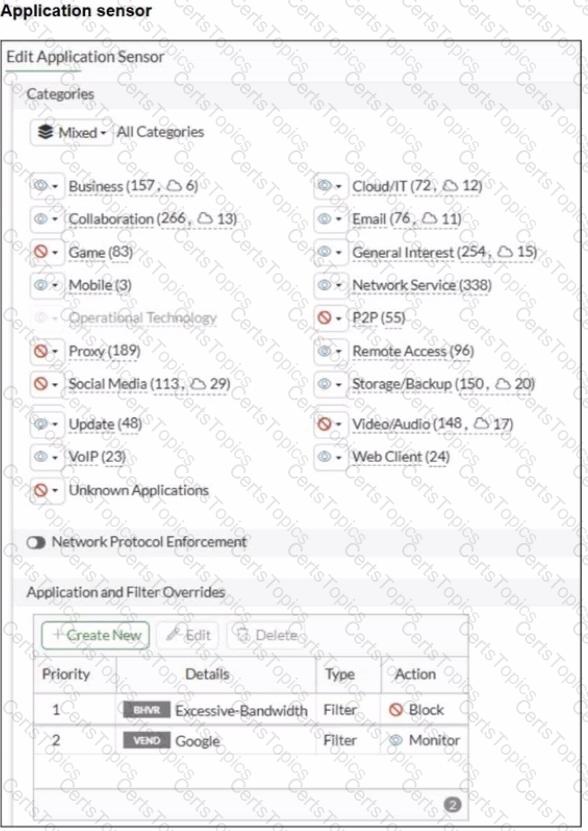
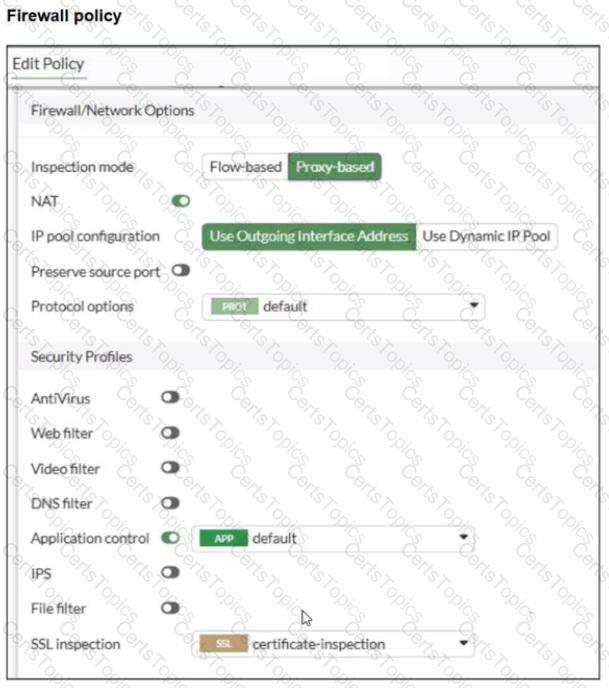
Refer to the exhibits.

You have implemented the application sensor and the corresponding firewall policy as shown in the exhibits.

You cannot access any of the Google applications, but you are able to access

Which two actions would you take to resolve the issue? (Choose two.)

Options:

A.

Set SSL inspection to deep-content inspection.

B.

Move up Google in the Application and Filter Overrides section to set its priority lot

C.

Add " Google " .com to the URL category in the security profile.

D.

Change the Inspection mode to Flow-based

E.

Set the action for Google in the Application and Filter Overrides section to Allow