
Month End Sale Special - 75% Discount Offer - Ends in 0d 00h 00m 00s - Coupon code: big75certs

Pearson HPE7-S02 New Attempt

Page: 3 / 3
Total 40 questions

Advanced HPE Compute Integrator Solutions Written Exam Questions and Answers

Question 9

What option does HPE Private Cloud AI provide for organizations who want to retain Prometheus metrics over the long term?

Options:

A.

Enabling metric collection on the HPE Private Cloud AI workspace from HPE GreenLake cloud

B.

Installing Grafana on the pod running the HPE AI Essentials UI

C.

Exporting alerts from the HPE AI Essentials UI

D.

Registering an OTel endpoint

Question 10

You are planning to demonstrate how you can use KServe to run NIMs on HPE Private Cloud AI. You have downloaded the CodeLlama-70B-Instruct model to a volume in your namespace named demo-model.

The objects that you are planning to deploy are shown below:
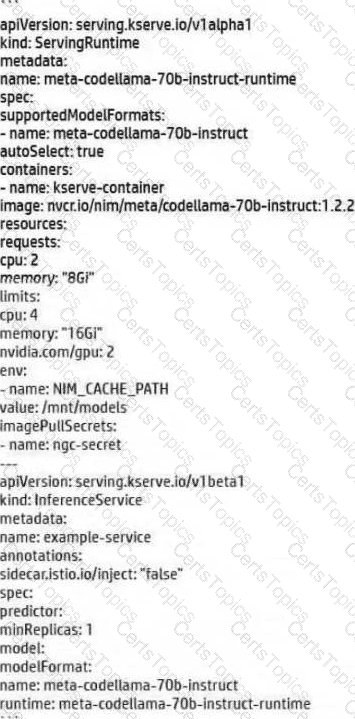
What change should you make to the objects?

Options:

A.

In the InferenceService, change spec.predictor.model.modelFormat.name to: pvc://demo-model/codellama-70b-instruct

B.

Add this line to the ServingRuntime under spec: storageUri: pvc://demo-model

C.

In the ServingRuntime, change the NIM_CACHE_PATH environment variable value to “/mnt/demo-model”

D.

Add this line to the InferenceService under spec.predictor.model: storageUri: pvc://demo-model

Question 11

An HPE Private Cloud AI customer wants to implement access controls on Airflow DAGs such that only HPE Private Cloud AI Administrators can trigger the DAGs.

What should you recommend?

Options:

A.

From within the HPE GreenLake cloud User management page, assign the Airflow Admin role to HPE Private Cloud AI Administrators.

B.

Configure the Airflow framework and change the value for the access_control line to “Admin.”

C.

Within the Airflow UI, go to the Security > List Roles page and assign the “trigger” permission to the Admin role.

D.

Add an access control line to the DAG code that permits “Admin” the “can_edit” privilege.

Question 12

At the request of an HPE Private Cloud AI customer, you have added an AWS S3 object store to HPE AI Essentials. Several HPE Private Cloud AI Users should be able to access that source when running notebooks and Spark applications. Other users should have no access.

What should you do?

Options:

A.

Go to the Identity and access management page in the HPE AI Essentials UI. Manage the privileges of individual users to grant them access to the object store.

B.

Go to the User Management page within HPE GreenLake cloud. Select the user and add privileges to access the data source from there.

C.

Configure the data source settings and select the users permitted access within those settings.

D.

Manually create an “access-token” secret with the data store credentials within the namespace of each user who should be permitted access to the store.

Page: 3 / 3
Total 40 questions
