Halloween Sale Special - 75% Discount Offer - Ends in 0d 00h 00m 00s - Coupon code: big75certs

Newly Released Microsoft MD-102 Exam PDF

Page: 2 / 14
Total 440 questions

Managing and Securing Microsoft 365 Endpoints by using Intune Questions and Answers

Question 5

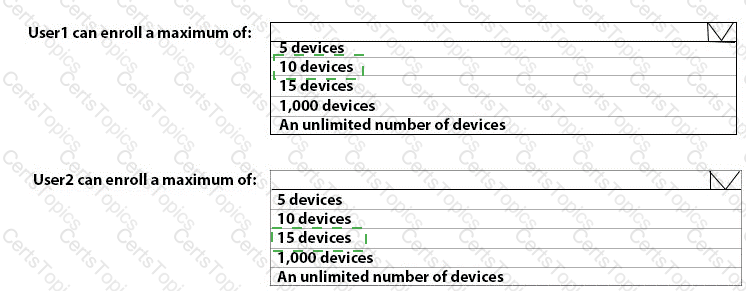
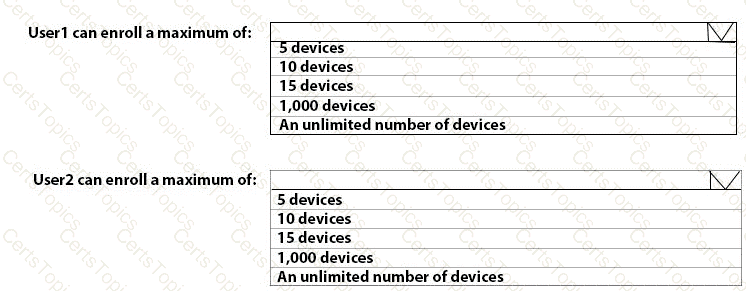
What is the maximum number of devices that User1 and User2 can enroll in Intune? To answer, select the appropriate options in the answer area.

NOTE: Each correct selection is worth one point.
Options:

Question 6

You need to prepare for the deployment of the Phoenix office computers.

What should you do first?

Options:

A.

Generalize the computers and configure the Mobility (MDM and MAM) settings from the Azure Active Directory admin center.

B.

Extract the hardware ID information of each computer to a CSV file and upload the file from the Microsoft Intune blade in the Azure portal.

C.

Extract the hardware ID information of each computer to an XML file and upload the file from the Devices settings in Microsoft Store for Business.

D.

Extract the serial number information of each computer to a CSV file and upload the file from the Microsoft Intune blade in the Azure portal.

Question 7

You need to meet the requirements for the MKG department users.

What should you do?

Options:

A.

Assign the MKG department users the Purchaser role in Microsoft Store for Business

B.

Download the APPX file for App1 from Microsoft Store for Business

C.

Add App1 to the private store

D.

Assign the MKG department users the Basic Purchaser role in Microsoft Store for Business

E.

Acquire App1 from Microsoft Store for Business

Question 8

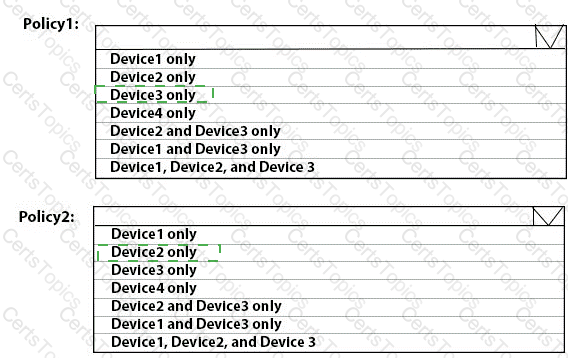
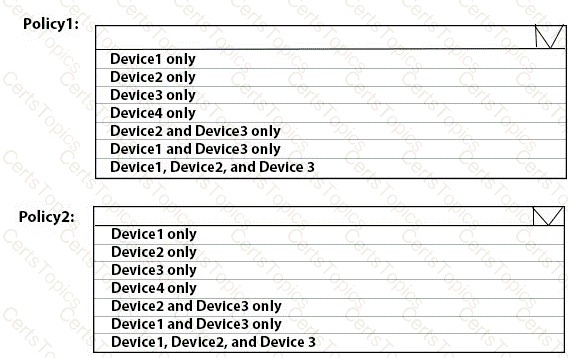
To which devices do Policy1 and Policy2 apply? To answer, select the appropriate options in the answer area.

NOTE: Each correct selection is worth one point.
Options:

Page: 2 / 14
Total 440 questions