You have an Azure SQL database that supports the OLTP workload of an order-processing application.
During a 10-minute incident window, you run a dynamic management view query and discover the following:
Session 72 is sleeping with open_transaction_count = 1.
Multiple other sessions show blocking_session_id = 72 in sys.dm_exec_requests.
sys.dm_exec_input_buffer(72, NULL) returns only BEGIN TRANSACTION UPDATE Sales.Orders.
Users report that updates to Sales.Orders intermittently time out during the incident window. The timeouts stop only after you manually terminate session 72.
What is a possible cause of the blocking?
You have an SDK-style SQL database project named MyDatabaseProject.sqlproj stored in a private GitHub repository. The repository contains the following GitHub Actions workflow:
YAML
name: Build and Deploy SQL Project
on:
push:
branches:
- main
workflow_dispatch:
jobs:
build-and-deploy:
runs-on: ubuntu-latest
permissions:
id-token: write
contents: read
steps:
- uses: actions/checkout@v4
- name: Build SQL project
run: dotnet build MyDatabaseProject.sqlproj
- name: Publish DACPAC
uses: azure/sql-action@v2

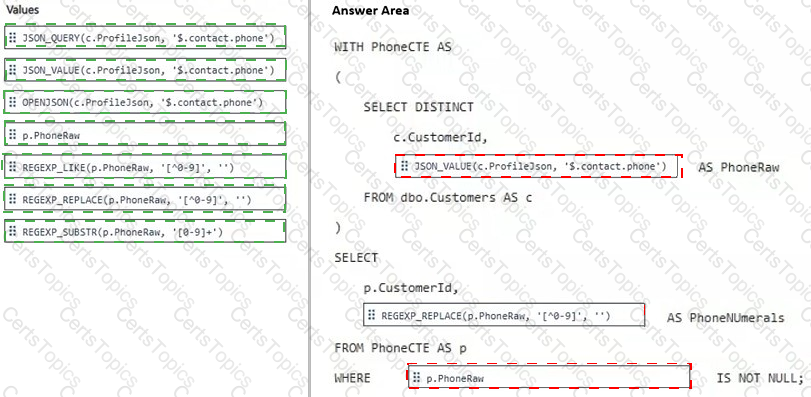
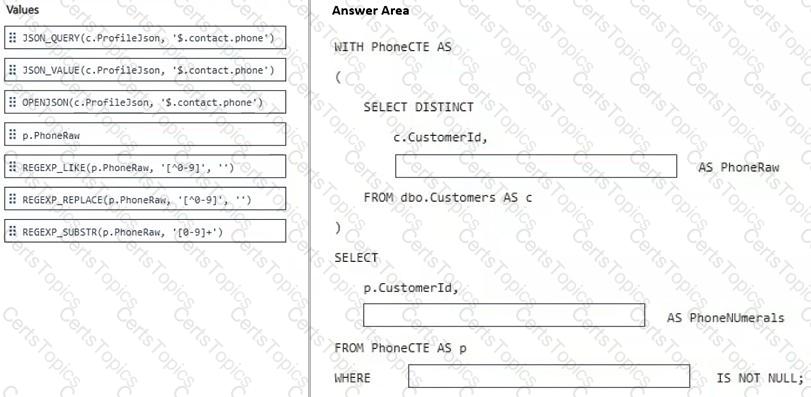
You have an Azure SQL database that contains a table named dbo.Customers. dbo.Customers contains the following columns:
• CustomerId (int)(primary key)
• ProfileJson (nvarchar(max))
You have an application that returns phone numbers in a format of +000 000-000-0000. The phone numbers are stored in ProfileJson.
You need to write a query that returns:
• One row per customer
• A PhoneNUmerals column that contains only the digits
How should you complete the Transact-SQL query? To answer, drag the appropriate values to the correct targets. Each value may be used once, more than once, or not at all. You may need to drag the split bar between panes or scroll to view content.
NOTE: Each correct selection is worth one point.
You have an Azure SQL database named ToDo that contains a table named dbo.ToDo.
Your company plans to develop an Azure Functions app to run whenever the rows in dbo.ToDo change. The app will process INSERT, UPDATE, and DELETE events by using the Azure SQL trigger binding.
You need to configure ToDo to support the planned app.
What should you do?
Copyright © 2021-2026 CertsTopics. All Rights Reserved