
A BIG-IP Administrator configured the following virtual server to pass traffic on all addresses and ports. After configuration is completed, the BIG-IP Administrator notices that the virtual server is unable to pass traffic.
ltm virtual forwarding_any_vs {
destination 0.0.0.0:any
ip-forward
mask 255.255.255.255
profiles {
fastL4 { }
}
serverssl-use-sni disabled
source 0.0.0.0/0
translate-address disabled
translate-port disabled
}
Which part of the configuration is the cause of the issue? (Choose one answer)
A BIG-IP Administrator notices that one of the servers that runs an application isNOTreceiving any traffic. The BIG-IP Administrator examines the configuration status of the application and observes the displayed monitor configuration and affected pool member status.
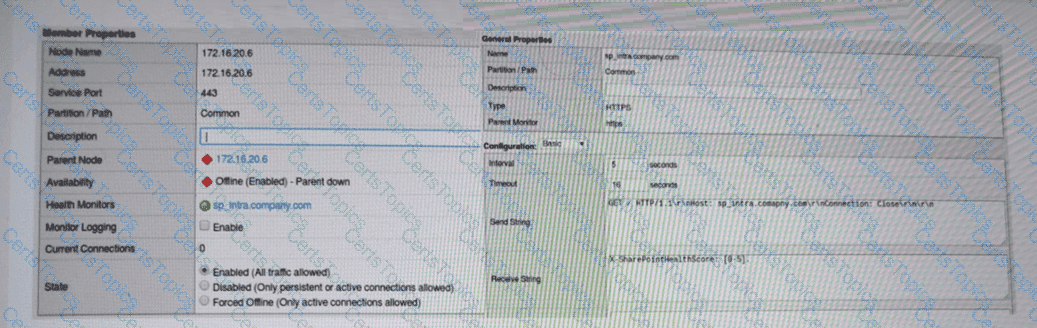
What is the possible cause of this issue? (Choose one answer)
Copyright © 2021-2026 CertsTopics. All Rights Reserved
