Summer Certification Sale 70% Discount Offer - Ends in 0d 00h 00m 00s - Coupon code: save70

Complete UiPath-ADPv1 UiPath Materials

Page: 6 / 15
Total 205 questions

UiPath Automation Developer Professional Exam (2024.10) (ADPv1) Questions and Answers

Question 21

To retrieve all Outlook emails with the word " UiPath " in the subject, which filtering property and filter schema should a developer use?

Options:

A.

Property: FilterByMessageIdsSchema: " @SQL= " " urn:schemas:httpmail:subject ' " ' like ' UiPath% ' "

B.

Property: FilterSchema: " @SQL= " " urn:schemas:httpmail:subject " " like ' UiPath% ' "

C.

Property: FilterSchema: " @SQL= " " urn:schemas:httpmail:subject " " like ' %UiPath% ' "

D.

Property: FilterByMessageIdsSchema: " @SQL= " " urn:schemas:httpmail:subject " " like ' %UiPath% ' "

Question 22

Which of the following best describes the Alerts panel?

Options:

A.

A panel that displays a more comprehensive list of all alerts.

B.

A panel that displays summaries of the alerts you subscribed to, received as error reports every ten minutes, or as daily reports.

C.

A panel that displays alerts as they occur.

D.

A panel that displays the most severe five alerts, accessible from the Alerts bell.

Question 23

What is the default polling interval set for an event trigger?

Options:

A.

1 minute

B.

5 minutes

C.

10 minutes

D.

15 minutes

Question 24

A developer is using the REFramework template to automate a process. In " SetTransactionStatus " file, there is the following sequence of activities, where the last Log

Message activity was added by the developer:
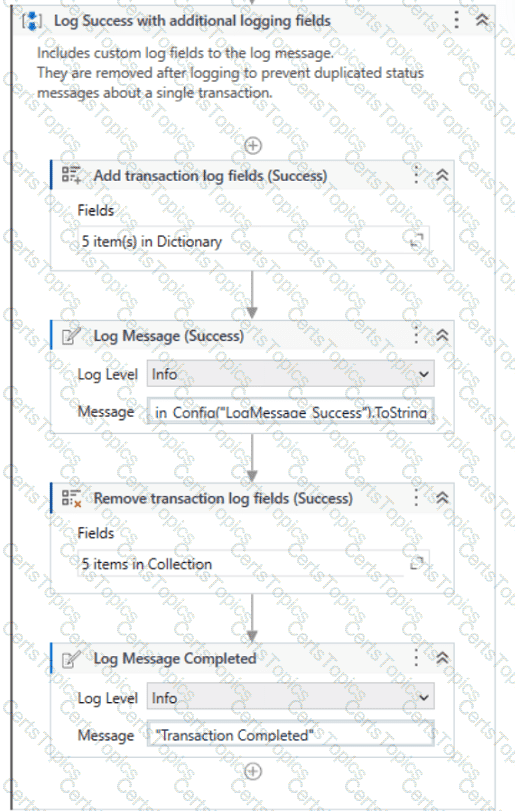
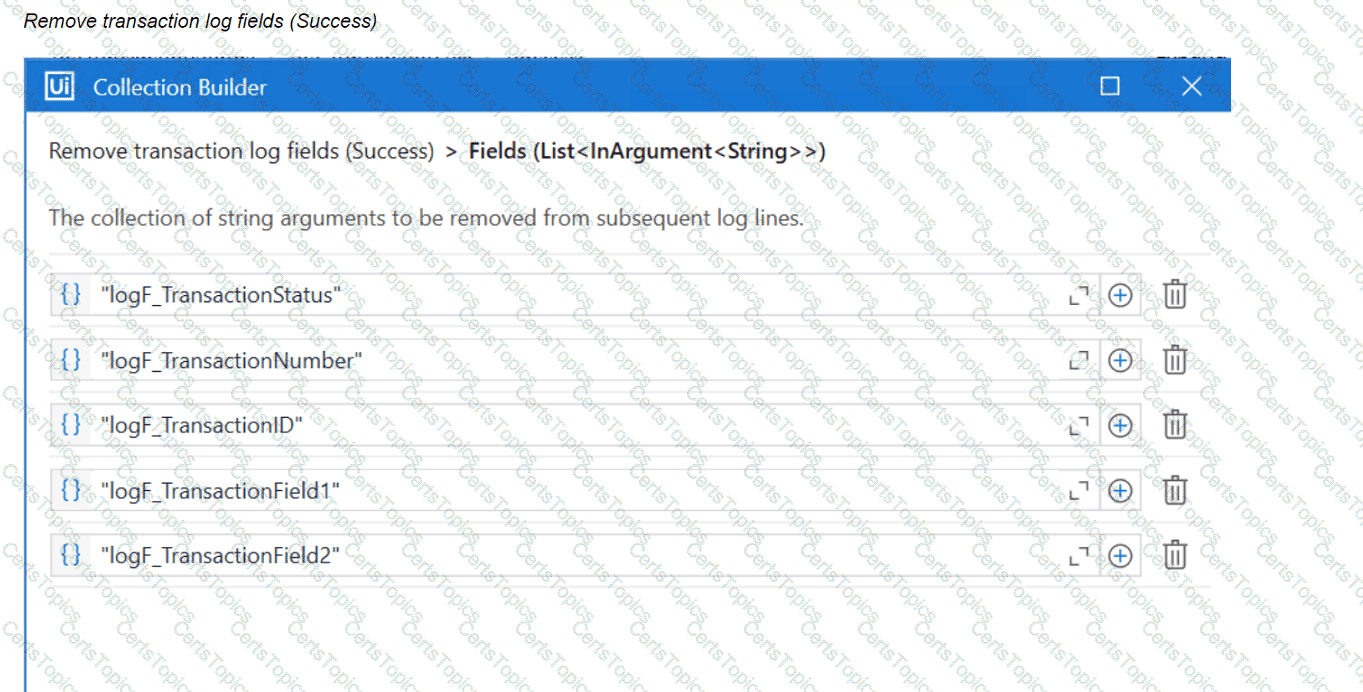
The configuration for Add Log Fields and Remove Log Fields activities are shown below:

Add transaction log fields (Success)
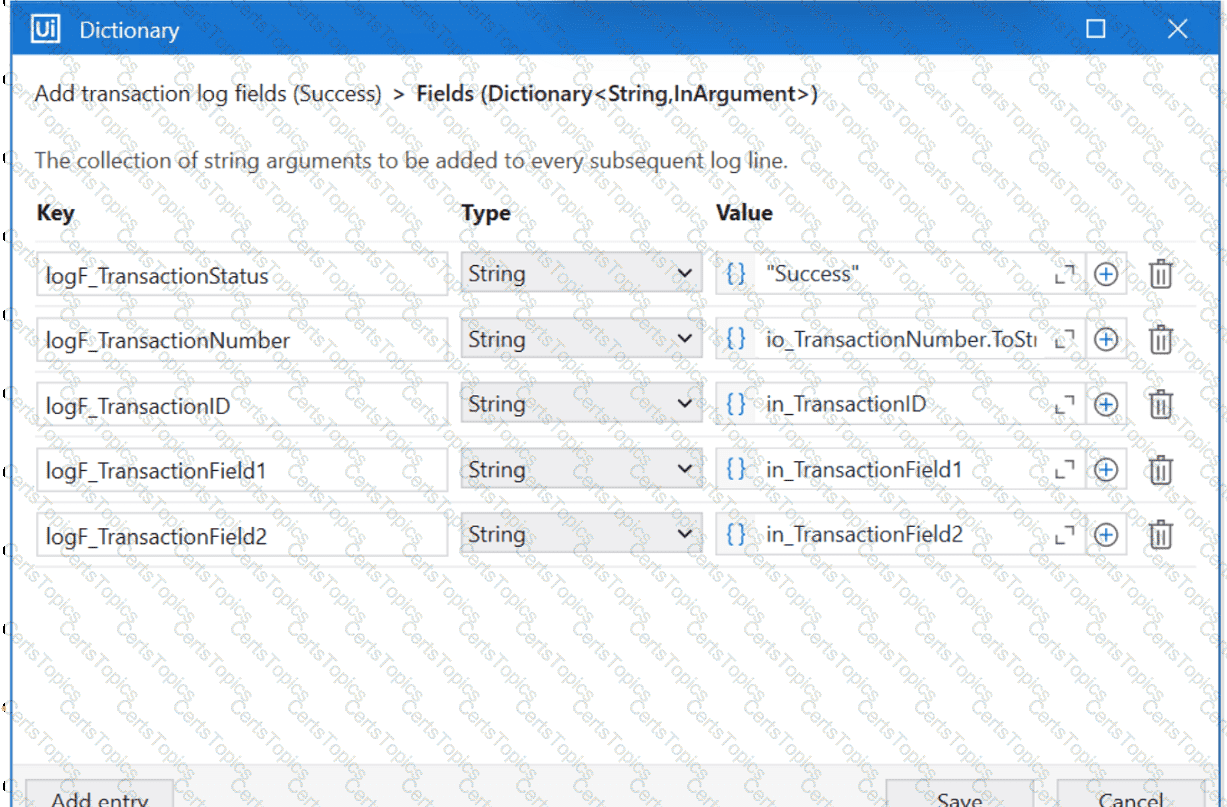
The developer runs the process and notices the argument values for the first transaction are:

in_TransactionID = " 07/18/2023 10:27:29 "

io_TransactionNumber = 1

in_TransactionField1 = " UI235-80 "

in_TransactionField2 = " Update Request "

Which of the following Log Message Details will be displayed when executing the activity Log Message Completed for the first transaction, considering it is successful?

Options:

A.

{ " message " : " Transaction Completed " , " level " : " Information " , " logType " : " User " , " timeStamp " : " 10:30:19 " , " fileName " : " SetTransactionStatus " , " processVersion " : " 1.0.0 " , " jobId " : " cb865477-35f8-4c0a-93e9-e4f4246223f2 " , " robotName " : " test.robot " , " machineId " : 0, " logF_TransactionField2 " : " Update Request " , " logF_TransactionID " : " 07/18/2023 10:27:29 " , " logF_BusinessProces

B.

{ " message " : " Transaction Completed " , " level " : " Information " , " logType " : " User " , " timeStamp " : " 10:30:19 " , " fileName " : " SetTransactionStatus " , " processVersion " : " 1.0.0 " , " jobId " : " 59325301-680a-4d55-a81b-56ca1f369c12 " , " robotName " : " test.robot " , " machineId " : 0, " logF_TransactionField2 " : " " , " logF_TransactionStatus " : " " , " logF_TransactionID " : " logF_BusinessProcessName

C.

{ " message " : " Transaction Completed " , " level " : " Information " , " logType " : " User " , " timeStamp " : " 10:30:19 " , " fileName " : " SetTransactionStatus " , " processVersion " : " 1.0.0 " , " jobId " : " 59325301-680a-4d55-a81b-56ca1f369c12 " , " robotName " : " test.robot " , " machineId " : 0, " logF_TransactionField2 " : empty, " logF_TransactionStatus " : empty, " logF_TransactionID " : empty, " logF_BusinessProce

D.

{ " message " : " Transaction Completed " , " level " : " Information " , " logType " : " User " , " timeStamp " : " 10:30:19 " , " fileName " : " SetTransactionStatus " , " processVersion " : " 1.0.0 " , " jobId " : " f8a36a46-8ebc-40df-8f71-26b39087ebee " , " robotName " : " test.robot " , " machineId " : 0, " logF_BusinessProcessName " : " Framework " }

Page: 6 / 15
Total 205 questions