
Spring Sale 70% Discount Offer - Ends in 0d 00h 00m 00s - Coupon code: save70

Free and Premium Proofpoint PPAN01 Dumps Questions Answers

Page: 1 / 4
Total 52 questions

Certified Threat Protection Analyst Exam Questions and Answers

Question 1

In which part of the SMTP conversation can threat actors spoof information to make the message look safe to the recipient?

Options:

A.

Body

B.

Envelope

C.

Connection

D.

Header

Buy Now
Question 2

What is a defining characteristic of Advanced Persistent Threat (APT) actors?

Options:

A.

They primarily use social engineering to gain access.

B.

They operate independently without government affiliation.

C.

They focus on short-term financial scams.

D.

They are state-sponsored and target strategic assets.

Question 3

Which two tasks are considered frequent and high-priority when actively reviewing the threat landscape? (Select two.)

Options:

A.

Updating user training materials for quarterly phishing simulations.

B.

Scheduling annual penetration tests for system validation.

C.

Monitoring current threats and vulnerabilities affecting systems.

D.

Archiving historical incident reports for long-term compliance.

E.

Reviewing monitoring data to inform risk-based decisions.

Question 4

An attacker registers a domain like “great-company.com” to impersonate “greatcompany.com.” What tactic is being used?

Options:

A.

Domain Hijacking

B.

Display Name Spoofing

C.

Lookalike Domain

D.

Subdomain Takeover

Question 5

Under what circumstances will TAP generate an email notification alert?

Options:

A.

A malicious attachment was blocked from delivery.

B.

A malicious impostor message has been delivered.

C.

A click has been blocked to a malicious site.

D.

A message has been delivered to numerous recipients.

Question 6

An analyst has been tasked with providing a report that can be used to prioritise investigations based on a user's Attack Index score. Which report would be most suitable for this purpose?

Options:

A.

VIP Activity

B.

Top 10 Recipients

C.

Very Attacked People

D.

Top 10 Clickers

Question 7

An analyst is reviewing a quarantined threat within Threat Protection Workbench.
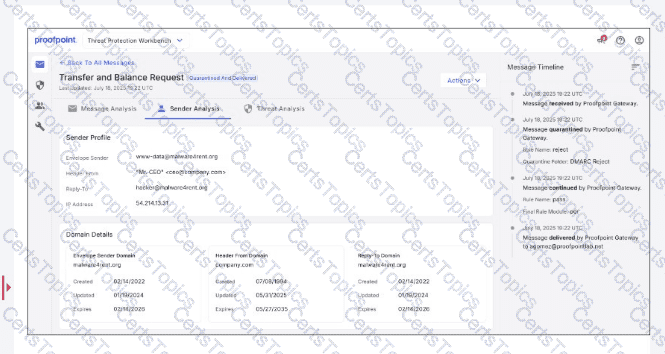
Based on the indicators shown in the exhibit, what is the most likely reason the threat was quarantined?

Options:

A.

The threat was quarantined because it contained malware.

B.

The threat was quarantined because there is a sender impersonation risk.

C.

The threat was quarantined because it is from a newly created domain.

D.

The threat was quarantined because it is from a known malicious IP address.

Question 8

An analyst wants to use the Threats page in TAP Dashboard to review all messages related to a phishing campaign that contain an attachment. What is the correct method to filter these messages?

Options:

A.

Use the threat filter to set the category, grouping, and type.

B.

Open the Impacted tab to display users exposed to a threat.

C.

Type campaign: phishing & type: attachment into the search bar.

D.

Select the Highlighted tab to review Notable Techniques.

Question 9

Which of the following is a useful training exercise for security analysts?

Options:

A.

Incident response tabletop

B.

Updating standard operating procedures

C.

Vulnerability scanning

D.

Network port scanning

Question 10

When filtering for threats on the TAP People page, which two filters have the highest chance of finding compromises? (Select two.)

Options:

A.

Exposure > Permitted Clicks

B.

Users > Locations

C.

Exposure > Delivered with Accessible Threat

D.

Threats > False Positives Only

E.

Users > VIP

Question 11

An analyst is reviewing the Threat Response Quarantines card for a message in TAP Dashboard, as shown in the exhibit.
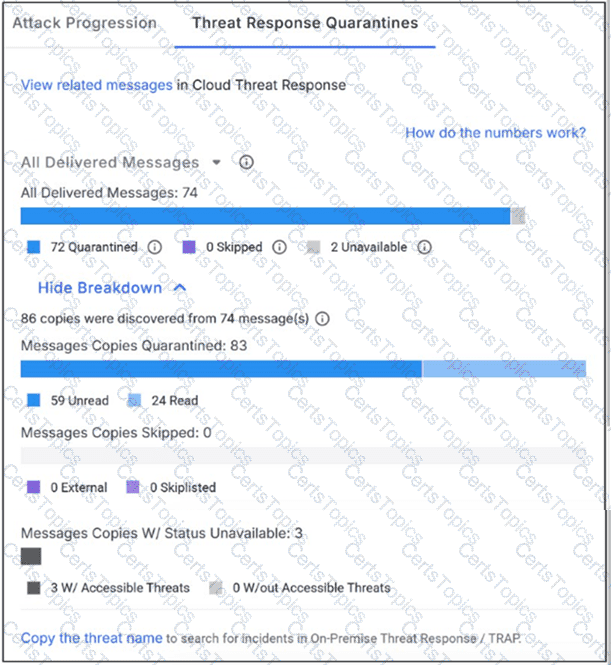
Why might a message be flagged with status “unavailable”?

Options:

A.

The message was deleted from the mailbox before it could be quarantined.

B.

The message was automatically moved into a user-created folder for archiving.

C.

The message was delayed in delivery because of large attachment size.

D.

The message was marked as read by the user before it could be quarantined.

Question 12

Refer to Exhibit:

X-Proofpoint-Banner-Trigger: inbound

MIM-version: 1.0

Content-Type: multipart/mixed; boundary="boundary-1698346305"

X-CLX-Shades: MLX

X-Proofpoint-Virus-Version: vendor=baseguard

engine=ICAP:2.0.272,Aquarius:18.0.987,Hydra:6.0.619,FMLib:17.11.176.26 definitions=2023-10-26_22,2023-10-26_01,2023-05-22_02

X-Proofpoint-Spam-Details: rule=spam policy=default score=89 bulkscore=0 phishscore=0 mlxlogscore=-91 suspectscore=0 malwarescore=0 adultscore=0 spamscore=89 classifier=spam adjust=0 reason=mlx scancount=l engine=8.12.0-2310240000 definitions=main-2310260209

In the process of reviewing a false positive, you see the following email header. What was the reason the message was quarantined by the Proofpoint Protection Server?

Options:

A.

A custom spam rule caused the message to be quarantined.

B.

An anti-virus rule forced the message to be quarantined.

C.

The recipient's personal block list forced quarantine of the message.

D.

A content policy rule (DLP/compliance) forced quarantine of the message.

Question 13

What is the purpose of Smart Search?

Options:

A.

Trace and analyze information about files downloaded from a user's computer.

B.

Trace and analyze information about messages processed by the Proofpoint Protection Server.

C.

Trace and analyze information about user clicks on external websites.

D.

Trace and analyze information about firewall breaches.

Question 14

As a security analyst, you need to update the TAP URL Defense Custom Blocklist. Which three entries are valid formats for the blocklist? (Select three.)

Options:

A.

http://www.example.com

B.

.xxx

C.

*.acme.org

D.

ftp://ftp.example.com

E.

example

F.

example.com

Question 15

You would like to view the total number of uncleared threats or false positives that have been interacted with by users over the past 2 weeks. How can this be accomplished on the TAP Dashboard?

Options:

A.

On the Threats page, select Last 14 days and click on the “Intended” column header.

B.

On the Threats page, select Last 14 days and click on the “At Risk” column header.

C.

On the Threats page, select Last 14 days and click on the “Impacted” column header.

D.

On the Threats page, select Last 14 days and click on the “Highlighted” column header.

Page: 1 / 4
Total 52 questions
